Loading
Get Sc Dor St-385 2017-2026
How it works
-

Open form follow the instructions
-

Easily sign the form with your finger
-

Send filled & signed form or save
How to fill out the SC DoR ST-385 online
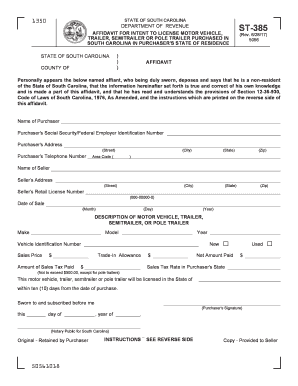
The SC DoR ST-385 form is an affidavit for a non-resident's intent to license a motor vehicle, trailer, semitrailer, or pole trailer purchased in South Carolina in their state of residence. This guide will provide step-by-step instructions to help users complete the form accurately and efficiently online.
Follow the steps to fill out the SC DoR ST-385 online.
- Click the ‘Get Form’ button to access the ST-385 form and open it in your preferred online editor.
- Begin by filling in the name of the purchaser in the designated field. Ensure that the name is accurate, as this information is crucial for identification.
- Enter the purchaser's Social Security Number or Federal Employer Identification Number. This is mandatory for identification purposes.
- Complete the address fields for the purchaser, including the street, city, state, and zip code. Verify that all details are correct to avoid issues later.
- Input the purchaser's telephone number, ensuring to include the area code. This information may be used for verification purposes.
- Provide the name of the seller in the appropriate field. Like the purchaser's name, accuracy is essential.
- Fill out the seller's address, including street, city, state, and zip code. This information connects the transaction to the appropriate seller.
- Enter the seller's retail license number in the specified format (000-00000-0). This number verifies the seller's legitimacy.
- Indicate the date of sale, ensuring you use the format of month, day, and year. This establishes the timeline for licensing.
- Describe the vehicle, trailer, semitrailer, or pole trailer by entering the make, model, year, and Vehicle Identification Number (VIN).
- Enter the sales price of the vehicle. Make sure to verify this amount, as it affects tax calculations.
- Record the amount of sales tax paid on the purchase or any trade-in allowances. This may impact your eventual tax obligations.
- Calculate and enter the net amount paid after accounting for any trade-in value. Double-check all calculations to ensure accuracy.
- Fill in the sales tax rate applicable in the purchaser's state. Remember, this should not exceed $500.00 for pole trailers.
- Finalize the form by signing where indicated. This signature confirms the truthfulness of the information provided.
- Save your changes to the form. Options may include downloading it as a PDF, printing for your records, or sharing it as needed.
Complete your ST-385 form online today to ensure a smooth vehicle licensing process!
To claim your SC sales tax refund, you need to submit a refund request to the South Carolina Department of Revenue. Fill out the necessary forms accurately, including the SC DoR ST-385 if applicable. If you need templates or guidance, check out the resources offered by USLegalForms to ensure your submission is complete and efficient.