Loading

Open form follow the instructions

Easily sign the form with your finger

Send filled & signed form or save
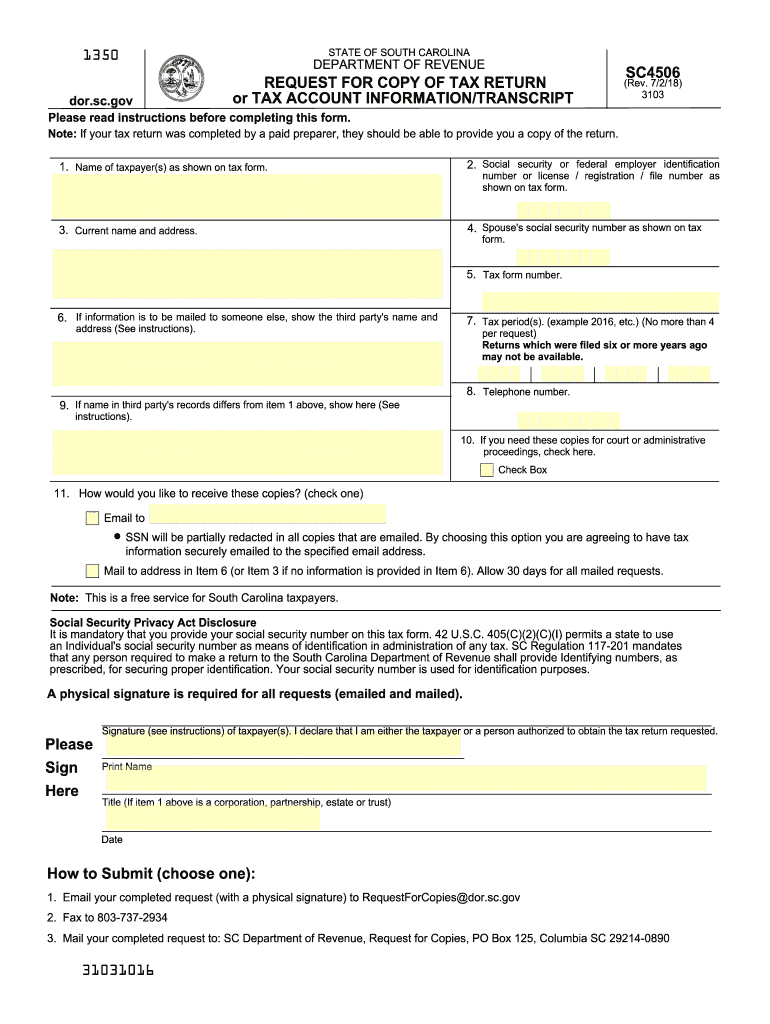
How to fill out the SC DoR SC4506 online
This guide provides a detailed overview of how to effectively complete the SC DoR SC4506 form online. Whether you are familiar with digital forms or are filling this out for the first time, these instructions will help you navigate the process easily.
Follow the steps to successfully fill out the SC DoR SC4506 form online.
- Locate and click the ‘Get Form’ button to access the SC DoR SC4506 form. This will allow you to open the document in the editing interface.
- Begin by entering your personal information in the designated fields. Ensure that all entries are accurate and reflect your current details.
- Proceed to fill in any required sections related to your application or request. Be sure to follow any specific instructions provided within each section.
- Review all the information you have entered for completeness and correctness. Double-check that there are no omissions or errors.
- Once you have completed the form, look for options to save your changes. You may download, print, or share the completed form as needed.
Start filling out your SC DoR SC4506 online today!
Experience a faster way to fill out and sign forms on the web. Access the most extensive library of templates available.
Related content
General instructions: • In order to locate the proper return, you must provide the...
Get answers to your most pressing questions about US Legal Forms API.
What address do I send my SC state taxes to?
To send your South Carolina state taxes, refer to the SC Department of Revenue's official website for the correct mailing address. This address may vary depending on the type of tax being submitted, so confirm it with your SC DoR SC4506 form instructions. Properly address your mail to ensure it reaches the tax office without issues.
Can I get a copy of my tax return online?
Yes, you can access a copy of your tax return online through the South Carolina Department of Revenue's website. After verifying your identity, you can use their online tools to download your return. This service saves time and provides a convenient way to manage your tax documentation using the SC DoR SC4506 reference.
Where do I mail my estimated tax payments to?
Mail your estimated tax payments to the address designated by the South Carolina Department of Revenue, which is typically provided on the SC DoR SC4506 form. It's important to check the latest instructions on the department's website to ensure you have the correct address. Always include your form and payment to prevent delays.
How do I make an estimated tax payment to SC?
Making an estimated tax payment to South Carolina involves filling out the SC DoR SC4506 form, available online. You can make payments electronically through the state's online portal or send in a check with the form. Keeping track of your payments is essential for accurate tax reporting.
How do I find my SC tax ID number?
To locate your South Carolina tax ID number, check previously filed tax returns or official correspondence from the SC Department of Revenue. If you cannot find your number, you can contact the SC DoR directly for assistance, or use the SC DoR SC4506 form to reapply for a new number if necessary.
Does SC have fillable tax forms?
Yes, South Carolina offers fillable tax forms for convenience when filing your taxes. Using the SC DoR SC4506, you can access these forms easily online. Fillable forms allow you to fill in your information directly, making the process simpler and more efficient. Explore the options available through uslegalforms to find the best fit for your needs.
Can you file a South Carolina extension electronically?
Yes, you can file a South Carolina tax extension electronically through the SC DoR SC4506. This extension provides you with additional time to complete your tax return without incurring late fees. It's essential to file the extension before the original deadline to ensure compliance. For assistance, consider using uslegalforms to guide you through the electronic filing process.
Does South Carolina tax 401k distributions?
Yes, South Carolina does tax 401k distributions as part of your income. If you receive funds from your 401k, it's important to report these on your tax return using the SC DoR SC4506. Make sure to understand how these distributions may impact your overall tax liability. Platforms like uslegalforms offer helpful resources to clarify any questions you may have on this topic.
Does South Carolina have a state withholding form?
Yes, South Carolina has a state withholding form that is essential for employers to report income withheld from employees. By using the SC DoR SC4506, you can easily access and file this form electronically. This ensures compliance with state tax laws, helping you avoid future penalties. Consider visiting uslegalforms for more resources and assistance.
Does South Carolina have an eFile form?
Yes, South Carolina provides an eFile option for tax returns through the SC DoR SC4506. This form is designed to facilitate an efficient online filing process. It enhances submission speed and allows you to receive faster refunds, if applicable. Make use of platforms like uslegalforms to navigate this process smoothly.
Use professional pre-built templates to fill in and sign documents online faster. Get access to thousands of forms.
If you believe that this page should be taken down, please follow our DMCA take down process here.