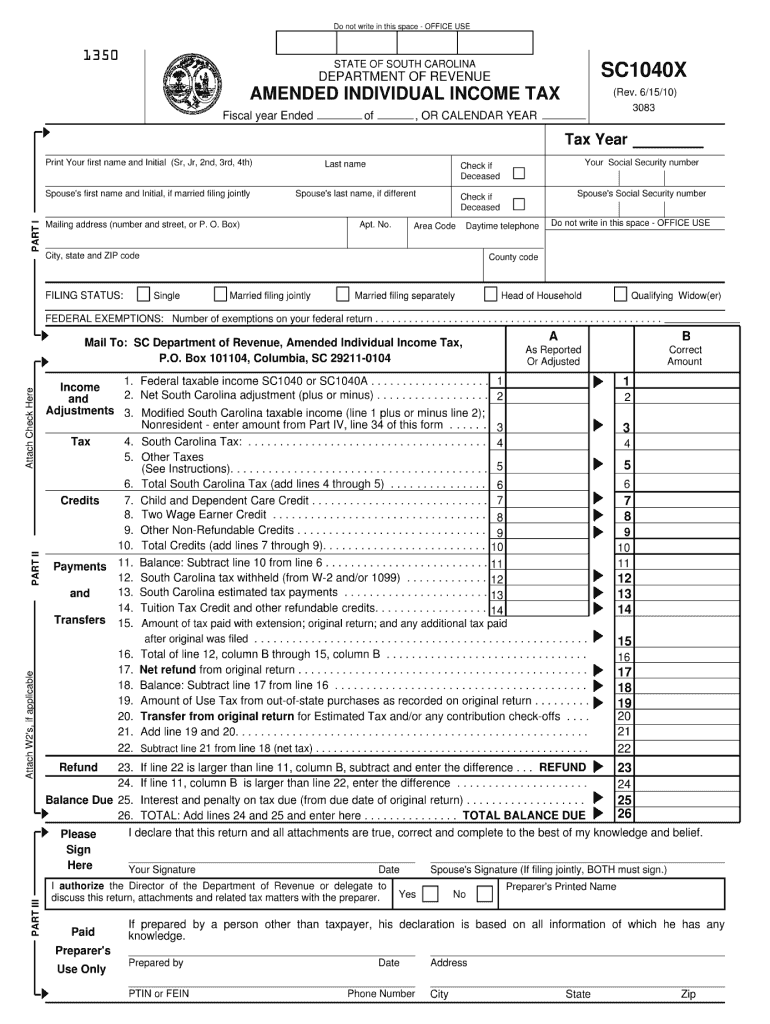
. . . . . . . . 19. Amount of Use Tax from out-of-state purchases as recorded on original return . . . . . . . . . 20. Transfer from original return for Estimated Tax and/or any contribution check-offs . . . . 21. Add line 19 and 20. . . . . . . . . . . . . . . . . . . . . . . . . . . . . . . . . . . . . . . . . . . . . . . . . . . . . . . . 22. Subtract line 21 from line 18 (net tax) . . . . . . . . . . . . . . . . . . . . . . . . . . . . . . . . . . . . . . . . . . . . . . 1 2 3 4 5 6 7.
Loading

Open form follow the instructions

Easily sign the form with your finger

Send filled & signed form or save
How to fill out the SC DoR SC1040X online
Filing an amended individual income tax return can seem daunting, but with the right guidance, it can be straightforward. This guide will walk you through the process of filling out the SC DoR SC1040X online, ensuring you understand each section and field clearly.
Follow the steps to complete your SC DoR SC1040X online.
- Click ‘Get Form’ button to obtain the form and open it in the editor.
- Enter the tax year in the provided space at the top of the form, which indicates the fiscal year or calendar year for which you are filing.
- Complete Part I by filling in your first name, middle initial, last name, and Social Security number. If applicable, add your spouse's details.
- Enter your current mailing address, including street number and name, city, state, ZIP code, and area code for your daytime telephone.
- Select your filing status by marking the appropriate box, ensuring it reflects your status on your original return.
- In Part II, begin by reporting adjustments and the federal taxable income. Carefully enter the corrected amounts in the corresponding boxes, following the example provided.
- Complete the sections related to calculating your South Carolina tax liability, ensuring you sum the correct lines as instructed.
- Proceed to list any credits in Part II. Indicate eligible child and dependent care credits and other non-refundable credits correctly.
- In Part III, ensure you sign and date the return. If filing jointly, your spouse must also sign.
- For users reporting as nonresidents, complete Part IV by filling in the necessary calculations from your original return.
- Finally, review all entries for accuracy, save your changes, and prepare to download, print, or share the completed form.
Complete your documents online to simplify your filing process.
Experience a faster way to fill out and sign forms on the web. Access the most extensive library of templates available.
Related content
Need forms assistance? Trouble opening a form? Right click on the form link, save the file...
Get answers to your most pressing questions about US Legal Forms API.
Where to mail SC1120S?
You should mail your SC1120S form to the South Carolina Department of Revenue at PO Box 12265, Columbia, SC 29211-2265. Like with the SC DoR SC1040X, ensure the form is filled out completely and you have included any necessary documentation to support your filing. Always double-check for the most current mailing address on the SC DoR website to avoid any misdirection.
Can you file a South Carolina extension electronically?
Yes, you can file a South Carolina extension electronically. You can do this through the South Carolina Department of Revenue’s website or via an authorized e-filing software. When filing, remember that the SC DoR SC1040X form must be completed correctly to ensure your extension is processed without issues.
Can I file my South Carolina taxes online?
Yes, you can file your South Carolina taxes online through the South Carolina Department of Revenue's website or via approved tax software. E-filing can expedite the processing of your SC DoR SC1040X, making the filing experience smoother and quicker. Many online platforms also allow for secure submission of both state and federal forms.
Does South Carolina require a copy of federal tax return?
No, South Carolina does not require you to submit a copy of your federal tax return when filing your state tax return. However, keeping a copy of your federal tax return for your records can be beneficial. It may help you answer questions on the SC DoR SC1040X form, as some information from your federal return is relevant for state filing.
What address should I put on my tax return?
You should write your current residential or business address on your tax return. Ensure it matches the information you provided during your previous tax filings to avoid any processing issues. For SC DoR SC1040X, double-check the address section to guarantee accuracy and consistency for all necessary forms.
How do I get a sales tax exemption certificate for South Carolina?
To obtain a sales tax exemption certificate for South Carolina, you must complete the required application form available on the South Carolina Department of Revenue website. Once filled out, submit it to the appropriate department for approval. The SC DoR SC1040X form can specifically guide you in understanding any sales tax implications while filing your taxes.
Can I mail my tax return in a regular envelope?
Yes, you can mail your tax return in a regular envelope, but it is best to use a sturdy envelope for protection. When using a regular envelope, make sure to include adequate postage and keep it neat. Remember to clearly address it to the appropriate South Carolina Department of Revenue location when filing your SC DoR SC1040X.
Where do I mail my SC 1040?
You should mail your SC 1040 to the South Carolina Department of Revenue at PO Box 125, Columbia, SC 29214-0907. Ensure you include the correct form, SC DoR SC1040X, when sending your tax return. It is also advisable to check for any specific mailing instructions provided on the form to avoid delays in processing.
What is the deduction for 65 and older in South Carolina?
In South Carolina, individuals aged 65 and older can benefit from a substantial tax deduction. Specifically, qualifying seniors may deduct up to $15,000 from their taxable income. This deduction is designed to provide financial relief and promote tax equity among older residents. Make sure to include this benefit when completing your tax return with the SC DoR SC1040X, and consider using USLegalForms for clearer guidance.
How much can you make in SC without paying taxes?
In South Carolina, the amount you can earn without paying taxes varies based on your filing status and deductions. Generally, if your taxable income falls below the standard deduction limits, you won't owe any state income tax. It’s vital to calculate your income accurately, utilizing the SC DoR SC1040X to ensure compliance. Services like USLegalForms can also assist in determining your tax obligations.
Use professional pre-built templates to fill in and sign documents online faster. Get access to thousands of forms.
If you believe that this page should be taken down, please follow our DMCA take down process here.
This form is available in several versions. Select the version you need from the drop-down list below.