Loading
Form preview
  • US Legal Forms
  • Other Templates
  • Legal Forms
  • California Legal Forms
  • Ca Pos-040 2020

Get Ca Pos-040 2020-2026

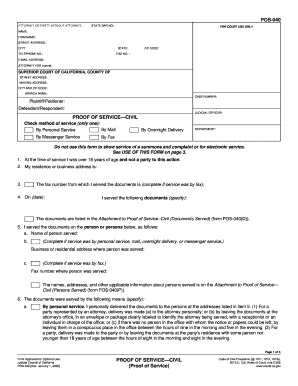
On date I served the following documents specify The documents are listed in the Attachment to Proof of Service Civil Documents Served form POS-040 D. Provide the names addresses and other applicable information about the persons served. If more than one person was served check the box on item 5 complete the Attachment to Proof of Service Civil Persons Served form POS-040 P and attach it to form POS-040. Page 1 of 3 Form Approved for Optional Use Judicial Council of California POS-040 Rev. January 1 2016 Proof of Service Code of Civil Procedure 1011 1013 1013a 2015. Business or residential address where person was served c. 1 Fax number where person was served 2 Time of service The names addresses and other applicable information about persons served is on the Attachment to Proof of Service Civil Persons Served form POS-040 P. Service by fax generally requires the prior agreement of the parties. You must sign and date the proof of service form. By signing you are stating under penalty ....

How it works

  1. Open form

    Open form follow the instructions

  2. Easily sign form

    Easily sign the form with your finger

  3. Share form

    Send filled & signed form or save

How to fill out the CA POS-040 online

The CA POS-040 form is essential for documenting the proof of service in civil cases in California. This guide aims to provide you with clear instructions on how to accurately complete the form online, ensuring you meet all necessary requirements.

Follow the steps to complete the CA POS-040 online

  1. Click ‘Get Form’ button to access the CA POS-040 and open it in your editor.
  2. In the first section, fill in your details as the attorney or the party without an attorney, including the state bar number, name, firm name, street address, city, state, telephone number, and email address.
  3. Continue by providing the attorney for whom you are filing this document, if applicable.
  4. Next, complete the court information, including the superior court of California, county name, mailing address, city and zip code, branch name, and case number.
  5. Identify the parties involved in the case by filling in the names of the plaintiff/petitioner and the defendant/respondent.
  6. Choose the method of service you used by checking only one box from the options provided, such as by mail, personal service, messenger service, overnight delivery, or fax.
  7. Confirm your eligibility by stating that you are over 18 years of age and not a party to this action, then provide your residence or business address.
  8. If applicable, enter the fax number from which you served the documents.
  9. On the specified date, list the documents you served and ensure they are attached in the designated section.
  10. Provide the names and addresses of the persons served in item 5, ensuring to complete any necessary attachments for multiple services.
  11. Check the box corresponding to the method of service used and include any required additional information.
  12. Finally, sign the form, affirming under penalty of perjury that the information provided is truthful and accurate. Save your changes, and you may choose to download, print, or share the completed form.

Complete your CA POS-040 form online to ensure accurate submission and adherence to legal requirements.

Get form

Experience a faster way to fill out and sign forms on the web. Access the most extensive library of templates available.
Get form

Related content

Browse All Forms By Name - California Courts
Browsing Form Files on California Courts ..... 7/1/2016, Application to Set Aside Order to...
Learn more
(PDF) KIMBERLY COX'S MOTION FOR ENTRY OF DEFAULT...
31 Matches - 40; 9 (c) Plaintiff's Notice of Errata to Correct Order filed on August 5...
Learn more

Related links form

CT JD-CV-72 2002 CT JD-CV-74 2010 CT JD-CV-78 2009 CT JD-CV-79 2010

Questions & Answers

Get answers to your most pressing questions about US Legal Forms API.

Contact support

Within Acrobat, click on the Tools tab and select Prepare Form. Select a file or scan a document. ... Add new form fields from the top toolbar, and adjust the layout using tools in the right pane.

0:40 3:43 Suggested clip Word 2016 Tutorial Inserting and Deleting Merge Fields Microsoft ...YouTubeStart of suggested clipEnd of suggested clip Word 2016 Tutorial Inserting and Deleting Merge Fields Microsoft ...

To set up those custom fields, go into the Info menu in Word, and on the right side of the screen click on the dropdown arrow next to Properties > Advanced Properties. In this pop-up, you can add the recipient field by name. Select text as the type, and the value. Click Add, and then OK.

Click in your Word document wherever you wish to insert a Form Field. On the Forms Toolbar click on the first button to insert a Form Field into your document: Right-click on the Form Field and select Properties. Then provide a name for the field in the Bookmark section.

Enable Developer Tab. Open Microsoft Word, then go to the File Tab > Options > Customize Ribbon > check the Developer Tab in the right column > Click OK. Insert a Control. ... Edit Filler Text. ... Design Mode button again to exit the mode. Customize Content Controls.

On the File menu, click New. In the New Document task pane, in the Templates section, click On my computer. In the Create New box select Template. Click Blank Document, and then Click OK. Create the fill-in fields. ... On the File menu, click Save As. Name the template.

Enable Developer Tab. Open Microsoft Word, then go to the File Tab > Options > Customize Ribbon > check the Developer Tab in the right column > Click OK. ... Insert a Control. ... Edit Filler Text. ... Customize Content Controls.

Step 1: Display the "Developer" Section. Go into the "File" tab; then click "Options". ... Step 2: Create a Form Template. ... Step 3: Add Content to This Form. ... Step 4: Set Properties for Content Controls. ... Step 5: Include Instructional Text to Your Form. ... Step 6: Include Protection to Your Form.

Open a new document in Word. Click on the Word menu and select Preferences. Click the Ribbon button on the bottom row on the right-hand side. In the Customize section, scroll through the list and insert a check mark next to Developer. Click the OK button.

Within Acrobat, click on the Tools tab and select Prepare Form. Select a file or scan a document. ... Add new form fields from the top toolbar, and adjust the layout using tools in the right pane. Save your fillable PDF form and share it with others, or click Distribute to collect responses automatically.

Get This Form Now!

Use professional pre-built templates to fill in and sign documents online faster. Get access to thousands of forms.
Get form
If you believe that this page should be taken down, please follow our DMCA take down processhere.
Get CA POS-040
Get form
  • Adoption
  • Bankruptcy
  • Contractors
  • Divorce
  • Home Sales
  • Employment
  • Identity Theft
  • Incorporation
  • Landlord Tenant
  • Living Trust
  • Name Change
  • Personal Planning
  • Small Business
  • Wills & Estates
  • Packages A-Z
  • Affidavits
  • Bankruptcy
  • Bill of Sale
  • Corporate - LLC
  • Divorce
  • Employment
  • Identity Theft
  • Internet Technology
  • Landlord Tenant
  • Living Wills
  • Name Change
  • Power of Attorney
  • Real Estate
  • Small Estates
  • Wills
  • All Forms
  • Forms A-Z
  • Other Templates
  • Legal Hub
  • About Us
  • Help Portal
  • Legal Resources
  • Blog
  • Affiliates
  • Contact Us
  • Delete My Account
  • Site Map
  • Industries
  • Forms in Spanish
  • Localized Forms
  • State-specific Forms
  • Forms Kit
  • Real Estate Handbook
  • All Guides
  • Notarize
  • Incorporation services
  • For Consumers
  • For Small Business
  • For Attorneys
  • USLegal
  • FormsPass
  • pdfFiller
  • signNow
  • altaFlow
  • DocHub
  • Instapage
Form Packages
  • Adoption
  • Bankruptcy
  • Contractors
  • Divorce
  • Home Sales
  • Employment
  • Identity Theft
  • Incorporation
  • Landlord Tenant
  • Living Trust
  • Name Change
  • Personal Planning
  • Small Business
  • Wills & Estates
  • Packages A-Z
Form Categories
  • Affidavits
  • Bankruptcy
  • Bill of Sale
  • Corporate - LLC
  • Divorce
  • Employment
  • Identity Theft
  • Internet Technology
  • Landlord Tenant
  • Living Wills
  • Name Change
  • Power of Attorney
  • Real Estate
  • Small Estates
  • Wills
  • All Forms
  • Forms A-Z
  • Other Templates
Customer Service
  • Legal Hub
  • About Us
  • Help Portal
  • Legal Resources
  • Blog
  • Affiliates
  • Contact Us
  • Delete My Account
  • Site Map
  • Industries
  • Forms in Spanish
  • Localized Forms
  • State-specific Forms
  • Forms Kit
Legal Guides
  • Real Estate Handbook
  • All Guides
Prepared for you
  • Notarize
  • Incorporation services
Our Customers
  • For Consumers
  • For Small Business
  • For Attorneys
Our Sites
  • USLegal
  • FormsPass
  • pdfFiller
  • signNow
  • altaFlow
  • DocHub
  • Instapage
Social Media
Call us now toll free:
+1 833 426 79 33
As seen in:
© Copyright 1999-2026 airSlate Legal Forms, Inc. 17 Station Street, Ste. 203, Brookline, MA 02445
  • Your Privacy Choices
  • Terms of Service
  • Privacy Notice
  • Content Takedown Policy
  • Bug Bounty Program