We use cookies to improve security, personalize the user experience, enhance our marketing activities (including cooperating with our marketing partners) and for other business use.
Click "here" to read our Cookie Policy. By clicking "Accept" you agree to the use of cookies. Read less
Read more
Accept
Loading
Form preview
  • US Legal Forms
  • Form Library
  • Tax Forms
  • South Carolina Tax Forms
  • Sc Dor Pt-401 2012

Get Sc Dor Pt-401 2012-2025

N with the South Carolina Department of Revenue? Please indicate what kind of return. What name is the return filed under? Yes No Are alcoholic beverages served to the general public? Yes No Do any other individuals, associations or corporations occupy or use any part of the claimed exemption that is listed on this application? If yes, explainYes circumstances. No If additional space is needed, attach separate sheet. Explain the use of the property, land and buildings. Is any rent received f.

How it works

  1. Open form

    Open form follow the instructions

  2. Easily sign form

    Easily sign the form with your finger

  3. Share form

    Send filled & signed form or save

How to fill out the SC DoR PT-401 online

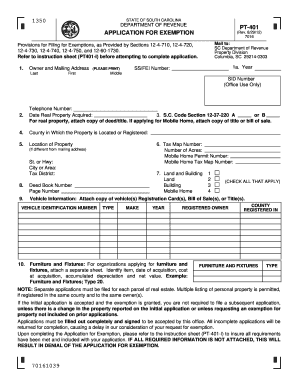
Filling out the SC DoR PT-401 application for exemption can be a straightforward process when approached step by step. This guide aims to provide you with clear and concise instructions to successfully complete the form online.

Follow the steps to complete the SC DoR PT-401 application online.

  1. Click the ‘Get Form’ button to access the application and open it in the editor.
  2. Provide the owner and mailing address details at the top of the form. Ensure you fill in your last name, first name, middle name, and the year of the application. Include your Social Security or Federal Employer Identification number, and the SID number, if applicable.
  3. Input your telephone number and the date when you acquired the real property.
  4. Identify the specific South Carolina Code Section under which you are applying for exemption. If necessary, attach a copy of the deed or title for real property or a bill of sale for a mobile home.
  5. Specify the county in which the property is located or registered.
  6. Fill out the location of the property, including the street or highway name, city or area, and tax district.
  7. For tax purposes, enter the tax map number, number of acres, mobile home permit number, and mobile home tax map number if applicable.
  8. Select the applicable types of land and buildings by checking all that apply for land, buildings, or mobile homes.
  9. Complete the deed book number and page number if relevant.
  10. If applicable, provide vehicle information by attaching a copy of the vehicle registration cards, bills of sale, or titles. Fill in details like vehicle identification number, type, make, year, and registered owner.
  11. For organizations applying for furniture and fixtures, attach a separate sheet listing the items, acquisition dates, costs, accrued depreciation, and net values.
  12. Answer the questions regarding organization incorporation status, tax exemption status, previous returns filed, occupation of the property by others, rental income received, and any limitations or restrictions concerning property use.
  13. After ensuring all fields are filled out completely, sign the declaration section as the owner or owner's agent, and add the date.
  14. Review the form thoroughly for completion and accuracy. Save your changes, and consider downloading, printing, or sharing the form as needed.

Start completing your SC DoR PT-401 application online today!

Get form

Experience a faster way to fill out and sign forms on the web. Access the most extensive library of templates available.
Get form

Related content

PT-401-I. - SC Department of Revenue
If you apply for a Property Tax Exemption on MyDORWAY, you do not need to submit a paper...
Learn more
PROPERTY TAX EXEMPTION APPLICATION FOR ...
Email: property.exemptions@dor.sc.gov ... Individuals who are requesting a property tax...
Learn more
Manual do proprietário
Aug 7, 2024 — This product utilizes batteries or an external power supply. (adapter). DO...
Learn more

Related links form

PA PSRS-248-1 2019 PA PSRS-248-3 2019 HUD-NPMA-99-A 2008 NV NMO-3430A 2021

Questions & Answers

Get answers to your most pressing questions about US Legal Forms API.

Contact support

The PT-401 is a form used in South Carolina to apply for property tax exemptions specifically for seniors, the disabled, and veterans. It plays a crucial role in helping eligible individuals reduce their tax burden. Filing the SC DoR PT-401 correctly can lead to significant financial relief. Be sure to provide accurate information to maximize your benefits.

In South Carolina, certain groups may qualify for exemptions from property taxes, including seniors over the age of 65, disabled individuals, and veterans. The SC DoR PT-401 provides the outlines for these exemptions. It's important to check with your local assessor's office to see if you qualify. Understanding these laws can lead to substantial savings on your taxes.

Seniors may not completely stop paying taxes, but they often become eligible for various exemptions or reductions. In South Carolina, reaching age 65 can unlock benefits through the SC DoR PT-401 form. This can significantly lower your property tax burden. Make sure to learn about the specific exemptions available in your county.

In South Carolina, there is no specific age at which all residents stop paying taxes. However, seniors may qualify for various tax breaks once they reach 65. Engaging with the SC DoR PT-401 process helps to ensure you receive any available tax benefits. Always be proactive and check for updates related to tax laws.

To obtain a South Carolina sales tax exemption certificate, you must fill out the appropriate form from the South Carolina Department of Revenue. This process typically includes proving your eligibility for the exemption, such as demonstrating your business's nonprofit status. After submitting your application, the SC DoR will review it and issue the certificate if approved. Utilizing resources like uslegalforms can streamline this application process and ensure compliance.

To calculate property tax in South Carolina, you first need to determine your property's assessed value, usually set at a percentage of its market value. Next, find the local property tax rate, which varies by county and municipality. Multiply the assessed value by the property tax rate to find your tax amount. The SC DoR PT-401 form can also provide guidance on how these calculations impact your tax rates.

To obtain the 4% property tax rate in South Carolina, you must apply through the South Carolina Department of Revenue (SC DoR). Begin by completing the SC DoR PT-401 form to demonstrate your eligibility for this tax rate. Keep in mind that the property must be your primary residence and meet certain qualifications. After submitting your application, the SC DoR will review your request and notify you of your status.

PT 401, also known as SC DoR PT-401, is a South Carolina Department of Revenue form used to report and manage personal property taxes. Understanding this form is essential for accurately assessing your tax obligations. If you're unsure about completing the form or have questions, US Legal Forms offers resources that can simplify the process and ensure compliance.

In South Carolina, certain types of income are not taxable, such as Social Security benefits and some pension distributions. This provision allows residents to retain more of their hard-earned income. To better understand non-taxable income in relation to the SC DoR PT-401, consider checking local tax resources for the most accurate guidance.

Seniors in South Carolina can access various tax breaks, such as the homestead exemption for property taxes. This exemption reduces the taxable value of a home for those over 65, offering financial relief. To explore all available tax benefits for seniors, including those outlined under the SC DoR PT-401, it's beneficial to review state guidelines or consult a tax professional.

Get This Form Now!

Use professional pre-built templates to fill in and sign documents online faster. Get access to thousands of forms.
Get form
If you believe that this page should be taken down, please follow our DMCA take down processhere.

Industry-leading security and compliance

US Legal Forms protects your data by complying with industry-specific security standards.
  • In businnes since 1997
    25+ years providing professional legal documents.
  • Accredited business
    Guarantees that a business meets BBB accreditation standards in the US and Canada.
  • Secured by Braintree
    Validated Level 1 PCI DSS compliant payment gateway that accepts most major credit and debit card brands from across the globe.
Get SC DoR PT-401
Get form
Form Packages
Adoption
Bankruptcy
Contractors
Divorce
Home Sales
Employment
Identity Theft
Incorporation
Landlord Tenant
Living Trust
Name Change
Personal Planning
Small Business
Wills & Estates
Packages A-Z
Form Categories
Affidavits
Bankruptcy
Bill of Sale
Corporate - LLC
Divorce
Employment
Identity Theft
Internet Technology
Landlord Tenant
Living Wills
Name Change
Power of Attorney
Real Estate
Small Estates
Wills
All Forms
Forms A-Z
Form Library
Customer Service
Terms of Service
Privacy Notice
Legal Hub
Content Takedown Policy
Bug Bounty Program
About Us
Help Portal
Legal Resources
Blog
Affiliates
Contact Us
Delete My Account
Site Map
Industries
Forms in Spanish
Localized Forms
State-specific Forms
Forms Kit
Legal Guides
Real Estate Handbook
All Guides
Prepared for You
Notarize
Incorporation services
Our Customers
For Consumers
For Small Business
For Attorneys
Our Sites
US Legal Forms
USLegal
FormsPass
pdfFiller
signNow
airSlate WorkFlow
DocHub
Instapage
Social Media
Call us now toll free:
+1 833 426 79 33
As seen in:
  • USA Today logo picture
  • CBC News logo picture
  • LA Times logo picture
  • The Washington Post logo picture
  • AP logo picture
  • Forbes logo picture
© Copyright 1997-2025
airSlate Legal Forms, Inc.
3720 Flowood Dr, Flowood, Mississippi 39232
Form Packages
Adoption
Bankruptcy
Contractors
Divorce
Home Sales
Employment
Identity Theft
Incorporation
Landlord Tenant
Living Trust
Name Change
Personal Planning
Small Business
Wills & Estates
Packages A-Z
Form Categories
Affidavits
Bankruptcy
Bill of Sale
Corporate - LLC
Divorce
Employment
Identity Theft
Internet Technology
Landlord Tenant
Living Wills
Name Change
Power of Attorney
Real Estate
Small Estates
Wills
All Forms
Forms A-Z
Form Library
Customer Service
Terms of Service
Privacy Notice
Legal Hub
Content Takedown Policy
Bug Bounty Program
About Us
Help Portal
Legal Resources
Blog
Affiliates
Contact Us
Delete My Account
Site Map
Industries
Forms in Spanish
Localized Forms
State-specific Forms
Forms Kit
Legal Guides
Real Estate Handbook
All Guides
Prepared for You
Notarize
Incorporation services
Our Customers
For Consumers
For Small Business
For Attorneys
Our Sites
US Legal Forms
USLegal
FormsPass
pdfFiller
signNow
airSlate WorkFlow
DocHub
Instapage
Social Media
Call us now toll free:
+1 833 426 79 33
As seen in:
  • USA Today logo picture
  • CBC News logo picture
  • LA Times logo picture
  • The Washington Post logo picture
  • AP logo picture
  • Forbes logo picture
© Copyright 1997-2025
airSlate Legal Forms, Inc.
3720 Flowood Dr, Flowood, Mississippi 39232