Loading
Get Pr Sc 4809.1 1998-2026
How it works
-

Open form follow the instructions
-

Easily sign the form with your finger
-

Send filled & signed form or save
How to fill out the PR SC 4809.1 online
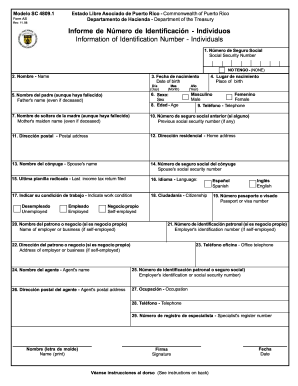
The PR SC 4809.1 form is essential for individuals in Puerto Rico to provide their identification information to the Department of Treasury. This guide will help you navigate the online completion of this form, ensuring accuracy and completeness.
Follow the steps to complete the PR SC 4809.1 online successfully.
- Click the ‘Get Form’ button to obtain the PR SC 4809.1 form and open it for editing.
- In the first field, enter your Social Security Number. If you do not have one, select the 'NO TENGO' option.
- Fill in your full name in the designated field.
- Provide your date of birth by selecting the day, month, and year.
- Indicate your place of birth in the provided section.
- Enter your father's name, even if they are deceased.
- Select your sex from the options provided.
- Input your age in the specified field.
- Provide your mother’s maiden name, even if they are deceased.
- If applicable, enter any previous Social Security Number you may have had.
- Fill in your postal address where you receive mail.
- Provide your residential address where you currently live.
- Enter your spouse's name, if applicable.
- Input your spouse's Social Security Number, if applicable.
- State the last income tax return you filed.
- Select your preferred language for receiving communication.
- Indicate your current work condition by selecting the appropriate option.
- Provide information about your citizenship.
- Enter your passport or visa number if applicable.
- If self-employed, enter the name of your business or employer.
- Provide the employer's identification number if you are self-employed.
- Enter the address of your employer or business if applicable.
- Fill in the office phone number for your employer or business.
- Input the name of your authorized agent.
- Enter the identification number or Social Security number of your agent.
- Provide the postal address of your agent.
- State your occupation in the designated field.
- Input your phone number.
- Provide your specialist's register number if applicable.
- Print your name legibly in the designated area.
- Sign the form in the signature field.
- Date the form by entering the date of completion.
- After completing all fields, save your changes, and choose to download, print, or share the form as needed.
Complete your PR SC 4809.1 online today to ensure timely processing.
Can a Judgment Be Reversed? Sometimes. You can ask the court to re-open a judgment or file an appeal. It's also possible to have the terms of a judgment altered.