Loading

Open form follow the instructions

Easily sign the form with your finger

Send filled & signed form or save
How to fill out the MD Comptroller MW506A online
Filling out the MD Comptroller MW506A form is an essential step for employers who need to report income tax withheld from employees. This guide provides clear, step-by-step instructions to help you complete the form accurately and efficiently.
Follow the steps to successfully complete the MD Comptroller MW506A form online.
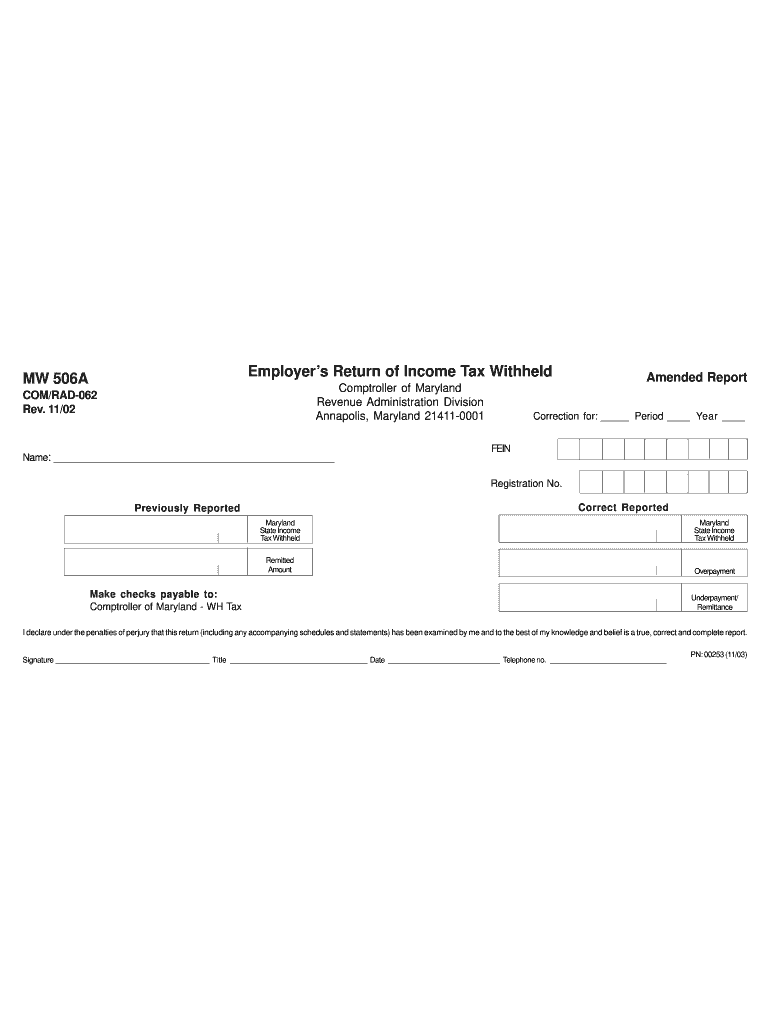
- Press the ‘Get Form’ button to obtain the MW506A form and open it in your selected editor.
- Begin by entering the name of your organization or business in the designated field.
- If this is an amended report, check the box labeled 'Amended Report' and specify the correction for the corresponding period and year.
- Provide your Federal Employer Identification Number (FEIN) and registration number in the appropriate fields.
- Fill in the amounts for Maryland State Income Tax Withheld, ensuring you differentiate between previously reported and correct reported amounts.
- Calculate and enter any remitted amounts, indicating if there is an overpayment or underpayment.
- Make checks payable to 'Comptroller of Maryland - WH Tax' if applicable.
- Sign the form, include your title, the date of submission, and your telephone number.
- After reviewing all entries for accuracy, you can save changes, download the form, print it, or share it as needed.
Complete your MD Comptroller MW506A form online today.
Experience a faster way to fill out and sign forms on the web. Access the most extensive library of templates available.
Related content
MARYLAND EMPLOYER RETURN OF INCOME TAX WITHHELD. COMPTROLLER OF MARYLAND, REVENUE...
A person making a tax payment using the ACH credit, ACH debit, direct debit, or wire...
Get answers to your most pressing questions about US Legal Forms API.
How do I file a MW506 form?
Filing a MW506 form can be done electronically or via paper submissions, depending on your preference. For electronic filing, visit the Maryland Comptroller's online services, where you can submit your form quickly and securely. If you choose the paper route, ensure you download the form from the MD Comptroller site, fill it out accurately, then mail it to the provided address. For additional clarity and resources, uslegalforms can guide you through the process related to the MD Comptroller MW506A.
Where do I mail my Maryland tax payment?
Your Maryland tax payment should be mailed to the address specified on your tax form, typically found on the MD Comptroller's website. Double-check that you are using the correct processing address for your payment type, as there may be several locations. Ensuring your payment reaches the right destination on time can help you avoid penalties and enhance your experience with the MD Comptroller MW506A.
Where do I file MD 502?
You can file your MD 502 form online through the Maryland Comptroller's website or by mailing it to the appropriate address provided by the state. Ensure that you check the latest updates on submission guidelines and deadlines for timely processing. Filing correctly is crucial, so consider consulting the MD Comptroller MW506A section for specific instructions via uslegalforms to streamline your filing.
How do I write a check to Comptroller in Maryland?
Writing a check to the Comptroller in Maryland requires a few specific steps. Begin by dating the check, then write 'Comptroller of Maryland' on the payee line. Fill in the payment amount clearly in both figures and words. Don't forget to sign the check, which is necessary for it to be processed effectively and credited under MD Comptroller MW506A.
How many exemptions should I claim in Maryland MW507?
In Maryland, the number of exemptions you claim on your MW507 form should align with your personal circumstances. It is essential to consider your financial situation and tax responsibilities to determine the correct exemption count. By accurately claiming your exemptions, you can optimize your tax payments and potentially enhance your refunds. For detailed guidance, you may visit the MD Comptroller MW506A resources provided by uslegalforms.
What is the PO box for the Comptroller of Maryland payment processing?
For payment processing, the Comptroller of Maryland utilizes a specific PO box where you can send your tax payments and related documents. It is critical to ensure you send your payments to the correct address, especially when submitting your MD Comptroller MW506A. The correct PO box information is available on the official Maryland Comptroller’s website or through their consumer services. Always double-check to ensure timely processing of your payments.
Why is the Comptroller of Maryland sending me mail?
The Comptroller of Maryland may send you mail for various reasons, such as to communicate changes in tax laws or to address any discrepancies in your tax filings. If you're an employer submitting the MD Comptroller MW506A, it's particularly vital to respond to this correspondence. Understanding the reason for these notifications can help you stay compliant and avoid any potential penalties. Utilize services like US Legal Forms to assist you in these processes.
Why would I get a letter from the Comptroller of Maryland?
A letter from the Comptroller of Maryland may arise from various reasons, such as notifying you about tax assessments or providing updates on regulations that affect your filings. If you have filed or are expected to file the MD Comptroller MW506A, correspondence may relate to your withholding tax obligations. It is essential to read these letters carefully so you can address any requirements or questions promptly.
Why would I get mail from the tax commissioner?
Receiving mail from the tax commissioner may indicate that there is important information regarding your tax status or obligations. This correspondence often requires your attention, especially if it involves the MD Comptroller MW506A. Such communications can include notices related to tax assessments, audits, or reminders for filing deadlines. Stay informed and responsive to these letters to ensure compliance with state regulations.
What does the Comptroller of Maryland do?
The Comptroller of Maryland is responsible for collecting state revenues, managing expenditures, and overseeing the implementation of tax laws. Through this office, Maryland ensures taxpayers meet their obligations while receiving necessary services. The MD Comptroller also plays a significant role in budget planning, ensuring that funds are allocated effectively. Knowing their responsibilities helps you navigate your financial responsibilities better, particularly concerning tax filings like the MW506A.
Use professional pre-built templates to fill in and sign documents online faster. Get access to thousands of forms.
If you believe that this page should be taken down, please follow our DMCA take down process here.
This form is available in several versions. Select the version you need from the drop-down list below.