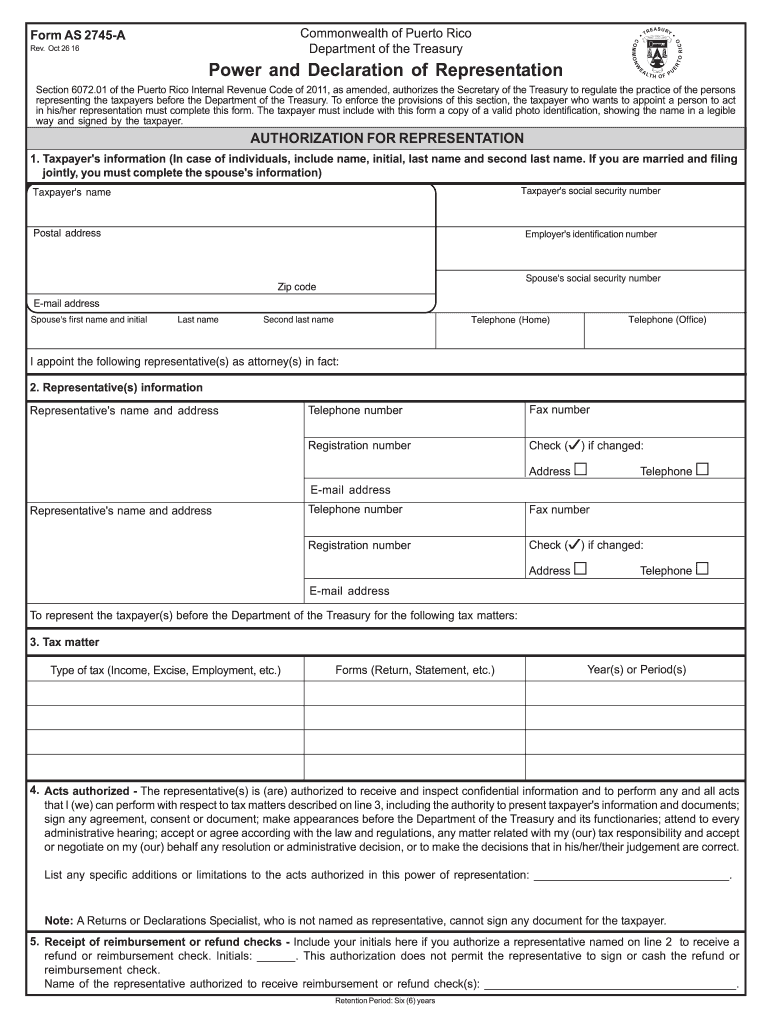
: Six (6) years Page 2 Form AS 2745-A, Rev. Oct 26 16 6. Notices and communications - Original notices and other written communications will be sent to the first representative and a copy to the taxpayer, unless you check one or more of the boxes below. a. If you want to receive the original and the first representantive named on line 2 to receive copy of such notices or communications, check (w) this box .
Loading

Open form follow the instructions

Easily sign the form with your finger

Send filled & signed form or save
How to fill out the PR AS 2745-A online
This guide provides a comprehensive overview of how to complete the PR AS 2745-A online. Whether you are a taxpayer looking to appoint a representative or an individual assisting someone with this form, these step-by-step instructions will help ensure that the process is smooth and efficient.
Follow the steps to fill out the PR AS 2745-A online.
- Press the ‘Get Form’ button to obtain the form and open it in your preferred online editor.
- Complete the taxpayer's information section, which includes entering your full name, social security number, postal address, and email address. If filing jointly, include your spouse's information as well.
- In the representative(s) information section, provide the names and addresses of each representative you are appointing. This should include their telephone and fax numbers, as well as their registration numbers.
- Specify the tax matters for which you seek representation in the tax matter section. Indicate the type of tax involved and the relevant forms and years or periods.
- Read and understand the acts authorized section. This section clarifies what your representative can do on your behalf regarding your tax matters. If you have specific limitations, list them clearly.
- For receipt of reimbursement or refund checks, authorize your representative to receive these funds by including your initials and specifying the representative's name who is authorized.
- Fill out notices and communications preferences to indicate how you want to receive original notices and if copies should be sent to your representatives.
- Review the revocation of prior power(s) of representation section to ensure any previous authorizations are revoked as intended.
- Sign and date the effective period section. Ensure both taxpayers sign if filing jointly. Make sure to enter the authorization period, which cannot exceed one year.
- Complete the declaration of representative section by ensuring that your representative fills out their credentials and signs the form. A current photo identification must accompany the submission.
- After all sections are completed, review the form thoroughly for accuracy. Save your changes, and you may then download or print the form for submission.
Complete your documents online today to streamline your tax representation process.
Experience a faster way to fill out and sign forms on the web. Access the most extensive library of templates available.
Related content
Oct 26, 2016 — Acts authorized - The representative(s) is (are) authorized to receive...
by AC Surek · 2016 · Cited by 7 — A metodologia utilizada foi a pesquisa descritiva...
Pode gravar vídeo e imagens fixas no cartão de memória SD e. CompactFlash (cartão CF)...
Get answers to your most pressing questions about US Legal Forms API.
What is the tax on non-resident selling property in Puerto Rico?
When non-residents sell property in Puerto Rico, they face a withholding tax on the sale proceeds, typically at a rate of up to 15%. This tax is significant for non-residents, as it affects their financial returns and obligations. Knowing the specifics of this tax, especially in connection with PR AS 2745-A, is essential for informed decision-making.
What is the withholding for non-residents in Puerto Rico?
Withholding for non-residents in Puerto Rico is established to ensure tax compliance on income sourced from the island. The amount withheld can vary based on the income type, generally ranging up to 30%. Non-residents must be aware of their obligations under PR AS 2745-A to avoid potential penalties.
What is the non-resident withholding tax?
The non-resident withholding tax applies to payments made to individuals or entities who do not reside in Puerto Rico. This tax is typically withheld at the source, ensuring that the government collects revenue owed by non-residents. Understanding this tax is particularly important for those involved in transactions related to PR AS 2745-A.
What is Section 6072.01 of the Puerto Rico Internal Revenue Code of 2011?
Section 6072.01 refers to the provisions guiding the income tax process for non-residents in Puerto Rico. It outlines mandatory compliance metrics and taxation rules affecting foreign individuals and entities. Familiarity with this section is essential when dealing with matters regarding PR AS 2745-A.
What is the tax rate for non-resident?
The tax rate for non-residents in Puerto Rico largely depends on the income type. For many non-residents, the applicable tax rate can fluctuate, often around 29% to 30%. It’s vital to stay informed about these rates, especially when considering implications from PR AS 2745-A.
What is the withholding tax in Puerto Rico for non-residents?
The withholding tax for non-residents in Puerto Rico is applied to various types of income earned within the territory. Typically, this tax rate can reach up to 30%, depending on the nature of the income. Understanding this is crucial for non-residents, especially when navigating obligations related to PR AS 2745-A.
What is Suri in Puerto Rico?
Suri is the online tax return platform developed by the Puerto Rico Department of Treasury to streamline tax filing for residents and non-residents. It simplifies the process of submitting forms, including those related to PR AS 2745-A. By using Suri, users can effectively manage their tax obligations from anywhere, reducing paperwork and enhancing accuracy.
How to become a bona fide resident of Puerto Rico?
Becoming a bona fide resident involves meeting specific residency requirements, including staying in Puerto Rico for the required number of days and establishing ties to the community. This status allows you to benefit from the tax incentives allowed under PR AS 2745-A. It's essential to keep thorough records of your time spent there and any connections you have to demonstrate your residency.
How to establish residency in Puerto Rico for tax purposes?
To establish residency for tax purposes, you need to demonstrate a physical presence in Puerto Rico, typically by living there for at least 183 days each year. Additionally, you should intend to make Puerto Rico your permanent home. Following the guidelines of PR AS 2745-A can help ensure you meet the necessary criteria.
How to file PR taxes?
Filing PR taxes involves several steps, including gathering your income documents and completing the appropriate forms. Be sure to consult the most recent guidelines related to PR AS 2745-A for accurate filing procedures. You can simplify this process by using platforms like uslegalforms, which provide user-friendly templates and instructions.
Use professional pre-built templates to fill in and sign documents online faster. Get access to thousands of forms.
If you believe that this page should be taken down, please follow our DMCA take down process here.
This form is available in several versions. Select the version you need from the drop-down list below.