Loading
Form preview
  • US Legal Forms
  • Other Templates
  • Tax Forms
  • Executive Department Treasury IRS Forms
  • Irs 990 Or 990-ez - Schedule E 2018

Get Irs 990 Or 990-ez - Schedule E 2018

This website is not affiliated with IRS

How it works

  1. Open form

    Open form follow the instructions

  2. Easily sign form

    Easily sign the form with your finger

  3. Share form

    Send filled & signed form or save

How to fill out the IRS 990 or 990-EZ - Schedule E online

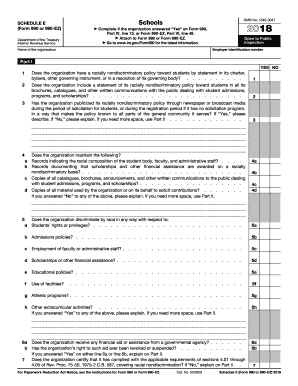
This guide provides a comprehensive overview of how to fill out Schedule E of IRS Form 990 or 990-EZ online. It is essential for organizations that meet specific criteria regarding private schools to report on their nondiscriminatory policies.

Follow the steps to complete Schedule E online.

  1. Click ‘Get Form’ button to obtain the form and open it in the editing interface.
  2. Enter your organization’s employer identification number (EIN) and name at the top of the form. This information is necessary for identifying your organization in the IRS records.
  3. In Part I, answer the questions regarding the organization’s racially nondiscriminatory policies. For each question, mark ‘Yes’ or ‘No’ as applicable. Provide additional details as required, especially for questions that ask for explanations.
  4. Is your organization maintaining necessary records? In line 4, confirm whether records are kept regarding the racial composition of students, faculty, and staff, and whether scholarships are awarded on a nondiscriminatory basis.
  5. If you answered ‘Yes’ to any of the questions in section 5, provide explanations in the space provided or indicate if you need additional space in Part II.
  6. Complete line 6 by indicating if the organization receives any financial aid or assistance from a governmental agency, and if so, whether its rights have been revoked or suspended.
  7. Certify compliance with all applicable requirements as noted in line 7. This certification must be made by an individual authorized to take official action on behalf of the organization.
  8. After completing all relevant sections, review your entries for accuracy and completeness. Ensure that you attach Schedule E to Form 990 or 990-EZ when submitting it.
  9. Finally, save your changes, and choose to download, print, or share the filled-out form as necessary.

Start filling out the IRS 990 or 990-EZ - Schedule E online to ensure compliance with federal regulations.

Get form

Experience a faster way to fill out and sign forms on the web. Access the most extensive library of templates available.

Related content

Instructions for Schedule E (Form 990), Schools
Dec 6, 2024 — Schedule E (Form 990) is used by an organization that files Form 990 or...
Learn more
2010 Form 990 or 990-EZ (Schedule E)
Schedule E (Form 990 or 990-EZ) is used by an organization that files Form 990 or Form...
Learn more
Return of Organization Exempt From Income Tax
Complete if the organization is a section 501(c)(3) organization or a section 4947(a)(1)...
Learn more

Related links form

LST-3 TAX OFFICE COPY $ $ $ $ $ $ LST-3 Instructions The Local ... Ahin Logon Trading Partner Agreement - Arkansas Blue Cross And Blue Shield Improvement Location Report (ILR) Order Form - Shield's Survey

Questions & Answers

Get answers to your most pressing questions about US Legal Forms API.

Contact support

Yes, you can file a 990-EZ using TurboTax. However, you must ensure that your version of TurboTax supports nonprofit tax filings. Utilizing IRS 990 or 990-EZ - Schedule E within TurboTax can streamline your reporting process and help you maintain compliance effortlessly.

Deciding whether to file Form 990 or Form 990-EZ is primarily based on your organization’s financial thresholds. If your organization has lower gross receipts and assets, IRS 990 or 990-EZ - Schedule E can facilitate easier compliance. Always review your finances carefully before making this decision.

Schedule E on the 990-EZ form is used to provide information about professional fundraising services that an organization may have utilized. This schedule helps to disclose costs associated with fundraising activities. Accurately reporting this information is crucial for transparency and meeting IRS regulations.

The decision to file Form 990 or 990-EZ depends on your organization’s financial size. If your gross receipts exceed $200,000 or total assets exceed $500,000, you are required to file Form 990. Otherwise, IRS 990 or 990-EZ - Schedule E provides a simpler reporting option perfect for smaller entities.

Yes, switching from Form 990 to 990-EZ is possible, pending certain criteria. If your organization meets the eligibility thresholds relating to gross receipts and total assets, you can choose to file Form 990-EZ. This switch can simplify your filing process, allowing you to comply efficiently using IRS 990 or 990-EZ - Schedule E.

Schedule A is a supplementary form used with IRS Form 990 or 990-EZ. It provides detailed information about an organization’s public charity status and contributions it received. This schedule helps to clarify the public support test—an important aspect of maintaining tax-exempt status.

Nonprofit organizations and small tax-exempt entities typically fill out Form 990-EZ. This form is ideal for those that may not have significant revenues or assets. If your organization receives gross receipts under $200,000 and total assets under $500,000, you should consider using IRS 990 or 990-EZ - Schedule E for your reporting needs.

Form 990-E is a simplified version of the standard Form 990, designed for smaller organizations with less complex financial situations. It allows tax-exempt organizations to provide essential financial information while reducing the reporting burden. Understanding the nuances of IRS 990 or 990-EZ - Schedule E helps you determine if this form suits your organization. It’s a great option for those looking to streamline their tax filing process.

Self-employment tax Schedule E involves reporting income derived from a business where you are the sole proprietor on an IRS form. Although primarily for individuals, organizations may need to consider if owners or members earn income that could be taxable. This aspect of IRS 990 or 990-EZ - Schedule E can be complex, and it’s essential to evaluate your situation carefully. Always consult a tax professional for guidance to remain compliant.

Schedule E is designed for organizations that earn specific revenue types necessary for their operations. This includes income from services, grants, and contributions that support your tax-exempt purpose. To qualify for including lines on Schedule E, make sure the income relates directly to your organization's mission. It is essential to get this right when filing your IRS 990 or 990-EZ - Schedule E.

Get This Form Now!

Use professional pre-built templates to fill in and sign documents online faster. Get access to thousands of forms.
If you believe that this page should be taken down, please follow our DMCA take down processhere.
Get IRS 990 or 990-EZ - Schedule E
  • Adoption
  • Bankruptcy
  • Contractors
  • Divorce
  • Home Sales
  • Employment
  • Identity Theft
  • Incorporation
  • Landlord Tenant
  • Living Trust
  • Name Change
  • Personal Planning
  • Small Business
  • Wills & Estates
  • Packages A-Z
  • Affidavits
  • Bankruptcy
  • Bill of Sale
  • Corporate - LLC
  • Divorce
  • Employment
  • Identity Theft
  • Internet Technology
  • Landlord Tenant
  • Living Wills
  • Name Change
  • Power of Attorney
  • Real Estate
  • Small Estates
  • Wills
  • All Forms
  • Forms A-Z
  • Other Templates
  • Legal Hub
  • About Us
  • Help Portal
  • Legal Resources
  • Blog
  • Affiliates
  • Contact Us
  • Delete My Account
  • Site Map
  • Industries
  • Forms in Spanish
  • Localized Forms
  • State-specific Forms
  • Forms Kit
  • Real Estate Handbook
  • All Guides
  • Notarize
  • Incorporation services
  • For Consumers
  • For Small Business
  • For Attorneys
  • USLegal
  • FormsPass
  • pdfFiller
  • signNow
  • altaFlow
  • DocHub
  • Instapage
Form Packages
  • Adoption
  • Bankruptcy
  • Contractors
  • Divorce
  • Home Sales
  • Employment
  • Identity Theft
  • Incorporation
  • Landlord Tenant
  • Living Trust
  • Name Change
  • Personal Planning
  • Small Business
  • Wills & Estates
  • Packages A-Z
Form Categories
  • Affidavits
  • Bankruptcy
  • Bill of Sale
  • Corporate - LLC
  • Divorce
  • Employment
  • Identity Theft
  • Internet Technology
  • Landlord Tenant
  • Living Wills
  • Name Change
  • Power of Attorney
  • Real Estate
  • Small Estates
  • Wills
  • All Forms
  • Forms A-Z
  • Other Templates
Customer Service
  • Legal Hub
  • About Us
  • Help Portal
  • Legal Resources
  • Blog
  • Affiliates
  • Contact Us
  • Delete My Account
  • Site Map
  • Industries
  • Forms in Spanish
  • Localized Forms
  • State-specific Forms
  • Forms Kit
Legal Guides
  • Real Estate Handbook
  • All Guides
Prepared for you
  • Notarize
  • Incorporation services
Our Customers
  • For Consumers
  • For Small Business
  • For Attorneys
Our Sites
  • USLegal
  • FormsPass
  • pdfFiller
  • signNow
  • altaFlow
  • DocHub
  • Instapage
Social Media
Call us now toll free:
+1 833 426 79 33
As seen in:
© Copyright 1999-2026 airSlate Legal Forms, Inc. 17 Station Street, Ste. 203, Brookline, MA 02445
  • Your Privacy Choices
  • Terms of Service
  • Privacy Notice
  • Content Takedown Policy
  • Bug Bounty Program
IRS 990 or 990-EZ - Schedule E
This form is available in several versions.
Select the version you need from the drop-down list below.
2020 IRS 990 Or 990-EZ - Schedule E
Select form
  • 2020 IRS 990 Or 990-EZ - Schedule E
  • 2019 IRS 990 or 990-EZ - Schedule E
  • 2018 IRS 990 or 990-EZ - Schedule E
  • 2017 IRS 990 or 990-EZ - Schedule E
  • 2016 IRS 990 or 990-EZ - Schedule E
  • 2015 IRS 990 or 990-EZ - Schedule E
Select form