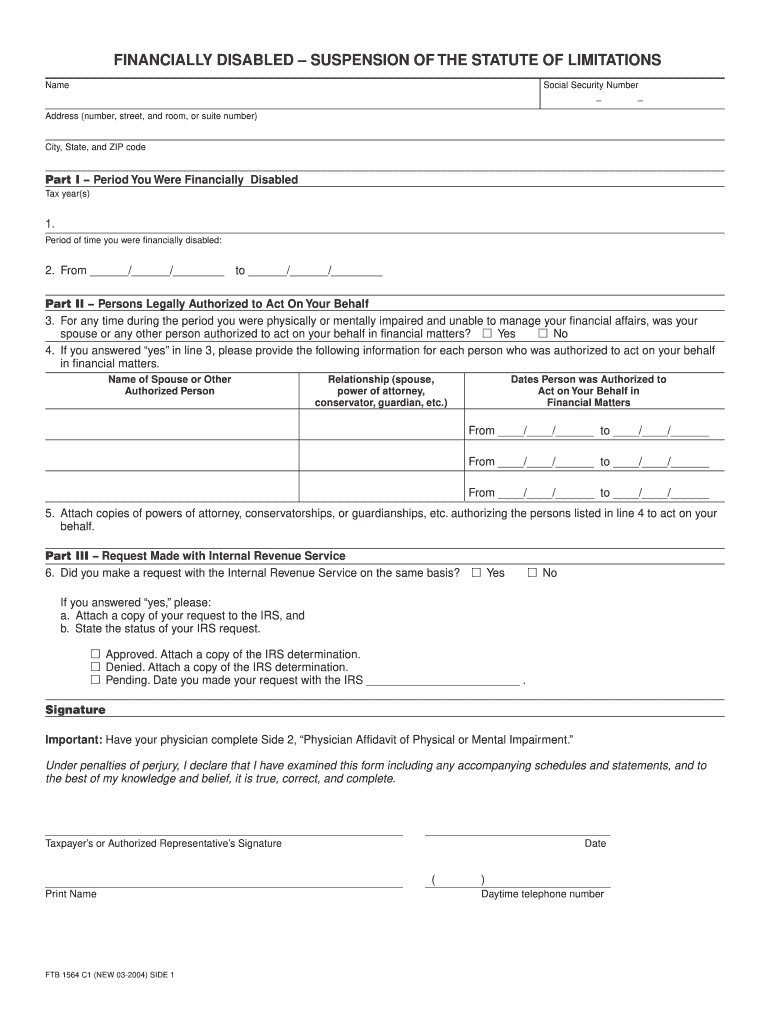
FINANCIALLY DISABLED SUSPENSION OF THE STATUTE OF LIMITATIONS Name Social Security Number Address (number, street, and room, or suite number) City, State, and ZIP code Part I Period You Were Financially.
Loading

Open form follow the instructions

Easily sign the form with your finger

Send filled & signed form or save
How to fill out the CA FTB 1564 C1 online
Filling out the CA FTB 1564 C1 form is an essential step for individuals seeking to declare financial disability for tax purposes. This guide will walk you through the process of completing the form online, ensuring that you can provide all necessary information clearly and accurately.
Follow the steps to complete the CA FTB 1564 C1 form online.
- Press the ‘Get Form’ button to access the CA FTB 1564 C1 form and open it in your editor of choice.
- Begin by entering your name and Social Security number in the designated fields. Make sure to format the Social Security number correctly, using the format XXX-XX-XXXX.
- Fill in your address, including the number, street, room or suite number, city, state, and ZIP code. Ensure that your information is current and complete.
- In Part I, indicate the tax year(s) for which you are claiming financial disability. Clearly list the period during which you were financially disabled by providing both the start and end dates.
- In Part II, answer the question about whether anyone was authorized to act on your behalf during your period of impairment. If yes, fill in the necessary details for each individual, including their relationship to you and the dates they were authorized.
- Attach any necessary documentation, such as copies of powers of attorney or conservatorships that validate the authority of the individuals listed in Part II.
- In Part III, state whether you made a request to the Internal Revenue Service regarding the same basis. If so, provide the required information, including the status of that request and any attachments.
- Finally, ensure that your physician completes the required affidavit of physical or mental impairment as needed. After reviewing all entries, sign and date the form.
- Once completed, save your changes. You can then download the form, print it, or share it as necessary.
Complete your CA FTB 1564 C1 form online to ensure a smooth process.
Experience a faster way to fill out and sign forms on the web. Access the most extensive library of templates available.
Related content
For California income tax information, contact the Franchise Tax Board at ftb.ca.gov....
May 17, 1976 — Permission to make digital or hard copies of all or part of this work for...
The EZ-ZONE® PM is a temperature limit device, approved by Factory Mutual, with a 3-year...
Get answers to your most pressing questions about US Legal Forms API.
Why is the California tax return taking so long?
Your California tax return may take longer than expected due to various factors including processing delays or additional review needs. If you submitted your CA FTB 1564 C1 form close to the deadline, this could contribute to the delay. Check the California Franchise Tax Board website for updates on processing times.
How do I speak to someone at the California tax board?
To speak to someone at the California tax board, you can call their designated hotline. Be prepared to provide relevant information regarding your CA FTB 1564 C1 issue. This will help ensure you receive specific answers to your questions more efficiently.
How to fight the California franchise tax board?
If you believe there is an error with the California Franchise Tax Board's assessment, you can appeal their decision. Begin by reviewing your CA FTB 1564 C1 form and any correspondences from them. You can file a formal appeal or reach out to their office to discuss your concerns directly.
How to get a copy of California tax return?
To get a copy of your California tax return, you can request it through the California Franchise Tax Board website. By providing the necessary information, including your Social Security number and the tax year, you can obtain a copy of your CA FTB 1564 C1. Alternatively, you may also call their support team for assistance.
How to get a hold of the California tax board?
To get a hold of the California tax board, you can call their customer service number during their business hours. Additionally, you can visit their website for specific information related to the CA FTB 1564 C1 or submit an inquiry through their online contact form. This ensures you get the right assistance with your tax questions.
How to make CA FTB payment?
Making a CA FTB payment can be done online through the California Franchise Tax Board's website, where you can use various payment methods. Alternatively, you can mail a check along with your CA FTB 1564 C1 form. Be sure to make your payment on time to avoid any late fees.
How to complete the CA state tax form?
To complete the CA state tax form, you need to gather your financial documents, including income statements and deductions. Start by downloading the CA FTB 1564 C1 form from the California Franchise Tax Board website. Follow the instructions carefully, and ensure that all information is accurate before submitting your form.
How to fill a CA tax form?
Filling out a CA tax form, including CA FTB 1564 C1, requires careful attention to detail. Start by gathering all necessary documents, like W-2s and 1099s, which will provide essential information for accurate reporting. Follow the instructions on the form closely, and make sure all entries are complete and correct before submission. If you feel uncertain, consider using uslegalforms to guide you through the process seamlessly.
How to register with CA FTB?
Registering with the CA FTB is straightforward. Begin by visiting the California Franchise Tax Board's website and look for the registration section. You will need to provide your personal information, along with any relevant tax identification numbers. Once registered, you gain access to numerous resources, including forms like CA FTB 1564 C1, that can simplify your tax reporting process.
How to file CA use tax?
To file CA use tax, start by determining the amount you owe based on your purchases. You can access the appropriate forms, like CA FTB 1564 C1, through the California Franchise Tax Board's website. Complete the form accurately by providing details about your purchases, and then submit it by mail or electronically. Remember, paying your use tax on time helps you avoid penalties.
Use professional pre-built templates to fill in and sign documents online faster. Get access to thousands of forms.
If you believe that this page should be taken down, please follow our DMCA take down process here.
This form is available in several versions. Select the version you need from the drop-down list below.