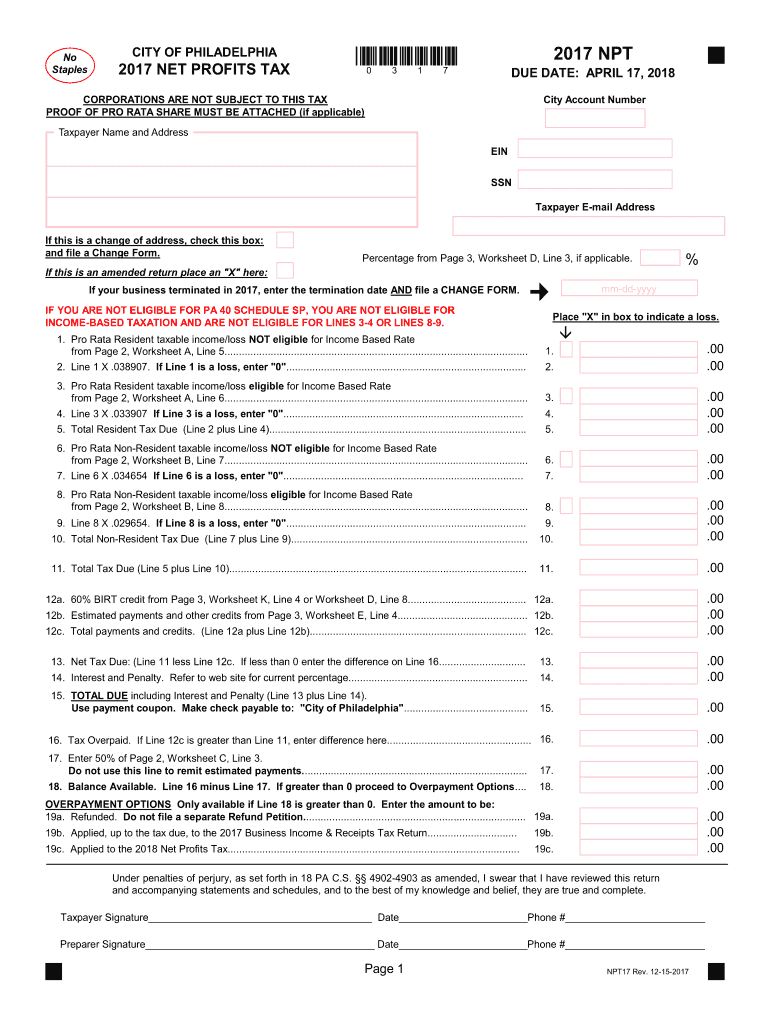
Cable) City Account Number Taxpayer Name and Address EIN SSN Taxpayer E-mail Address If this is a change of address, check this box: and file a Change Form. If this is an amended return place an "X" here: Percentage from Page 3, Worksheet D, Line 3, if applicable. If your business terminated in 2017, enter the termination date AND file a CHANGE FORM. IF YOU ARE NOT ELIGIBLE FOR PA 40 SCHEDULE SP, YOU ARE NOT ELIGIBLE FOR INCOME-BASED TAXATION AND ARE NOT ELIGIBLE FOR LINES 3-4 OR LINES.
Loading

Open form follow the instructions

Easily sign the form with your finger

Send filled & signed form or save
How to fill out the PA NPT online
This guide provides clear and comprehensive instructions on how to fill out the Pennsylvania Net Profits Tax (PA NPT) online. Designed for individuals including those with little legal experience, it aims to support users in completing this important tax document accurately.
Follow the steps to complete the PA NPT online effectively.
- Click ‘Get Form’ button to access the PA NPT form and open it in your preferred online form editor.
- Begin by entering your City Account Number in the designated field. Then, provide the Taxpayer Name and Address, ensuring that all information is correct and current.
- Enter your Employer Identification Number (EIN) or Social Security Number (SSN) as applicable. Make sure to keep this information secure.
- If this form is being used to file a change of address, indicate this by checking the corresponding box. Additionally, file a Change Form as instructed.
- If this return is amended, mark the 'X' box for an amended return. This will clarify the nature of the submission.
- Proceed to fill in the income/loss sections as specified, taking care to calculate the Pro Rata Resident taxable income from the provided worksheets.
- Input the calculated amounts including any eligible percentages derived from the worksheets, ensuring all fields are filled correctly.
- Calculate the total tax due by summing the applicable income amounts and deductions, then enter that total in the designated section.
- Review your inputs for accuracy. Each section should reflect your financial situation for the respective tax year.
- At the end of the form, you will have options to save changes, download, print, or share the completed form as needed.
Complete your documents online to ensure timely filing and compliance with tax obligations.
Experience a faster way to fill out and sign forms on the web. Access the most extensive library of templates available.
Related content
The Net Profits Tax (NPT) is imposed on the net profits from the operation of a trade...
Nov 5, 2024 — Nurse practitioners (NPs) and physician assistants (PAs) are advanced...
The flowmeter version can be identified by referring to the name plate that is attached to...
Get answers to your most pressing questions about US Legal Forms API.
How do I track my refund status?
To track your refund status, visit the Pennsylvania Department of Revenue’s official website. There, you can enter the necessary information to see real-time updates about your refund. Staying informed about your refund status can ease your financial planning. For additional resources or guidance, uslegalforms is available to assist you.
When can I expect my state refund?
The timeframe for receiving your PA state refund can vary based on several factors, including when you filed your return and if there are any discrepancies in your submission. Generally, you can expect to receive your refund within four to six weeks after successful processing. Considering this, utilizing tools like uslegalforms can enhance your filing experience for smoother refunds.
What is PA state tax?
PA state tax refers to the tax levied on income earned within Pennsylvania. This tax is applicable to both residents and non-residents earning income in the state. Understanding PA state tax obligations is crucial for accurate financial planning and compliance. To stay informed, the uslegalforms platform provides resources that break down the tax responsibilities clearly.
Where is my state tax refund PA?
If you're wondering where your Pennsylvania state tax refund is, you can quickly find out by accessing the Pennsylvania Department of Revenue's refund tracking service. Inputting your information will help you track its status. If you encounter issues, don’t hesitate to consult resources like uslegalforms, which can guide you through potential challenges.
What is the NPT tax rate in Philadelphia?
The NPT tax rate in Philadelphia varies based on specific circumstances, but it is generally around 3.92%. This rate applies to non-residents who earn income in Philadelphia. It’s important to calculate your NPT properly to avoid any discrepancies. For accurate calculations and forms, consider using the resources available on the uslegalforms platform.
How do I track my PA state refund?
You can track your PA state refund through the Pennsylvania Department of Revenue website. By entering your details, you can get real-time updates on your refund status. This tracking tool is useful for managing your finances and ensuring you stay informed. For additional assistance with tracking, uslegalforms offers useful tools and information.
What is NPT filing?
NPT filing refers to the Non-Resident Pennsylvania Tax filing process. This process is essential for individuals who earned income in Pennsylvania but do not reside in the state. By filing NPT, you comply with state tax laws and avoid potential penalties. Using resources like uslegalforms helps streamline your understanding of the NPT filing requirements.
Why are PA state refunds taking so long?
Many taxpayers in Pennsylvania have noticed delays in receiving PA state refunds. These delays can be due to increased processing times or a higher volume of returns to review. Checking the status of your refund can provide updates, and ensuring all documents are submitted correctly can help speed up the process. For those concerned about the wait, the uslegalforms platform offers guidance on navigating refund-related questions.
How to calculate Philadelphia net profit tax?
To calculate the Philadelphia NPT, you need to determine your net profit from business activities conducted within the city. The rate is typically 3.926%, applied to your net income after allowable deductions. For accurate calculations and to streamline your filing process, consider using US Legal Forms, which can help you navigate the complexities of the NPT.
Who must file Philadelphia NPT?
Any individual or business that earns income from activities conducted in Philadelphia is required to file the Philadelphia Net Profits Tax (NPT). This applies to both residents and non-residents earning income in the city. If you're a non-resident with Philadelphia-based income, it is essential to comply with these tax regulations to avoid penalties.
Use professional pre-built templates to fill in and sign documents online faster. Get access to thousands of forms.
If you believe that this page should be taken down, please follow our DMCA take down process here.
This form is available in several versions. Select the version you need from the drop-down list below.