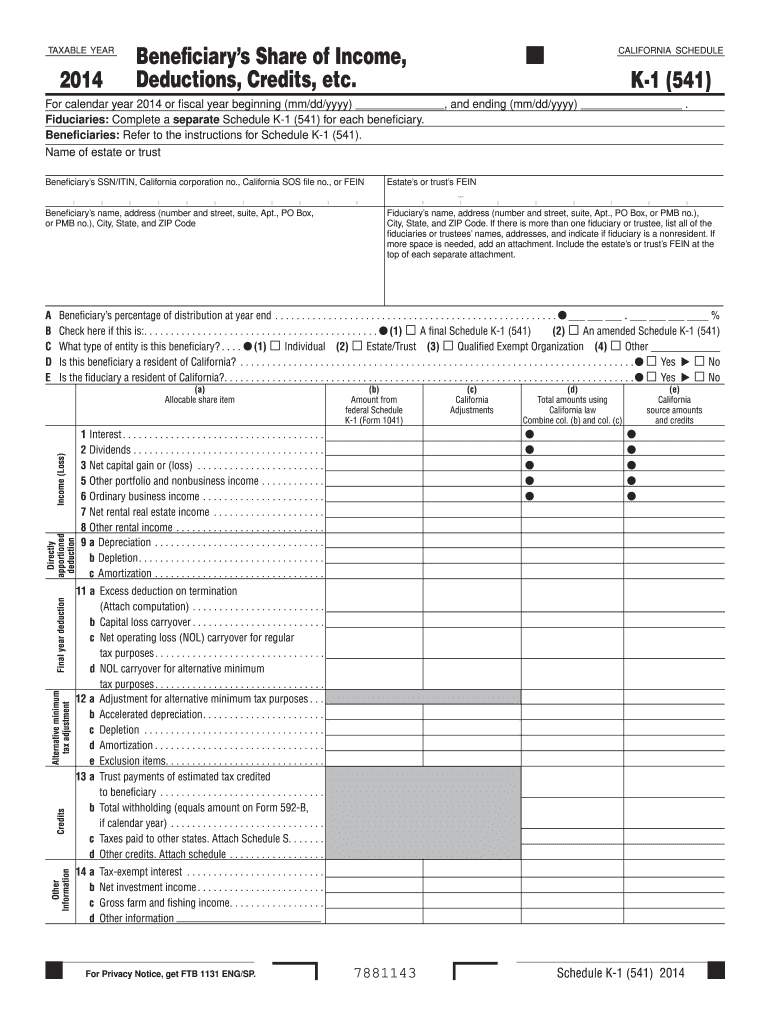
Or FEIN Estate s or trust s FEIN Beneficiary s name, address (number and street, suite, Apt., PO Box, or PMB no.), City, State, and ZIP Code Fiduciary s name, address (number and street, suite, Apt., PO Box, or PMB no.), City, State, and ZIP Code. If there is more than one fiduciary or trustee, list all of the fiduciaries or trustees names, addresses, and indicate if fiduciary is a nonresident. If more space is needed, add an attachment. Include the estate s or trust s FEIN a.
Loading

Open form follow the instructions

Easily sign the form with your finger

Send filled & signed form or save
How to fill out the CA FTB 541 - Schedule K-1 online
Filling out the CA FTB 541 - Schedule K-1 can seem daunting, but with a clear understanding of each section, it can be done efficiently. This guide will provide you with step-by-step instructions to navigate the online process of completing this important tax form.
Follow the steps to accurately complete the CA FTB 541 - Schedule K-1.
- Click the ‘Get Form’ button to access the CA FTB 541 - Schedule K-1 form online, allowing you to begin filling out the necessary information.
- Enter the taxable year for which the Schedule K-1 is being prepared. Specify '2014' or the appropriate year and indicate whether it is for a calendar year or a fiscal year by filling in the dates.
- Provide the name of the estate or trust at the designated field. Ensure that all information is accurate to avoid issues with tax authorities.
- Fill in the beneficiary’s identification details, including their SSN/ITIN and address. Accuracy here is critical, as it directly affects tax filing and record-keeping.
- Complete fiduciary information by listing the fiduciary’s name and address. If there are multiple fiduciaries, indicate their names and addresses clearly.
- Enter the beneficiary’s percentage of distribution at year-end. This percentage determines the allocation of the estate’s or trust’s income to the beneficiary.
- Indicate whether the Schedule K-1 is a final or amended form by checking the appropriate box.
- Select the type of entity for the beneficiary by marking the corresponding box (individual, estate/trust, qualified exempt organization, or other).
- Answer whether the beneficiary is a resident of California by checking 'Yes' or 'No'. Repeat this for the fiduciary.
- Complete the various reporting sections for allocable share items, including amounts from federal Schedule K-1 and any California adjustments. Make sure to add any additional information or attachments as required.
- Once all relevant fields have been filled in correctly, review your entries for accuracy. After confirming everything is correct, you can save your progress, download the form for your records, or print and share it with relevant tax authorities.
Start completing your CA FTB 541 - Schedule K-1 online today for a seamless tax filing experience.
Experience a faster way to fill out and sign forms on the web. Access the most extensive library of templates available.
Related content
Purpose. The estate or trust uses Schedule K-1 (541) to report your share of the estate's...
by RS Kinyon · 2013 · Cited by 3 — ble for California, and identifies California...
Mar 16, 2020 — TOOLS AND RULES. ASSA ABLOY Door Security Solutions® Customer Service...
Get answers to your most pressing questions about US Legal Forms API.
What is a California Schedule K-1?
A California Schedule K-1, or CA FTB 541 - Schedule K-1, is a tax form used to report a taxpayer's share of income, deductions, and credits from a partnership or S corporation in California. It is crucial for accurate personal tax filing and is furnished by these entities to their partners or shareholders. Knowing the details of your K-1 can help ensure compliance and avoid surprises during tax season.
Who prepares Schedule K-1?
The CA FTB 541 - Schedule K-1 is usually prepared by the partnership or S corporation's tax preparer or accountant. They compile the financial information necessary to complete the form and ensure it complies with tax regulations. If you need assistance, platforms like uslegalforms provide resources that simplify the process of obtaining and understanding Schedule K-1.
What is CA 541 Schedule K-1?
CA FTB 541 - Schedule K-1 is a tax document that reports income, deductions, and credits from partnerships or S corporations to their partners or shareholders. It is essential for accurate tax filing in California. Completing your personal tax return accurately requires the information contained within the K-1, so understanding its details is vital.
Who provides Schedule K-1?
The CA FTB 541 - Schedule K-1 is provided by partnerships and S corporations to their partners or shareholders. These entities use the K-1 to report each owner's share of income, deductions, and credits for the tax year. If you are part of such an arrangement, make sure to check with your entity to receive your K-1 on time.
Where do I get Schedule K-1 form?
You should obtain your CA FTB 541 - Schedule K-1 form from the issuing partnership or S corporation. These entities are required to distribute K-1s to their owners and partners to report income accurately. If you need a blank form or additional copies, consider visiting websites like uslegalforms, which can guide you through the process.
How do I get a Schedule K-1 form?
You can get a CA FTB 541 - Schedule K-1 form directly from the entity that generates it, such as your partnership or S corporation. They typically send out these forms after the end of the tax year. If you have not received your K-1, you can check with uslegalforms, where you might find downloadable options for various tax forms.
Can I file my taxes without my K-1?
Filing your taxes without your CA FTB 541 - Schedule K-1 is generally not advisable. The K-1 provides important information about your share of income, deductions, and tax credits from a partnership or S corporation. Without it, you might miss out on reporting essential information, leading to potential delays or issues with your tax return.
How do I get a copy of my Schedule K-1?
To obtain a copy of your CA FTB 541 - Schedule K-1, you generally need to contact the entity that issued the form, such as a partnership or S corporation. They are responsible for providing K-1s to their partners and shareholders. If you cannot locate your form, consider reaching out directly to your tax advisor or using platforms like uslegalforms to find the necessary documents.
Is Schedule K-1 taxable?
Yes, amounts reported on Schedule K-1 are generally considered taxable income. The CA FTB 541 - Schedule K-1 outlines income, deductions, and credits that pass-through entities allocate to their owners or partners. Being aware of this helps you prepare for taxes owed and keep your finances in order. Always review your K-1 carefully to ensure all reported information is accurate and complete.
What is a Schedule K-1 for inheritance tax?
There isn’t a specific Schedule K-1 for inheritance tax, but K-1 may come into play if the inherited assets produce income. In this case, the income would be reported on your CA FTB 541 - Schedule K-1, affecting your tax responsibilities. It's essential to recognize the connection between inherited assets and their potential income-generating capabilities. This awareness can help you plan for any tax implications.
Use professional pre-built templates to fill in and sign documents online faster. Get access to thousands of forms.
If you believe that this page should be taken down, please follow our DMCA take down process here.
This form is available in several versions. Select the version you need from the drop-down list below.