Loading
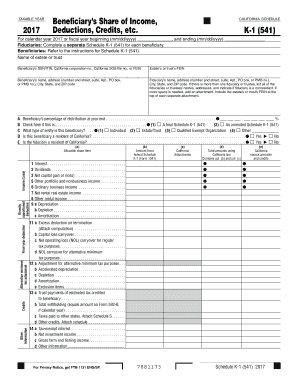
Get Ca Ftb 541 - Schedule K-1 2017
How it works
-

Open form follow the instructions
-

Easily sign the form with your finger
-

Send filled & signed form or save
How to fill out the CA FTB 541 - Schedule K-1 online
Completing the CA FTB 541 - Schedule K-1 is an essential task for beneficiaries receiving income from trusts or estates. This guide provides a clear step-by-step process to help you fill out the form accurately and efficiently online.
Follow the steps to complete the CA FTB 541 - Schedule K-1 online.
- Press the ‘Get Form’ button to access the CA FTB 541 - Schedule K-1. This will allow you to open the document in your preferred online editor.
- Enter the taxable year at the top of the form. This should reflect the calendar year or fiscal year for which you are reporting, formatted as mm/dd/yyyy where appropriate.
- Provide the name of the estate or trust. Ensure that this is accurate as it identifies the source of the income or distributions being reported.
- Input the beneficiary's identification details, including their Social Security Number (SSN), Individual Taxpayer Identification Number (ITIN), California corporation number, or Federal Employer Identification Number (FEIN).
- Fill in the beneficiary's name and address. Ensure that the information is complete with a street address, city, state, and ZIP code.
- Enter the fiduciary’s details, including their name and complete address. If multiple fiduciaries are involved, list all their names and addresses.
- Indicate the beneficiary’s percentage of distribution at year-end. This percentage represents the beneficiary's share of the income from the estate or trust.
- Check the box as applicable if this is a final or amended Schedule K-1, ensuring the correct designation is selected.
- Determine the type of beneficiary by selecting from the options provided: Individual, Estate/Trust, Qualified Exempt Organization, or Other.
- Confirm whether the beneficiary is a resident of California by selecting 'Yes' or 'No'. Repeat this for the fiduciary's residency status.
- Complete the schedule of allocable share items. This includes entering amounts from federal Schedule K-1 and any California adjustments, as detailed in the form.
- Provide details for each income category such as interest, dividends, capital gains, and other relevant income sources, making sure to complete all applicable fields.
- Review all information for accuracy and completeness. When done, you can save changes, download, print, or share the completed form.
Take the next step and complete your CA FTB 541 - Schedule K-1 online today.
Get form
Experience a faster way to fill out and sign forms on the web. Access the most extensive library of templates available.
In certain situations, tax amendments can be filed electronically, particularly if they are within the scope of forms accepted by the IRS or California FTB. Make sure to verify the specific requirements for your amendment. Using user-friendly services like uslegalforms can simplify the amendment process for your CA FTB 541 - Schedule K-1 filing.
Get This Form Now!
Use professional pre-built templates to fill in and sign documents online faster. Get access to thousands of forms.