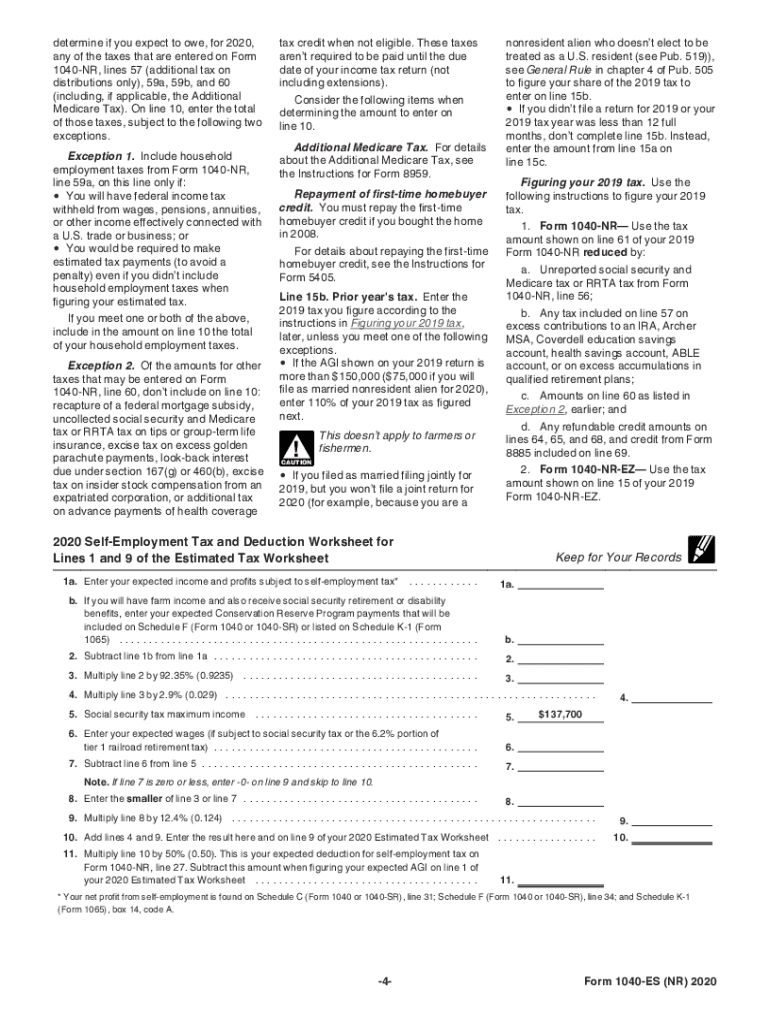
Do this, file a new Form W-4, Employee's Withholding Certificate, with your employer. You can use the Tax Withholding TIP Estimator IRS.gov/W4App to determine whether you need to have your withholding increased or decreased. Additional Information You May Need You can find most of the information you will need in Pub. 505, Tax Withholding and Estimated Tax. Other available information: Pub. 519, U.S. Tax Guide for Aliens. Instructions for the 2019 Form 1040-NR or Form 1040-NR-EZ. C.
Loading

Open form follow the instructions

Easily sign the form with your finger

Send filled & signed form or save
How to fill out the IRS 1040-ES (NR) online
Filing your estimated taxes can seem complicated, especially for nonresident alien individuals. This guide provides a clear, step-by-step process to help you accurately fill out the IRS 1040-ES (NR) form online.
Follow the steps to complete the form confidently.
- Click ‘Get Form’ button to obtain the form and open it for editing.
- Enter your personal information in the designated fields. This includes your name, address, and identifying number (SSN or ITIN). Make sure all information is accurate.
- Use the 2020 Estimated Tax Worksheet to calculate your expected adjusted gross income (AGI) for the year. Provide any deductions you anticipate and total them.
- Determine your tax using the 2020 Tax Rate Schedules based on your filing status. Ensure you factor in any additional taxes you expect, such as self-employment tax.
- List any tax credits that apply to you on the designated line, subtract these from your total estimated tax.
- Calculate your total estimated tax by summing the amounts from previous calculations. Check if it meets the threshold for making estimated payments.
- Decide on your payment plan based on your estimated taxes, ensuring to note key due dates like April 15, June 15, September 15, and January 15.
- Finally, save your changes, download the completed form, print it if necessary, or share it with your tax professional for their review.
Take the next step in your financial planning by completing your IRS 1040-ES (NR) form online today.
Experience a faster way to fill out and sign forms on the web. Access the most extensive library of templates available.
Related content
Dec 4, 2024 — If you are a nonresident alien, use this package to figure and pay your...
Purpose of This Package. Use Form 1040-ES to figure and pay your estimated tax for 2025...
Apr 15, 2015 — Estimated tax paid with Form. 1040-ES or Form 1040-ES (NR). 3. Tax paid...
Get answers to your most pressing questions about US Legal Forms API.
How do I avoid the underpayment penalty?
To avoid the IRS underpayment penalty, ensure that you make sufficient estimated tax payments throughout the year. Meeting either 90% of your current year tax or 100% of your previous year tax obligations can help you sidestep the penalties. Regularly reviewing your payments using IRS 1040-ES (NR) also keeps you on track. Utilizing US Legal Forms can provide you with the tools necessary to plan and manage your tax payments effectively.
Why am I getting an underpayment penalty if I'm getting a refund?
Receiving a refund does not automatically exempt you from an IRS underpayment penalty. It is possible to receive a refund while still underpaying based on your estimated tax payments reported on IRS 1040-ES (NR). Your tax withholding may cover your tax liability, but if your estimated payments were insufficient, you can still incur penalties. Review your tax situation carefully, and our platform can help you calculate the right amounts for future years.
Who is exempt from underpayment penalty?
Certain individuals, such as those with low income or specific tax situations, may qualify for an exemption from the IRS underpayment penalty. If you owe less than $1,000 in tax after subtracting your withholding and refundable credits, you generally avoid penalties. Additionally, if you had no tax liability in the previous year, you won’t incur a penalty. Consider our resources to manage your tax status and ensure you understand these exemptions.
What triggers the IRS underpayment penalty?
The IRS underpayment penalty can be triggered by several factors, including insufficient estimated tax payments or not paying enough throughout the year. If your payments are less than the lesser of 90% of your current year tax or 100% of your prior year tax, you may face this penalty. Therefore, accurately calculating your IRS 1040-ES (NR) payments is essential to stay compliant. Using our tools can help you estimate and track your payments effectively.
How do I report estimated tax payments on my tax return?
To report your estimated tax payments on your IRS 1040-ES (NR), you need to include the total amount of payments you've made throughout the year. This information goes on the first page of your tax return, typically on line 26 of the Form 1040. Accurately tracking these payments will help ensure you are not penalized for underpayment. For detailed assistance, consider using our US Legal Forms resources to simplify this process.
Who needs to file Form 1040-NR?
You must file Form 1040-NR if you are a nonresident alien who has U.S. income, received wages, or has other taxable income from U.S. sources. It is also necessary for those who owe taxes and are not eligible to file Form 1040. Using the IRS 1040-ES (NR) in conjunction with Form 1040-NR helps you plan and meet any payment obligations.
How do I know if I am a nonresident alien or resident alien?
Determining whether you are a nonresident alien or a resident alien typically depends on your physical presence in the U.S. over a specific period. The IRS applies tests, such as the Green Card and substantial presence tests, to classify your residency. It is crucial to confirm your status, as it affects which tax forms, including the IRS 1040-ES (NR), you need to file.
What is the difference between Form 1040 and Form 1040-NR?
The primary difference between Form 1040 and Form 1040-NR lies in the residency status of the taxpayer. Form 1040 is meant for U.S. citizens and resident aliens, while Form 1040-NR is for nonresident aliens. Understanding these distinctions is critical when preparing your tax returns and using the IRS 1040-ES (NR) to estimate any unpaid taxes.
What is Form 1040 ES NR?
Form 1040 ES NR is the estimated tax payment form specifically designed for nonresident aliens. It helps you calculate and remit quarterly estimated taxes based on your income. Utilizing the IRS 1040-ES (NR) form allows for better planning of your finances, ensuring you meet your U.S. tax obligations.
What happens if I file a Form 1040 instead of a 1040 NR?
Filing a Form 1040 instead of a 1040 NR can lead to complications with the IRS, including potential rejections or delays in processing. This misfiling can cause confusion about your residency status, which affects your tax obligations. To avoid issues, ensure you correctly file the IRS 1040-ES (NR) to estimate your payments based on nonresident income.
Use professional pre-built templates to fill in and sign documents online faster. Get access to thousands of forms.
If you believe that this page should be taken down, please follow our DMCA take down process here.