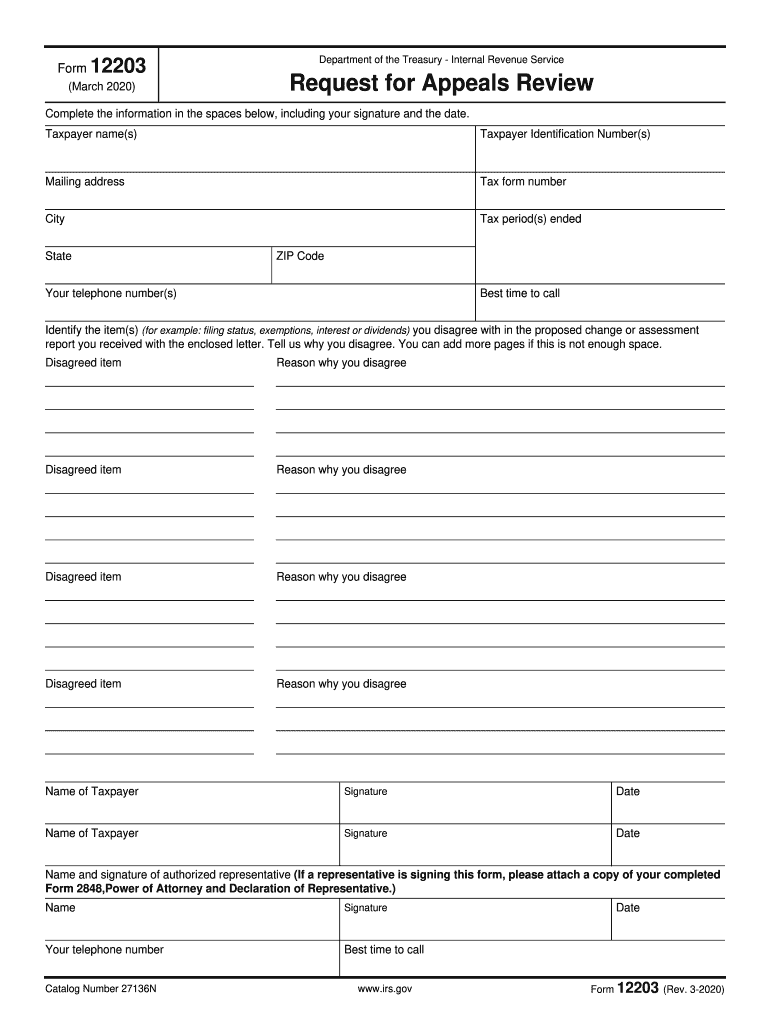
E(s) Taxpayer Identification Number(s) Mailing address Tax form number City Tax period(s) ended State ZIP Code Best time to call Your telephone number(s) Identify the item(s) (for example: filing status, exemptions, interest or dividends) you disagree with in the proposed change or assessment report you received with the enclosed letter. Tell us why you disagree. You can add more pages if this is not enough space. Disagreed item Reason why you disagree Disagreed item Reason why you d.
Loading

Open form follow the instructions

Easily sign the form with your finger

Send filled & signed form or save
How to fill out the IRS 12203 online
The IRS 12203 form, also known as the request for appeals review, allows users to seek a review of proposed adjustments to their tax filings. This guide provides a comprehensive walkthrough on filling out the form online, ensuring users can complete it accurately and effectively.
Follow the steps to successfully complete the IRS 12203 online
- Click the ‘Get Form’ button to obtain the IRS 12203 form and open it in your chosen editor.
- Begin by entering the taxpayer names in the designated spaces. Ensure the names match the information on your tax records.
- Input the taxpayer identification numbers (TINs) next. This can be either your Social Security Number or Employer Identification Number.
- Fill out the mailing address section, including the street address, city, state, and ZIP code.
- Specify the tax form number that corresponds to the form related to the adjustments you are disputing.
- Provide the tax periods in question, including the year or periods ended as indicated on your IRS notice.
- Indicate the best time to call by sharing your preferred time for follow-up communication from the IRS.
- Enter your telephone numbers to ensure the IRS can reach you for any clarifications or questions.
- Identify each item that you disagree with by providing specific details about the proposed changes or assessments mentioned in the letter from the IRS.
- For each disagreed item, explain your reasons in the space provided. If necessary, attach additional pages for a more detailed explanation.
- If you are represented by another person, complete the section for the authorized representative’s name and signature. Attach a copy of Form 2848 if applicable.
- Sign and date the form in the designated areas to validate your request.
- After completing all sections, save your changes, then choose to download, print, or share the completed form as needed.
Start to complete your IRS 12203 form online today for a smoother appeals process.
Experience a faster way to fill out and sign forms on the web. Access the most extensive library of templates available.
Related content
This form is to be used to request an Appeals review upon completion of an examination...
Purpose of this form: You can use this form to request a review in Appeals when you...
Feb 26, 2020 — (State of incorporation). (I.R.S. Employer Identification No.) 2...
Get answers to your most pressing questions about US Legal Forms API.
How to request an IRS audit reconsideration?
To request an IRS audit reconsideration, you should complete Form 12203 and submit it alongside necessary documentation to support your case. Make sure to clearly outline the reasons for your request and include relevant evidence. For additional guidance on this process, the US Legal Forms platform can assist you in ensuring everything is handled correctly.
How long does it take to process a form 3911?
The processing time for Form 3911 can vary, but it generally takes about six to eight weeks. However, during peak tax periods, it may take longer. If you’re concerned about status updates, consider utilizing the US Legal Forms platform to stay informed about your IRS 12203-related inquiries.
Where to mail form CT 3911?
When mailing Form CT 3911, you should send it to the address listed on the form's instructions. Ensure that you check the latest mailing details to prevent any unwanted delays in processing. If you prefer online resources, US Legal Forms has information that can guide you through this process.
Where can I get IRS form 3911?
You can get IRS Form 3911 directly from the IRS website or through legal documentation services like the US Legal Forms platform. This resource simplifies your search by providing the form along with detailed instructions. Having the right form is essential for resolving issues related to IRS 12203.
Where do I file the IRS form 12203?
You need to file IRS Form 12203 at the address specified in the form's instructions. It is vital to confirm where to send the form to avoid delays in processing your request. If you need assistance or further guidance, the US Legal Forms platform can offer you valuable insights.
Where can I get my IRS tax forms?
IRS tax forms are available on the official IRS website, which hosts a comprehensive library of forms. Additionally, you can find these forms on professional tax preparation websites and the US Legal Forms platform. Always ensure to use the correct version of the form that corresponds to your tax situation.
Where do I get a 3911 form?
You can obtain IRS Form 3911 from the official IRS website or via various online resources that offer downloadable forms. The US Legal Forms platform also provides access to this form, along with helpful instructions for completion. It’s crucial to have the correct form when dealing with your IRS 12203 matters.
How do I request a refund trace?
To request a refund trace, you can fill out Form 3911, which helps the IRS determine the status of your refund. Make sure to provide essential details like your name, Social Security number, and the specific tax year. If you need assistance with Form 3911, you can visit the US Legal Forms platform, which offers resources to guide you through the process.
How long does the IRS appeals process take?
The IRS appeals process can last anywhere from six months to a year, depending on your case's complexity. Once you file your appeal, the IRS will begin reviewing your case, and it is often a lengthy process due to their workload. If you have submitted IRS 12203 and are awaiting a response, you may want to start preparing for potential appeals to streamline your efforts. Understanding the timelines can help you manage expectations while navigating the appeals process.
Who qualifies for the IRS fresh start program?
The IRS Fresh Start Program is designed for individuals and small businesses struggling to meet tax obligations. To qualify, you generally need to demonstrate financial hardship, such as reduced income or increased expenses. Utilizing IRS 12203 can also help you navigate appeals or reconsiderations in case of penalties or audits under this program. Reviewing the specific qualifications will help you determine your eligibility.
Use professional pre-built templates to fill in and sign documents online faster. Get access to thousands of forms.
If you believe that this page should be taken down, please follow our DMCA take down process here.