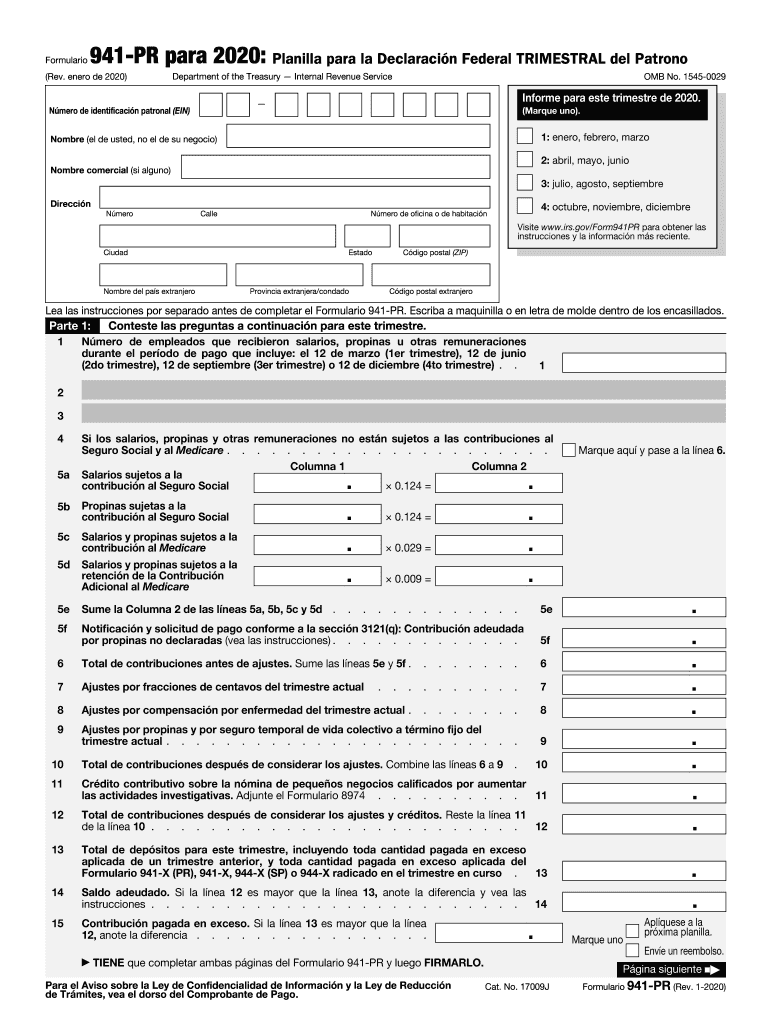
Ara este trimestre de 2020. N mero de identificaci n patronal (EIN) (Marque uno). 1: enero, febrero, marzo Nombre (el de usted, no el de su negocio) 2: abril, mayo, junio Nombre comercial (si alguno) 3: julio, agosto, septiembre Direcci n N mero Calle 4: octubre, noviembre, diciembre N mero de oficina o de habitaci n Visite www.irs.gov/Form941PR para obtener las instrucciones y la informaci n m s reciente. Ciudad Nombre del pa s extranjero C digo postal (ZIP) Estado.

Open form follow the instructions

Easily sign the form with your finger

Send filled & signed form or save
How to fill out the IRS 941-PR online
Filling out the IRS 941-PR form is an essential task for employers in the United States. This guide will walk you through the process of completing the form online, ensuring that you are equipped with the necessary information and instructions to do so successfully.
Follow the steps to complete the IRS 941-PR form online.
- Click ‘Get Form’ button to access the form and open it for editing.
- Fill in your employer identification number (EIN) at the top of the form. Ensure this number is accurate as it is crucial for your submission.
- In Part 1, provide the number of employees who received wages, tips, or other compensation during the reporting period.
- Complete lines 11 and 12 by entering any credits and then calculating your total contributions.
- Move on to Part 2, where you'll report your deposit schedule and the tax liability for the quarter.
- Finally, sign and date the form in Part 5, ensuring that you have completed both pages of the form 941-PR.
- Once you have filled out the form accurately, you can save any changes, download a copy for your records, print it out, or share it as necessary.
Start filing your IRS 941-PR online for efficient and accurate reporting.
Experience a faster way to fill out and sign forms on the web. Access the most extensive library of templates available.
Related content
Employers in Puerto Rico use this form to: Report income taxes, social security tax, or...
Employers must file Form 941 for the first quarter they pay wages, and each subsequent...
MeF will accept Forms 940, 940-PR, 941, 941-PR, 941-SS, 943, 943-PR, 944, and 945. The...
Get answers to your most pressing questions about US Legal Forms API.
Is there a new 941 form for 2025?
Currently, there is no announcement regarding a new IRS 941-PR form for 2025. However, it is always best to keep an eye on IRS updates or changes in tax filing requirements. Following IRS guidelines through reliable platforms such as uslegalforms can simplify the process for you, allowing for timely adaptations.
What is the difference between 941 and 941 R?
While both forms relate to employer tax reporting, the IRS 941 reports quarterly wages, whereas the IRS 941-R focuses on adjustments to previously filed 941 forms. The IRS 941-R helps correct errors in prior filings, ensuring that employers maintain accurate records and compliance with IRS requirements. Understanding these distinctions aids in proper tax management.
How to figure out taxable social security wages on 941?
To determine taxable Social Security wages for the IRS 941-PR, you should first identify the total wages subject to Social Security tax. This amount includes all earnings, tips, and other compensation before any deductions. Additionally, remember to exclude any non-taxable benefits, ensuring that your reported figures are accurate and compliant.
Is the 941 PR discontinued?
No, the IRS 941-PR form is not discontinued. It remains an essential document for employers operating in Puerto Rico who need to meet their federal tax obligations. Staying updated on any changes to the form is critical, so you can ensure accurate reporting and compliance with IRS regulations.
Where to file 941 PR?
Filing the IRS 941-PR form is straightforward. Employers should send it to the appropriate address listed in the IRS instructions specific to Puerto Rico. Typically, this address is designated for specific IRS services that handle forms filed by Puerto Rican employers, making accurate submission essential for compliance.
What is the difference between 941 and 941 PR?
The IRS 941 form is used to report income taxes, Social Security tax, and Medicare tax withheld from employee's paychecks. In contrast, the IRS 941-PR is specific for employers in Puerto Rico and accounts for local tax obligations and specific regulations. This distinction is crucial for compliance, ensuring that employers report accurately based on their location and employee classifications.
What is a 941-PR?
The IRS 941-PR is a payroll tax form designed specifically for employers in Puerto Rico. It is used to report income tax withholding and social security taxes withheld from employee paychecks. Utilizing this form accurately helps you maintain compliance with federal tax obligations while operating in Puerto Rico.
What address do I mail my IRS payment to?
The address for mailing your IRS payment will depend on whether you are sending Form 941 or another type of tax payment. You can find detailed instructions on the IRS website that specify where to send payments based on your form type and state. It's vital to follow these instructions carefully to avoid any late fees or processing issues.
Where to send 941-PR?
You can send the IRS 941-PR to the appropriate address listed in the form's instructions. Typically, this address varies depending on your location and whether you are submitting a payment along with the form. By ensuring you use the correct mailing address, you will help streamline the processing of your submission.
Is the 941-PR being discontinued?
No, the IRS 941-PR is not being discontinued at this time. It's essential to stay engaged with IRS updates to remain compliant with filing requirements. Staying informed can help you avoid potential penalties or issues related to payroll taxes.
Use professional pre-built templates to fill in and sign documents online faster. Get access to thousands of forms.
If you believe that this page should be taken down, please follow our DMCA take down process here.
This form is available in several versions. Select the version you need from the drop-down list below.