(Line 1 minus Lines 2, 3 and 4) 1. 2. 3. 4. 5. fire Insurance 6. 7. 8. 9. Gross Direct Premiums Received less Cancellations and Premiums Returned Dividends to Policy Holders Other Deductions (Attach Schedule.) Taxable Fire Insurance Premiums (Line 6 minus Lines 7 and 8) 6. 7. 8. 9. Accident and health Insurance 10. 11. 12. 13. 14. 15. 16. Gross Direct Accident and Health Premiums Dividends to Policy Holders Other Deductions (Attach Schedule.) Taxable Accident and Health Insurance Premiums.
Loading

Open form follow the instructions

Easily sign the form with your finger

Send filled & signed form or save
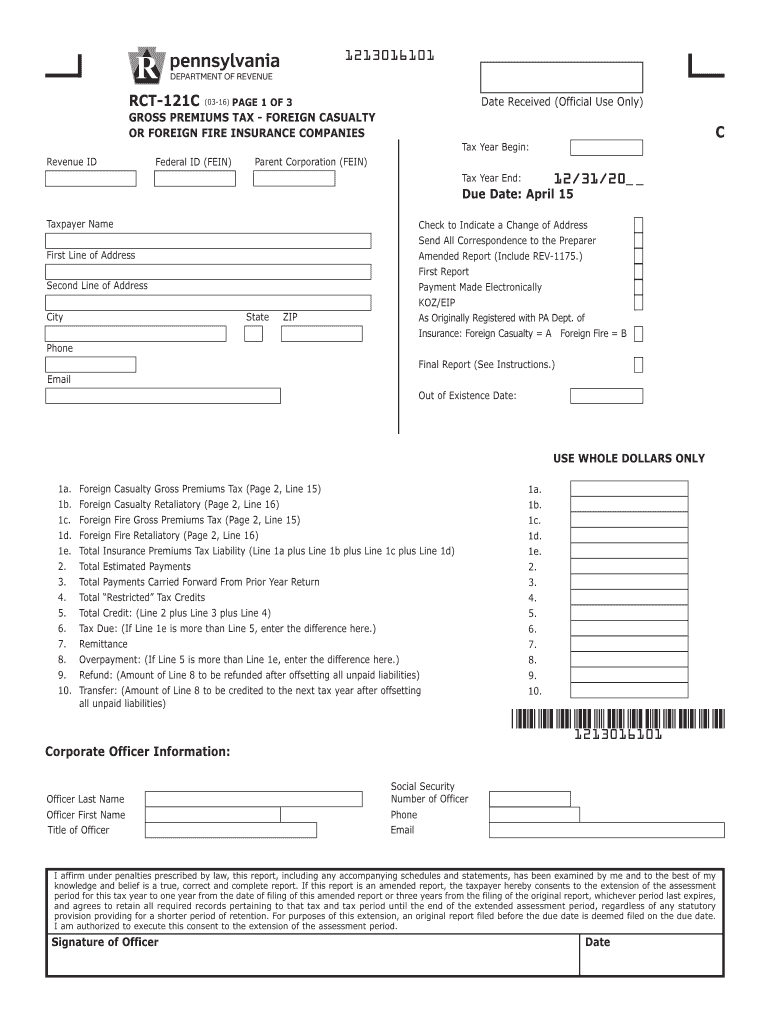
How to fill out the PA DoR RCT-121C online
Filling out the PA DoR RCT-121C form is essential for compliance with Pennsylvania’s gross premiums tax regulations for foreign casualty and fire insurance companies. This guide aims to provide clear and detailed instructions for users to complete the form successfully online.
Follow the steps to fill out the PA DoR RCT-121C accurately.
- Click the ‘Get Form’ button to obtain the form and open it for editing.
- Begin by entering the revenue ID, federal ID (FEIN), and the parent corporation's federal ID if applicable in the designated fields.
- Fill in the taxpayer’s name, address, city, state, and ZIP code.
- Provide your contact information, including phone number and email address.
- Complete the amounts for gross premiums tax and estimated payments in the designated fields on the form.
- For reporting additional deductions, specify the amounts related to dividends to policyholders and other taxable categories as outlined in the form.
- After completing all required fields, review your entries for accuracy.
- Once satisfied with the filled-out form, save your changes.
Ensure compliance by completing your PA DoR RCT-121C forms online today.
Experience a faster way to fill out and sign forms on the web. Access the most extensive library of templates available.
Related content
RCT-121C, Foreign Casualty or Foreign Fire Insurance Companies Gross Premiums Tax...
by DJ Zheng · 2024 · Cited by 6 — While many top-performing ORR cath- ode catalysts...
Get answers to your most pressing questions about US Legal Forms API.
Who needs to file a PA corporate tax return?
Every corporation generating income in Pennsylvania is required to file a PA corporate tax return. This obligation includes corporations formed in Pennsylvania as well as those incorporated in other states but operating within Pennsylvania. Utilizing the PA DoR RCT-121C helps ensure that filings are accurate and timely to avoid penalties.
How do I file an appeal with the PA Department of Revenue?
To file an appeal with the PA Department of Revenue, you typically use Form REV-499. This form allows you to contest decisions made by the department regarding your tax obligations or assessments. You will need to provide sufficient documentation to support your appeal, which can be facilitated through our website for easier processing.
Who must file a PA corporate tax return?
Corporations doing business in Pennsylvania, making taxable income, or engaging in activities that generate revenue must file a PA corporate tax return. This includes both domestic and foreign corporations operating in Pennsylvania. Filing appropriately is vital for compliance, and the PA DoR RCT-121C serves as the key form for this process.
Who files a corporate tax return?
Any corporation generating income in Pennsylvania must file a corporate tax return, including C corporations and S corporations. This requirement applies regardless of whether the corporation is operated from within or outside the state. The PA DoR RCT-121C is essential for corporations wishing to meet their tax obligations effectively.
Where do I file a PA extension?
To file a PA extension, you can submit Form REV-276 to the Pennsylvania Department of Revenue. This form allows you to request an extension, giving you extra time to file your return without incurring a penalty. Utilizing online resources can simplify this process and provide clarity on your filing requirements.
How do I file an amended PA return?
To file an amended PA return, you will need Form 1040X. Ensure that you clearly indicate the changes you are making and attach any required documentation. Using services like uslegalforms can streamline this process, helping you accurately complete the necessary forms to amend your PA return.
Who needs to file a PA tax return?
Any individual, business, or entity earning income through work or investments in Pennsylvania is required to file a PA tax return. This applies whether you live in Pennsylvania or not. To stay compliant and avoid issues, it is crucial to file the appropriate return, such as the PA DoR RCT-121C, if your business meets the required criteria.
Who must file PA 65 Corp?
Businesses operating as partnerships in Pennsylvania must file the PA 65 Corp. This includes any partnership that generates income in the state, irrespective of its domicile. By accurately filing the PA 65 Corp, partnerships can ensure compliance with Pennsylvania tax laws and avoid potential penalties.
Who must file PA RCT 101?
PA RCT 101 must be filed by corporations that do business in Pennsylvania, including foreign corporations. This form ensures that entities comply with state tax regulations. If you are unsure whether you need to file or how PA DoR RCT-121C ties into your obligations, resources on US Legal Forms can assist you in navigating the process effortlessly.
What insurance is not taxable?
In Pennsylvania, life insurance benefits and accidental death insurance payouts typically do not incur state taxes. This provides financial relief to beneficiaries during challenging times. It is also important to stay updated on what qualifies as non-taxable, especially when dealing with issues related to PA DoR RCT-121C. Utilizing US Legal Forms can help clarify these distinctions.
Use professional pre-built templates to fill in and sign documents online faster. Get access to thousands of forms.
If you believe that this page should be taken down, please follow our DMCA take down process here.
This form is available in several versions. Select the version you need from the drop-down list below.