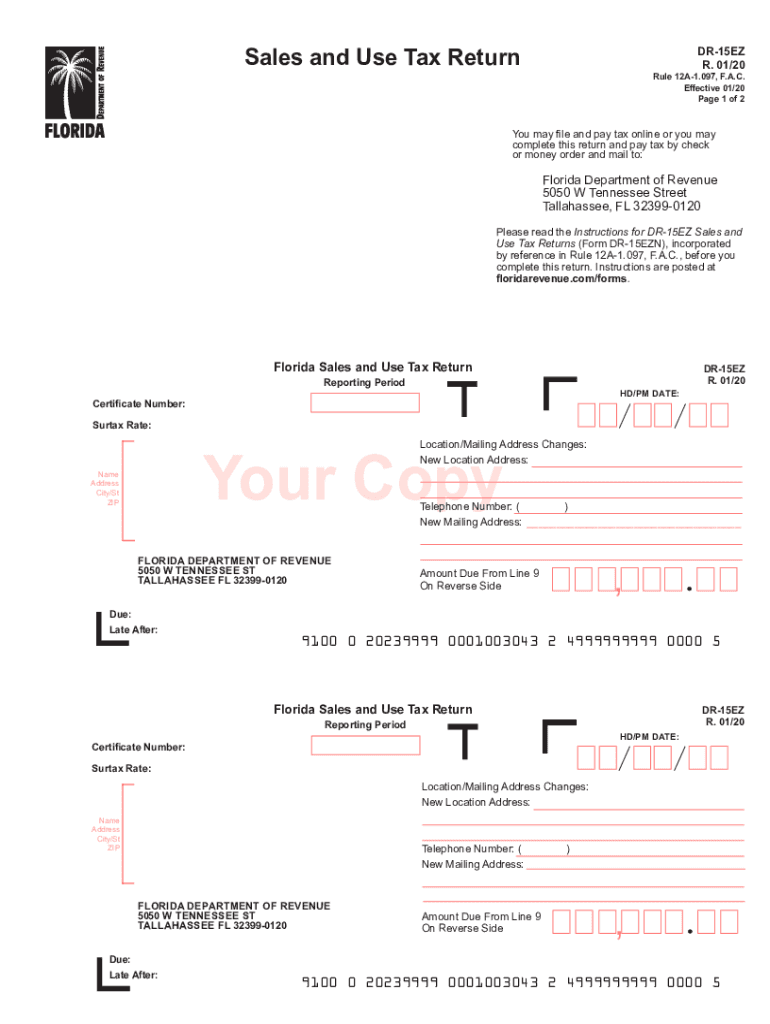
And mail to: Florida Department of Revenue 5050 W Tennessee Street Tallahassee, FL 32399-0120 Please read the Instructions for DR-15EZ Sales and Use Tax Returns (Form DR-15EZN), incorporated by reference in Rule 12A-1.097, F.A.C., before you complete this return. Instructions are posted at floridarevenue.com/forms. Florida Sales and Use Tax Return DR-15EZ R. 01/20 Reporting Period HD/PM DATE: Certificate Number: Surtax Rate: Location/Mailing Address Changes: New Location Address: Your Cop.
Loading

Open form follow the instructions

Easily sign the form with your finger

Send filled & signed form or save
How to fill out the FL DoR DR-15EZ online
The FL DoR DR-15EZ is a simplified form used for reporting sales and use taxes in Florida. Completing this form accurately is essential for compliance with tax regulations and ensures that you benefit from any applicable deductions or allowances.
Follow the steps to successfully complete the FL DoR DR-15EZ form online.
- Click ‘Get Form’ button to obtain the form and open it in your preferred editor.
- Begin by filling in the reporting period and HD/PM date in the designated fields.
- Enter your certificate number and the surtax rate applicable to your sales.
- If there are any changes to your location or mailing address, provide the new address in the corresponding fields.
- Fill out your name, address, city, state, and zip code, ensuring all information is current and accurate.
- Provide your telephone number for contact purposes.
- Next, fill in the section for ‘Gross Sales,’ excluding any tax amounts.
- Input ‘Exempt Sales’ in the appropriate space, making sure to include these in the gross sales line.
- Indicate the ‘Taxable Sales/Purchases,’ including any Internet or out-of-state purchases.
- Calculate the ‘Total Tax Due,’ including discretionary sales surtax from the specified line.
- List any lawful deductions and any credit memos provided by the Department of Revenue.
- Determine your net tax due by considering collection allowances or penalties as applicable.
- Ensure you reach the final section where you will state the ‘Amount Due With Return’ to be entered on the front of the form.
- Sign and date the form, inputting your telephone number for verification before submitting.
- Review all the entered information carefully before saving changes, downloading, printing, or sharing the completed form as needed.
Begin completing your FL DoR DR-15EZ online today to ensure timely and accurate filing.
Experience a faster way to fill out and sign forms on the web. Access the most extensive library of templates available.
Related content
All approved enterprise zone jobs tax credits must be taken on Line 16 of your Sales and...
When is Discretionary Sales Surtax Due? Discretionary sales surtax is reported with sales...
Changes in the sound quality are reduced by decoding with emphasis on the front channel...
Get answers to your most pressing questions about US Legal Forms API.
Is Florida sales tax number the same as EIN?
No, a Florida sales tax number and an Employer Identification Number (EIN) are not the same. The sales tax number is used for collecting sales tax from customers, while the EIN is for identifying your business entity for federal tax purposes. Businesses may need both numbers depending on their operations and regulatory needs. For aspects of taxation, including filing with the FL DoR DR-15EZ, understanding these differences is essential.
How to get a Florida sales tax certificate?
To obtain a Florida sales tax certificate, you must apply through the Florida Department of Revenue. This process typically requires you to provide your sales tax registration information. Once approved, your sales tax certificate enables purchases without charging sales tax, benefiting your business operations. Reference the FL DoR DR-15EZ for detailed information about the application steps.
Who is required to collect Florida sales tax?
In Florida, anyone selling tangible personal property or some services is required to collect sales tax. This includes businesses, vendors, and online sellers operating within the state. If your business exceeds the set threshold for sales, you must register and obtain a sales tax number. The FL DoR DR-15EZ provides insights into who qualifies for collecting sales tax in Florida.
How do I get a Florida tax ID number?
Obtaining a Florida tax ID number requires you to apply through the Florida Department of Revenue. This application can be done online, and you’ll need basic information about your business structure and revenue activities. Once your application is processed, you will receive your tax ID number, which is crucial for tax reporting and compliance. Consider reviewing the FL DoR DR-15EZ for guidance on tax obligations.
How do I get a Florida state sales tax number?
To get a Florida state sales tax number, you must register your business with the Florida Department of Revenue. You can complete this process online, where you’ll fill out the necessary application, which includes details about your business. After processing your application, you will receive a sales tax number, allowing you to collect sales tax from customers. The FL DoR DR-15EZ form can assist in understanding sales tax obligations and registration.
How to file an amended sales tax return in Florida?
To file an amended sales tax return in Florida, you should use the FL DoR DR-15EZ form, which is specifically designed for this purpose. Begin by filling out the necessary information, ensuring all amounts reflect the changes. After completing the form, submit it to the Florida Department of Revenue along with any required payment. By following this process, you can ensure your sales tax records are accurate and up to date.
What is a surtax in Florida calculator?
A surtax in Florida calculator is a tool that helps you determine the amount of surtax owed based on your taxable sales and local surtax rate. Using the FL DoR DR-15EZ can simplify this process. Many online services, including uslegalforms, offer calculators to make these estimations easy and accurate.
How to calculate surtax in Florida?
To calculate surtax in Florida, take the total taxable sales amount and multiply it by your local surtax rate, which is available in the FL DoR DR-15EZ. This equation provides you with the total surtax owed. Keeping track of these calculations can help you maintain accurate financial records.
What is the surtax rate in Florida?
The surtax rate in Florida varies by county, typically ranging from 0.5% to 2.5%. It is added to the state's base sales tax rate, which is 6%. To ensure compliance, it's important to check the specific surtax rate applicable to your county, often found in resources like FL DoR DR-15EZ.
How to file summary administration in Florida without a lawyer?
Filing for summary administration in Florida without a lawyer is feasible, but it requires careful attention to detail. You must complete and submit the appropriate forms, including the FL DoR DR-15EZ, to the court. It's beneficial to consult resources provided by uslegalforms to guide you through the necessary criteria. Taking these steps can simplify the process significantly.
Use professional pre-built templates to fill in and sign documents online faster. Get access to thousands of forms.
If you believe that this page should be taken down, please follow our DMCA take down process here.