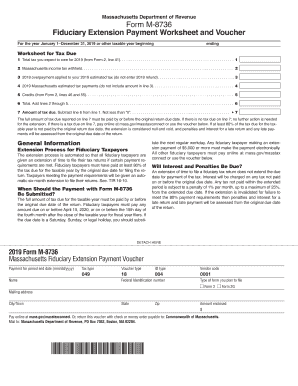
File a fiduciary tax return does not extend the due date for payment of the tax. Interest will be charged on any tax not paid on or before the original due date. Any tax not paid within the extended period is subject to a penalty of 1% per month, up to a maximum of 25%, from the extended due date. If the extension is invalidated for failure to meet the 80% payment requirements then penalties and interest for a late return and late payment will be assessed from the original due date of the return.
Open form follow the instructions
Easily sign the form with your finger
Send filled & signed form or save
How to fill out the MA M-8736 online
Filling out the MA M-8736 form online can be a straightforward process with the right guidance. This form serves as a fiduciary extension payment worksheet and voucher, allowing fiduciary taxpayers to manage their tax responsibilities effectively.
Follow the steps to complete your MA M-8736 with ease.
- Click ‘Get Form’ button to access the MA M-8736 form and open it in the designated editor.
- Begin filling out the worksheet by entering the total tax you expect to owe for the year in line 1.
- Input the amount of Massachusetts income tax withheld in line 2.
- Enter any 2018 overpayment applied to your 2019 estimated tax in line 3. Do not include the 2018 refund here.
- Record your 2019 Massachusetts estimated tax payments in line 4, excluding any amount listed in line 3.
- Fill in any applicable credits from Form 2 in line 5.
- Calculate the total by adding lines 2 through 5 and enter this amount in line 6.
- Determine the amount of tax due by subtracting line 6 from line 1 in line 7. Note that this amount cannot be less than zero.
- Ensure the total amount of tax due reported on line 7 is paid by or before the original return due date to avoid penalties.
- If applicable, pay online or use the voucher to submit your payment. If using the voucher, make sure to follow the mailing instructions provided and keep this worksheet for your records.
Complete your MA M-8736 form online today and stay compliant with your tax obligations.
Experience a faster way to fill out and sign forms on the web. Access the most extensive library of templates available.
Related content
Starting with tax year January 1, 2023, Massachusetts residents must pay an additional 4%...
Georgetown's program combines technical and strategic aspects with a holistic approach...
Get answers to your most pressing questions about US Legal Forms API.
Where do I mail my MA tax form?
Mail your Massachusetts tax form to the address listed in the instructions specific to your form type. Generally, it is sent to the Massachusetts Department of Revenue. Double-check that your address is correct to ensure your form reaches the correct destination and is processed promptly.
Can I file Form 8736 electronically?
Yes, you can file Form 8736 electronically through the Massachusetts Department of Revenue’s e-filing services. This option enhances efficiency and provides immediate confirmation of your submission. Be sure to gather all required information ahead of time to facilitate a smooth filing process.
Where do I file my MA Form 2?
MA Form 2 is typically submitted to the Massachusetts Department of Revenue. You can file it electronically through the department’s website or mail it directly to their office. Ensure you follow the specific instructions that accompany the form to avoid any issues with your filing.
Where do I mail my tax return?
To mail your Massachusetts tax return, send it to the address provided in the instructions for your tax form. Typically, this is the Massachusetts Department of Revenue. Make sure to check that you are using the correct address for your specific situation to ensure your return is processed smoothly.
How to file a Massachusetts state tax extension?
Filing for a Massachusetts state tax extension can be completed by using Form 4868, which you can find on the official Massachusetts Department of Revenue website. Be sure to fill out the form completely and submit it before the due date. If you owe taxes, be prepared to make a payment with the extension to avoid interest charges.
Where do I file my annual report in Massachusetts?
You can file your annual report for Massachusetts online through the Secretary of the Commonwealth's website. This process is streamlined and convenient. If you prefer, you can also mail the report directly to the address provided by the Secretary's office. Always ensure compliance with the deadlines to avoid penalties.
Who qualifies for no tax status in Massachusetts?
In Massachusetts, individuals who have very low income levels or meet specific criteria may qualify for no tax status. This often includes students or retirees with limited earnings. Utilizing the MA M-8736 can help you navigate your tax situation to determine eligibility for this status.
Where to mail IRS form 8736?
You should mail IRS Form 8736 to the address specified in the form's instructions, which usually depends on your location and whether you are enclosing payment. Always double-check the mailing address to ensure timely processing. The MA M-8736 also offers guidance on state-level submissions.
What is the IRS form 8736?
IRS Form 8736 is used to apply for an automatic extension of time to file certain tax returns. It is crucial for individuals looking to extend their deadlines without late penalties. With the MA M-8736, you can also manage your Massachusetts tax obligations during this extension period.
What is the Massachusetts income tax payment voucher?
The Massachusetts income tax payment voucher allows you to make payments towards your state income tax liability easily. Utilizing the MA M-8736 ensures you have a structured approach for your tax obligations. Be sure to file the voucher along with your tax payment to avoid penalties.
Use professional pre-built templates to fill in and sign documents online faster. Get access to thousands of forms.
If you believe that this page should be taken down, please follow our DMCA take down process here.
This form is available in several versions. Select the version you need from the drop-down list below.