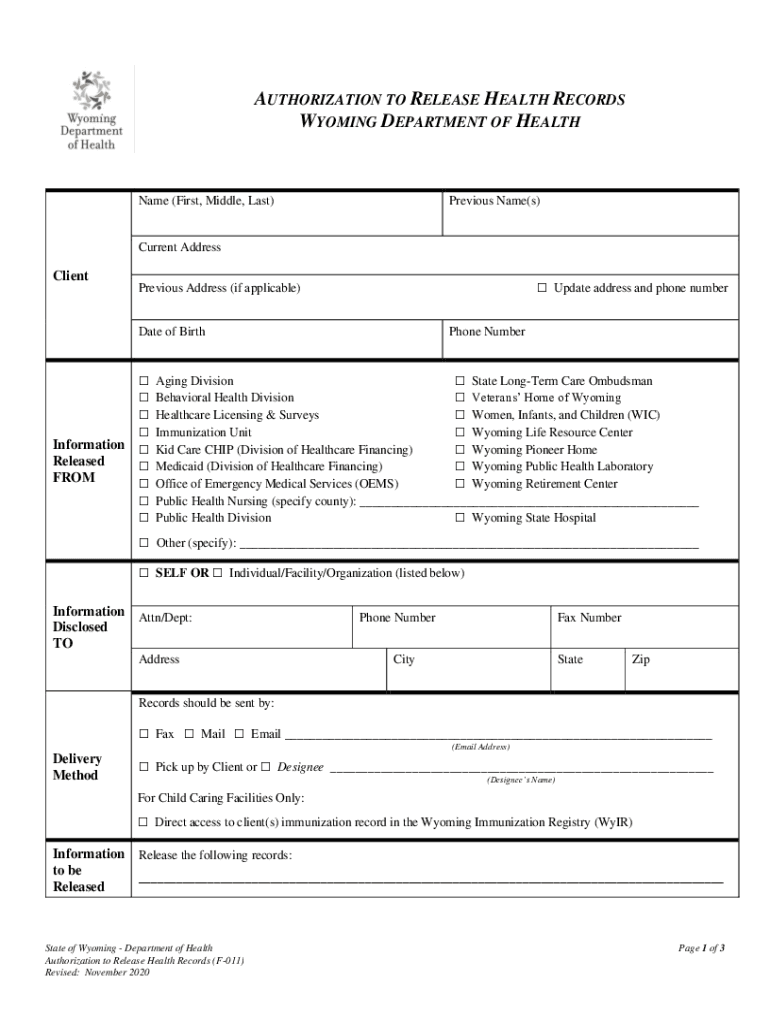
AUTHORIZATION TO RELEASE HEALTH RECORDS WYOMING DEPARTMENT OF Healthcare (First, Middle, Last)Previous Name(s)Current AddressClient Update address and phone numberPrevious Address (if applicable).
Loading

Open form follow the instructions

Easily sign the form with your finger

Send filled & signed form or save
How to fill out the WY DoH F-011 online
This guide provides clear instructions on completing the WY DoH F-011, the authorization to release health records form. Designed to be user-friendly, it will help you navigate each section of the form with confidence.
Follow the steps to accurately complete the form online.
- Press the ‘Get Form’ button to access the WY DoH F-011 document in your online editor.
- Begin by entering the full legal name of the client, including any previous names if applicable. This ensures the correct information is recorded.
- Fill in the current address and, if necessary, the previous address of the client. If you want to update the address, check the box indicating an address and phone number update.
- Input the client's date of birth and phone number, ensuring that accurate contact information is provided for any follow-up questions.
- In the 'Information Released FROM' section, select the relevant Wyoming Department of Health divisions or programs that will release the health information.
- In the 'Information Disclosed TO' section, enter the name and address of the individual, facility, or organization designated to receive the information.
- Choose a delivery method for how the information should be sent—options include fax, mail, or email. If opting for email, be sure to include the correct email address.
- Specify the information that is to be released and include specific dates if applicable to clarify which records you want to access.
- Indicate the purpose of the disclosure by selecting the relevant reason from the options provided.
- For expiration, note that the authorization will expire one year from the date of signing unless an alternative expiration date is entered.
- Review the revocation information. Understand that the authorization can be revoked at any time in writing.
- Sign the form, print your name, and provide the date of signing. If applicable, state your relationship to the client.
- Once completed, ensure that proof of identity, such as a photocopy of a state-issued driver’s license, accompanies your submission.
- Save the changes made to the form. You can then download, print, or share the completed WY DoH F-011 as needed.
Complete the WY DoH F-011 online today to manage your health records efficiently.
Experience a faster way to fill out and sign forms on the web. Access the most extensive library of templates available.
Related content
*The numbers displayed above were provided by other (non-ALF) ACF facilities and capture...
https://doh.vi.gov/programs/permits-licenses-and-certificates ... Wyoming. Meets. Wyoming...
The North American F-86D/K/L Sabre, initially known as the YF-95, and widely known...
Use professional pre-built templates to fill in and sign documents online faster. Get access to thousands of forms.
If you believe that this page should be taken down, please follow our DMCA take down process here.