Loading
Form preview
  • US Legal Forms
  • Other Templates
  • Tax Forms
  • Vermont Tax Forms
  • Vt Schedule K-1vt 2019

Get Vt Schedule K-1vt 2019

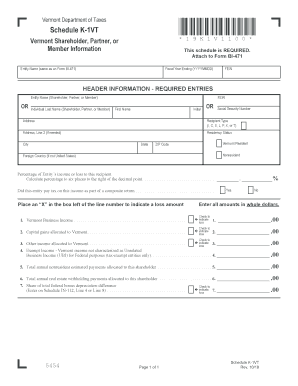
Ame as on Form BI-471) Fiscal Year Ending (YYYYMMDD) FEIN HEADER INFORMATION - REQUIRED ENTRIES OR Entity Name (Shareholder, Partner, or Member) Individual Last Name (Shareholder, Partner, or Member) First Name FEIN Initial OR Social Security Number Address Recipient Type (I, C, S, L, P, X, or T) Address, Line 2 (if needed) Residency Status City State Vermont Resident ZIP Code Nonresident Foreign Country (if not United States) Percentage o.

How it works

  1. Open form

    Open form follow the instructions

  2. Easily sign form

    Easily sign the form with your finger

  3. Share form

    Send filled & signed form or save

How to fill out the VT Schedule K-1VT online

Filling out the VT Schedule K-1VT is a crucial task for individuals involved with partnerships or corporations in Vermont. This guide will help you navigate the online process smoothly and accurately.

Follow the steps to complete the VT Schedule K-1VT online.

  1. Press the ‘Get Form’ button to access the form and open it in your preferred editor.
  2. Fill in the required header information. This includes the entity name (as it appears on Form BI-471), the fiscal year ending date in the format YYYYMMDD, and the Federal Employer Identification Number (FEIN).
  3. Complete the section for the shareholder, partner, or member. Enter their last name, first name, initial, and either their FEIN or Social Security Number.
  4. Provide the address information. Include the street address, city, state, ZIP code, and any international information if applicable. Indicate residency status by selecting whether they are a Vermont resident, nonresident, or from a foreign country.
  5. Calculate and enter the percentage of entity’s income or loss allocated to this recipient, rounded to six decimal places.
  6. Indicate whether the entity paid tax on this income as part of a composite return by selecting 'Yes' or 'No' with an 'X'.
  7. Input the amounts for each income type allocated to Vermont: Vermont business income, capital gains, other income, exempt income, estimated payments, real estate withholding payments, and any share of federal bonus depreciation difference. Each entry should be made in whole dollars.
  8. Once all fields are filled out correctly, conclude the process by saving your changes. You may also download, print, or share the form as needed.

Complete your VT Schedule K-1VT online today to ensure timely and accurate filing.

Get form

Experience a faster way to fill out and sign forms on the web. Access the most extensive library of templates available.

Related content

K-1VT-Instr-2023.pdf
No information is available for this page.
Learn more
Appendix
. Turning to the definition of M, we have. M(Vt−1. ,Vt,Vt+1) = 1. WV (g(Vt−1...
Learn more
PowerLogic™ PM5500 series usre manual - RS...
This manual covers safety, meter overview, features, hardware, display, alarming...
Learn more

Related links form

NC Authorized Reinsurer Contact Information Form 2020 NC DHHS 226-A NC DHHS Transitions To Community Living - Referral Screening Verification Process (RSVP) NC DMH 5-72-19 2019

Questions & Answers

Get answers to your most pressing questions about US Legal Forms API.

Contact support

To calculate your taxable income, start with your total income, including wages, investments, and any income reported on forms like the VT Schedule K-1VT. Apply allowable deductions and adjustments as permitted by Vermont state guidelines. This process will give you a clearer picture of your taxable income and overall tax liability.

Vermont does not tax Social Security income, providing relief for retirees relying on these benefits. However, as with other income sources, you still need to report the total income accurately on your tax return. Understanding your complete income picture, including any VT Schedule K-1VT information, is essential for accurate tax filing.

Vermont income tax is calculated using a progressive tax rate structure applied to your taxable income. You begin with your adjusted gross income and subtract allowable deductions to arrive at your taxable income. It's essential to complete your VT Schedule K-1VT accurately, as any reported income or deductions can significantly impact the calculation of your total tax liability.

Box 20 Code V on Schedule K-1 pertains to other information that may affect your total income or deductions on your tax return. This code can denote different tax-related items such as retirement contributions or special deductions. If you're unsure about the implications of your VT Schedule K-1VT and Box 20 Code V, it is wise to consult with a tax professional for clarity.

Form K-1, or Schedule K-1, is a tax document used to report income, deductions, and credits from partnerships, S corporations, estates, or trusts. This form does not get filed with your return but is rather distributed to each partner or shareholder to include in their own tax filings. Understanding your VT Schedule K-1VT is crucial, as it details your share of income that may affect your overall tax liability.

Schedule K-1 reflects income from partnerships, S corporations, estates, and trusts; however, it typically shows distributive shares of income rather than earned income. Indeed, the income reported may consist of dividends, interest, or capital gains, which are different from wages. To get a thorough understanding, reviewing your VT Schedule K-1VT may provide essential insights into how each type of income affects your tax situation.

To calculate your Vermont taxable income, you start with your federal adjusted gross income. Next, you make adjustments specific to Vermont. This includes adding or subtracting any income or deductions unique to the state. Utilizing the correct VT Schedule K-1VT can help clarify your income reporting and ensure accuracy.

Yes, you can file VT taxes online, which includes filing your VT Schedule K-1VT. Many online platforms, including uslegalforms, offer efficient solutions for completing and submitting your state tax return. This option provides convenience and helps ensure that your tax documentation is accurate and filed on time. Embracing online filing can simplify your experience and enhance your overall tax process.

Reporting Schedule K-1 income involves transferring the information you receive to your personal tax return. You'll need to include the details from your VT Schedule K-1VT when completing either Form 1040 or Form 1040-SR, depending on your situation. Using online tax services like uslegalforms can make this process smoother, providing easy options for inputting your income details. Ensuring accuracy is essential to avoid penalties and discrepancies.

Yes, Schedule K-1 is filed with the IRS, and it plays a crucial role in reporting income from partnerships or S corporations. You must ensure that you accurately complete the VT Schedule K-1VT before submitting it along with your tax return. Filing this form is essential for maintaining compliance and reporting your share of income properly. Ignoring this step can lead to complications with your tax obligations.

Get This Form Now!

Use professional pre-built templates to fill in and sign documents online faster. Get access to thousands of forms.
If you believe that this page should be taken down, please follow our DMCA take down processhere.
Get VT Schedule K-1VT
  • Adoption
  • Bankruptcy
  • Contractors
  • Divorce
  • Home Sales
  • Employment
  • Identity Theft
  • Incorporation
  • Landlord Tenant
  • Living Trust
  • Name Change
  • Personal Planning
  • Small Business
  • Wills & Estates
  • Packages A-Z
  • Affidavits
  • Bankruptcy
  • Bill of Sale
  • Corporate - LLC
  • Divorce
  • Employment
  • Identity Theft
  • Internet Technology
  • Landlord Tenant
  • Living Wills
  • Name Change
  • Power of Attorney
  • Real Estate
  • Small Estates
  • Wills
  • All Forms
  • Forms A-Z
  • Other Templates
  • Legal Hub
  • About Us
  • Help Portal
  • Legal Resources
  • Blog
  • Affiliates
  • Contact Us
  • Delete My Account
  • Site Map
  • Industries
  • Forms in Spanish
  • Localized Forms
  • State-specific Forms
  • Forms Kit
  • Real Estate Handbook
  • All Guides
  • Notarize
  • Incorporation services
  • For Consumers
  • For Small Business
  • For Attorneys
  • USLegal
  • FormsPass
  • pdfFiller
  • signNow
  • altaFlow
  • DocHub
  • Instapage
Form Packages
  • Adoption
  • Bankruptcy
  • Contractors
  • Divorce
  • Home Sales
  • Employment
  • Identity Theft
  • Incorporation
  • Landlord Tenant
  • Living Trust
  • Name Change
  • Personal Planning
  • Small Business
  • Wills & Estates
  • Packages A-Z
Form Categories
  • Affidavits
  • Bankruptcy
  • Bill of Sale
  • Corporate - LLC
  • Divorce
  • Employment
  • Identity Theft
  • Internet Technology
  • Landlord Tenant
  • Living Wills
  • Name Change
  • Power of Attorney
  • Real Estate
  • Small Estates
  • Wills
  • All Forms
  • Forms A-Z
  • Other Templates
Customer Service
  • Legal Hub
  • About Us
  • Help Portal
  • Legal Resources
  • Blog
  • Affiliates
  • Contact Us
  • Delete My Account
  • Site Map
  • Industries
  • Forms in Spanish
  • Localized Forms
  • State-specific Forms
  • Forms Kit
Legal Guides
  • Real Estate Handbook
  • All Guides
Prepared for you
  • Notarize
  • Incorporation services
Our Customers
  • For Consumers
  • For Small Business
  • For Attorneys
Our Sites
  • USLegal
  • FormsPass
  • pdfFiller
  • signNow
  • altaFlow
  • DocHub
  • Instapage
Social Media
Call us now toll free:
+1 833 426 79 33
As seen in:
© Copyright 1999-2026 airSlate Legal Forms, Inc. 17 Station Street, Ste. 203, Brookline, MA 02445
  • Your Privacy Choices
  • Terms of Service
  • Privacy Notice
  • Content Takedown Policy
  • Bug Bounty Program
VT Schedule K-1VT
This form is available in several versions.
Select the version you need from the drop-down list below.
2021 VT Schedule K-1VT
Select form
  • 2021 VT Schedule K-1VT
  • 2019 VT Schedule K-1VT
  • 2018 VT Schedule K-1VT
  • 2014 VT Schedule K-1VT
  • 2010 Tax Help Line 1 K 1vt 2010 Form
Select form