Loading
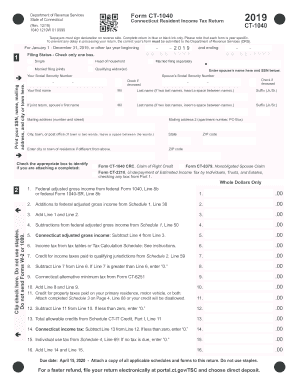
Get Ct Drs Ct-1040 2019
How it works
-

Open form follow the instructions
-

Easily sign the form with your finger
-

Send filled & signed form or save
How to fill out the CT DRS CT-1040 online
Filing your Connecticut resident income tax return using the CT DRS CT-1040 form can be straightforward with the right guidance. This guide provides clear instructions on each section and field of the form, ensuring you have the support you need to complete your return accurately.
Follow the steps to complete your CT DRS CT-1040 online
- Click 'Get Form' button to access the CT DRS CT-1040 and open it in your preferred editor.
- Begin by entering your Social Security number, name, mailing address, and city or town in the designated fields at the top of the form. Ensure that you use blue or black ink only.
- Select your filing status by checking the appropriate box. Options include Single, Head of Household, Married Filing Jointly, Qualifying Widow(er), or Married Filing Separately. If applicable, enter your spouse's name and Social Security number.
- Provide any required additional forms you are attaching by checking the relevant boxes on the form.
- Record your federal adjusted gross income. This information can be found on federal Form 1040, Line 8b or 1040-SR, Line 8b. Continue filling in the lines for additions and subtractions to arrive at your Connecticut adjusted gross income.
- Calculate your Connecticut income tax using the tax tables provided in the instructions. Fill in this amount along with any credits to be claimed.
- Follow the instructions for entering any withholding information based on your Forms W-2 and 1099. Carefully add the amounts in the relevant columns.
- Sum your total payments and refundable credits to determine if you have an overpayment or tax due. Fill in the appropriate lines based on your calculations.
- Complete the declaration by signing the form. Ensure you keep a copy of the return for your records.
- Finalize your filing by reviewing all entries for accuracy. Save your changes, download the form if required, and print or share it as necessary.
Start filling out your CT DRS CT-1040 online today to ensure timely processing of your tax return.
Get form
Experience a faster way to fill out and sign forms on the web. Access the most extensive library of templates available.
To obtain your CT 1099g form, you can log into the Connecticut Department of Revenue Services website. They provide electronic access to your tax information, including the 1099g. You may also receive a paper copy in the mail if you qualify for one.
Get This Form Now!
Use professional pre-built templates to fill in and sign documents online faster. Get access to thousands of forms.