Loading
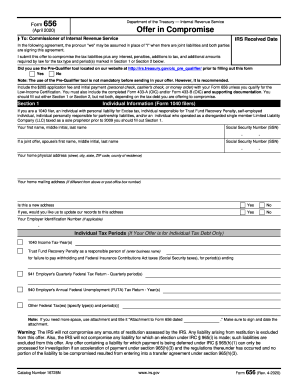
Get Irs 656 2020
This website is not affiliated with IRS
How it works
-

Open form follow the instructions
-

Easily sign the form with your finger
-

Send filled & signed form or save
How to fill out the IRS 656 online
The IRS Form 656 is an essential document for individuals and businesses looking to compromise their tax debts with the Internal Revenue Service. This guide provides clear and supportive instructions on how to complete the form online, ensuring that you provide all necessary information accurately and efficiently.
Follow the steps to successfully complete the IRS 656 online
- Press the ‘Get Form’ button to access the IRS 656 form, which will open in the designated editor. Ensure you have a good internet connection for smooth access.
- Read the introductory sections of the form carefully, which explain the purpose of the offer and the prerequisites for submission. Make sure you understand the conditions for submitting an offer in compromise.
- Indicate whether you used the Pre-Qualifier tool by selecting 'Yes' or 'No'. It is recommended to use this tool to check your eligibility before proceeding.
- In Section 1, fill out your individual information, including your first name, middle initial, last name, and Social Security Number. If it is a joint offer, complete the same information for your spouse.
- Complete your home physical address and mailing address. If this is a new address, select 'Yes' and indicate if you want to update the IRS records.
- Provide your Employer Identification Number if applicable and fill out the tax periods for which you are submitting your offer.
- If you are applying for Low-Income Certification, complete the necessary information to demonstrate your eligibility, including your adjusted gross income and household size.
- In Section 2, if submitting a business offer, provide the business name, addresses, Employer Identification Number, and primary contact details.
- Detail the business tax periods related to your offer, and ensure all relevant documentation is included.
- Explain your reason for the offer in Section 3, indicating whether it is based on doubt as to collectibility or exceptional circumstances.
- Select the payment terms in Section 4, indicating whether you are paying in lump sum cash or periodic payments, and provide the necessary amounts.
- In Section 5, designate how you want your payment applied, and include details for any payments made through the Electronic Federal Tax Payment System.
- Fill out Section 6 with the source of funds and confirm that you have filed all required tax returns.
- Review and complete the offer terms in Section 7, ensuring all signatures are provided and understanding the obligations being accepted.
- Finally, save your changes and check the completed form for accuracy. Download, print, or share the form as needed for submission.
Start filling out your IRS 656 form online now to take control of your tax situation.
Get form
Experience a faster way to fill out and sign forms on the web. Access the most extensive library of templates available.
The IRS considers exceptional circumstances as events that hinder your ability to meet your tax obligations, such as a serious illness or unexpected financial crisis. These conditions are assessed on a case-by-case basis. Providing a clear narrative when submitting the IRS 656 form can strengthen your case significantly.
Get This Form Now!
Use professional pre-built templates to fill in and sign documents online faster. Get access to thousands of forms.