Loading
Get Ca Ftb 2924 2018-2026
How it works
-

Open form follow the instructions
-

Easily sign the form with your finger
-

Send filled & signed form or save
How to fill out the CA FTB 2924 online
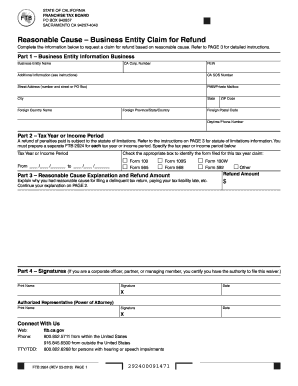
The CA FTB 2924 form is crucial for business entities seeking a refund based on reasonable cause. This guide offers a step-by-step approach to completing the form online, ensuring that users can navigate its components effectively and meet their filing requirements.
Follow the steps to confidently complete the CA FTB 2924 form online.
- Click the ‘Get Form’ button to access the CA FTB 2924 form and open it for editing.
- In Part 1, provide the business entity information. Fill in the business entity name, CA corporation number, FEIN, and any additional information as instructed. Ensure your address details, including street address, city, state, and ZIP code, are accurate.
- Complete Part 2 by specifying the tax year or income period for which you are requesting a refund. Make sure to prepare a separate FTB 2924 form for each tax year.
- In Part 3, provide a detailed explanation of the reasonable cause for your request. Clearly articulate the circumstances that led to filing a delinquent tax return or paying your tax liability late. Include the amount you are requesting as a refund.
- In Part 4, sign and date the form. If applicable, have the authorized representative or power of attorney sign as well.
- Once all sections have been filled out, you can save your changes. You may also download, print, or share the form as needed for your records or mailing.
Complete your CA FTB 2924 form online today to ensure your refund claim is processed smoothly.
To request a penalty abatement in California, you will need to fill out the necessary forms, highlighting your circumstances. The CA FTB 2924 is crucial in this process, as it provides the structure for your request. Include all relevant details and supporting documents to strengthen your case when submitting to the California Franchise Tax Board.