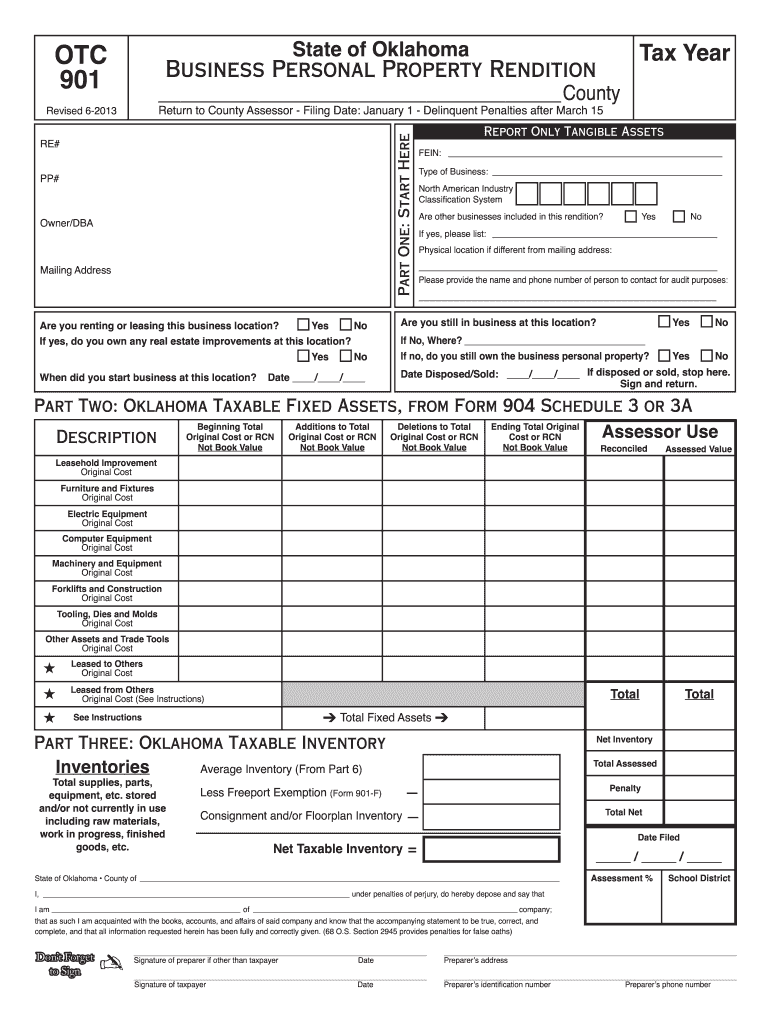
Cription, year acquired and original cost, and items that have zero book value, use reporting Asset Listing 904 Schedule 3 or 3A, which is available from the county assessor. Report ONLY TANGIBLE ASSETS. North American Industry Classification System (NAICS)... This is your six digit Federal Business Activity Code. Computer Equipment ... Items included: computer hardware, monitors, drives, and other such hardware components. Custom software is exempt as an intangible. Machinery and Equipment.
Loading

Open form follow the instructions

Easily sign the form with your finger

Send filled & signed form or save
How to fill out the OK OTC 901 online
The OK OTC 901 is a vital form required for the reporting of business personal property in Oklahoma. This guide provides a clear, step-by-step approach to assist users in accurately completing and submitting the form online.
Follow the steps to complete the OK OTC 901 online.
- Press the ‘Get Form’ button to access the document and open it for editing.
- Fill in the tax year and county at the top of the form. Ensure that the information is current and accurate.
- In 'Part One', provide your business’s name, owner or DBA, mailing address, and the rental status of your location. Indicate whether you are renting or leasing this business location.
- If you answered 'Yes' to renting or leasing, specify if you own any real estate improvements at the location.
- Indicate when your business started at this location using the format provided.
- Report only tangible assets by completing the fields for FEIN, type of business, and North American Industry Classification System code.
- If applicable, answer whether other businesses are included in the rendition and provide those details.
- Fill out the physical location if different from the mailing address and include a contact name and phone number for audit purposes.
- Confirm if you are still in business at this location, and if 'No', indicate what happened to the business personal property.
- Proceed to 'Part Two' to report taxable fixed assets by filling out each section with original costs and descriptions as required.
- In 'Part Three', calculate your taxable inventory, providing details about your average inventory and applying any exemptions.
- Complete 'Part Four' and 'Part Five' by listing any additions or deletions during the reporting year, along with their details.
- Finish with 'Part Six' by summarizing your monthly inventory and calculating the average across the specified months.
- Sign and date the form, ensuring the signature is from an authorized individual such as a business owner or partner.
- After all sections are completed, save changes, download, print, or share the form as needed.
Ready to submit your OK OTC 901 online? Complete your document now for timely filing!
Experience a faster way to fill out and sign forms on the web. Access the most extensive library of templates available.
Related content
Inventories held for others or cosigned must be reported separately. Inventory claimed...
Freeport Exemption Form OTC form #901-F. Five (5) Yr. Manufacturing Exemption ... Oklahoma...
Use manual feed for printing envelopes. 5. Choose the OK button. 6. Close the Printers...
Get answers to your most pressing questions about US Legal Forms API.
What is form 901 in Oklahoma?
Form 901 in Oklahoma, also known as the OK OTC 901, serves as a declaration for personal property for tax assessment. It provides details regarding the types and estimated values of property owned by individuals or businesses. Completing this form accurately ensures compliance with state tax laws and may help in claiming certain exemptions. For assistance in filling out the OK OTC 901, explore the helpful tools available on USLegalForms.
How much can property taxes increase per year in Oklahoma?
In Oklahoma, property taxes cannot increase more than 5% per year unless there has been a change in ownership or improvements to the property. This limitation helps to protect property owners from sudden, large increases in their tax burden. It's advisable to stay informed about the regulations surrounding the OK OTC 901 to make sure you're compliant. For clarity on these rules, consult the resources offered by USLegalForms.
Who qualifies for Homestead Exemption in Oklahoma?
The qualifications for Homestead Exemption in Oklahoma include being the owner of a residential property occupied as your primary home. Furthermore, applicants must be U.S. citizens or legal residents. You also should not have claimed the exemption on any other property within the last year. Understanding the specifics of the OK OTC 901 can aid you in the application process, and USLegalForms provides guidance on these forms.
What is a 901 form in Oklahoma?
The 901 form in Oklahoma, often referred to as the OK OTC 901, is a key document for property and business owners. It is used to report personal property for tax assessment purposes. Accurately completing this form can help ensure you meet your tax obligations and take advantage of available exemptions. For more detailed information, USLegalForms offers helpful resources and templates.
How to fill out business personal property rendition in Oklahoma?
Filling out a business personal property rendition in Oklahoma requires accurate reporting of all personal property owned by your business. You need to include details like the type of property, its value, and any applicable depreciation. Utilizing the OK OTC 901 form can simplify this process by providing a clear structure for your entries. For assistance, refer to resources on USLegalForms to guide you through each step.
At what age do seniors stop paying property taxes in Oklahoma?
In Oklahoma, seniors can stop paying property taxes when they reach the age of 65 and meet certain qualifications. They must apply for the homestead exemption to benefit from this program. This exemption helps to reduce the property tax burden significantly, allowing seniors to retain their homes more easily. To learn more about the OK OTC 901 and the application process, consider visiting the USLegalForms platform, which simplifies these forms.
What does rendition mean in business?
Rendition in business refers to the act of reporting personal property assets to taxing authorities. It is essential for determining property tax obligations. In Oklahoma, the OK OTC 901 form is the official document used for this purpose. Utilizing U.S. Legal Forms can ease the process, ensuring that you fulfill your tax reporting requirements accurately.
What is the business personal property tax?
The business personal property tax is a tax levied on the personal property owned by businesses, including furniture, machinery, and equipment. In Oklahoma, filing the OK OTC 901 form accurately informs the tax authorities of the property's value, which affects tax rates. Understanding this tax is important for business financial planning. U.S. Legal Forms can provide you with user-friendly templates to streamline this filing process.
What is a business personal property rendition form?
A business personal property rendition form is a document that business owners use to report the value of their personal property to the local taxing authority. In Oklahoma, the OK OTC 901 form serves this purpose, capturing essential information related to business assets. Accurate reporting ensures compliance with tax laws and helps determine the correct tax amount. Resources from U.S. Legal Forms can support businesses in submitting this form properly.
How to file for homestead exemption in Oklahoma?
To file for homestead exemption in Oklahoma, you need to complete the relevant application, which requires personal and property information. This application is often available through your county's assessor's office, and you should submit it by the deadline, typically around March 15th. The OK OTC 901 form may be necessary depending on your property type. U.S. Legal Forms offers templates and assistance to facilitate this process.
Use professional pre-built templates to fill in and sign documents online faster. Get access to thousands of forms.
If you believe that this page should be taken down, please follow our DMCA take down process here.
This form is available in several versions. Select the version you need from the drop-down list below.