Loading
Get Ok Otc 904 Schedule 3 2012-2026
How it works
-

Open form follow the instructions
-

Easily sign the form with your finger
-

Send filled & signed form or save
How to fill out the OK OTC 904 Schedule 3 online
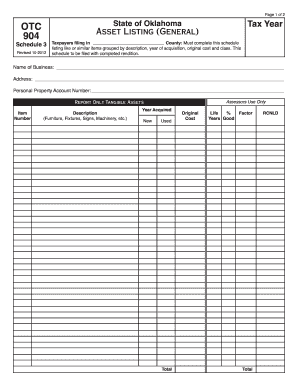
Filling out the OK OTC 904 Schedule 3 is essential for taxpayers in Oklahoma to accurately report their tangible assets. This guide provides straightforward instructions to assist users in completing the form online with ease.
Follow the steps to complete the OK OTC 904 Schedule 3 online
- Press the ‘Get Form’ button to access the OK OTC 904 Schedule 3 and open it in your online editing tool.
- Enter the tax year and the county where you are filing. This information is crucial for proper processing by local assessors.
- Provide the name of your business and its address in the designated fields to ensure accurate identification.
- Input your personal property account number if applicable. This helps link your assets to your existing account.
- Begin listing your tangible assets in the appropriate sections, starting with the item number for each asset.
- For each asset, fill out the description field, specifying whether it is furniture, fixtures, machinery, or another category.
- Indicate the year that the asset was acquired, distinguishing whether it was purchased new or used.
- Enter the total original cost of each asset and its estimated lifespan in years to provide evaluative data.
- Calculate the total remaining cost, less depreciation (RCNLD), and record it as specified in the form.
- Review all entries for accuracy and completeness before submitting your form online.
- Once you are satisfied with the information, you can save your changes, download the form, print it, or share it as needed.
Complete your OK OTC 904 Schedule 3 online today to ensure proper asset reporting.