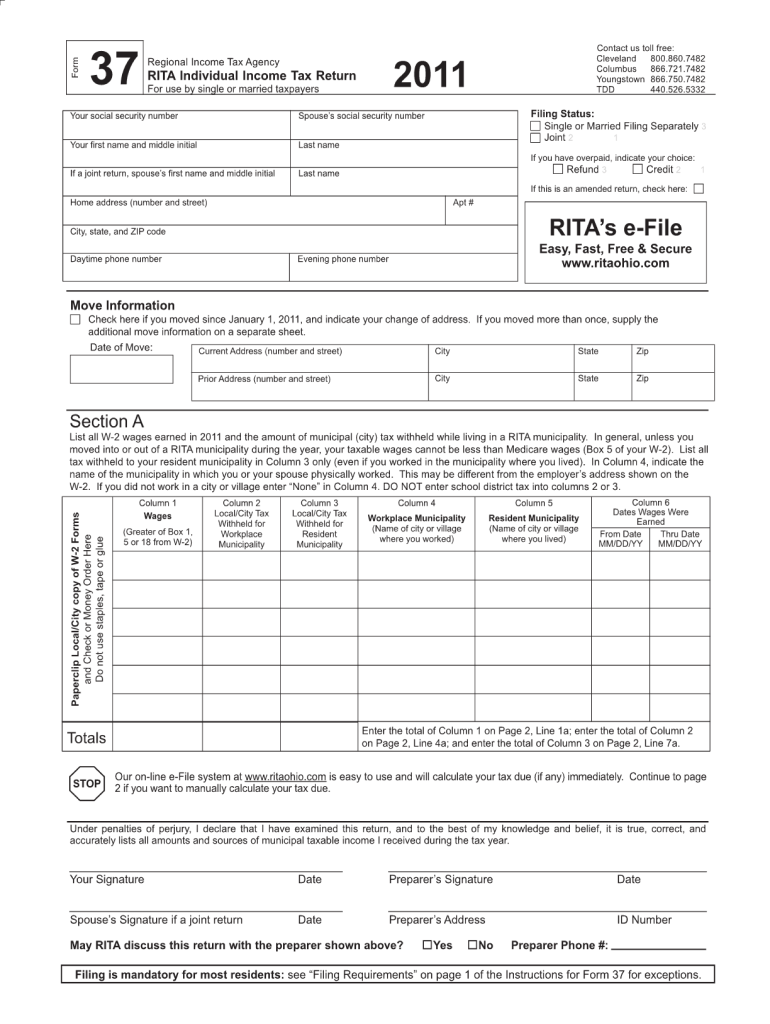
37 Form Regional Income Tax Agency RITA Individual Income Tax Return For use by single or married taxpayers 2011 Contact us toll free: Cleveland 800.860.7482 Columbus 866.721.7482 Youngstown 866.750.7482.
Loading

Open form follow the instructions

Easily sign the form with your finger

Send filled & signed form or save
How to fill out the OH RITA 37 online
Filling out the OH RITA 37 form online can streamline your document management process. This guide will provide clear instructions to help you navigate each section of the form efficiently.
Follow the steps to complete the OH RITA 37 form online.
- Click the ‘Get Form’ button to obtain the OH RITA 37 form and open it for editing.
- Begin by entering your personal information in the designated fields, including your full name, address, and contact information. Make sure the details are accurate and current.
- Proceed to the section that requires the purpose of filing the OH RITA 37. Clearly specify your intent, ensuring you meet any requirements outlined.
- Next, you will find fields asking for any relevant dates related to your submission. Fill in the appropriate dates accurately, as they are crucial for processing.
- Include any necessary attachments or supporting documents as specified in the instructions. Ensure that all documents are properly labeled and relevant to your submission.
- Once you have completed all sections, carefully review all entered information for accuracy and completeness to avoid errors.
- After verifying your inputs, save your changes. You will have the option to download, print, or share the completed OH RITA 37 form as necessary.
Complete your documents online for a more efficient filing experience.
Experience a faster way to fill out and sign forms on the web. Access the most extensive library of templates available.
Related content
Jan 1, 2022 — If you want RITA to calculate your taxes, please use the online eFile...
Yes. Filing is mandatory for most residents: see “Filing Requirements” on page 1 of...
Edge, SiteLink, SonoCalc, SonoHD2, SonoMB, SonoMBe, SonoSite e o logotipo SonoSite são...
Get answers to your most pressing questions about US Legal Forms API.
How to fill out a withholding allowance form?
Filling out a withholding allowance form requires you to enter your personal details, such as your Social Security number and filing status. Next, specify the number of allowances you want to claim to adjust your withholding based on your tax situation tied to OH RITA 37. Ensure to follow the form instructions carefully. If you need help, U.S. Legal Forms offers various resources and templates to assist with the process.
How do you calculate tax estimate?
To calculate a tax estimate, start by reviewing your previous year’s income and tax obligations, then project your current year’s expected income. Multiply your estimated income by the relevant federal and local tax rates, including RITA considerations for Ohio. This method can give you a close approximation of what you might owe. For more structured guidance, consider utilizing U.S. Legal Forms for tax estimation tools and resources.
How is tax computation calculated?
Tax computation typically involves determining your total income, subtracting deductions, and applying the appropriate tax rates. For residents in areas governed by OH RITA 37, make sure to factor in local tax responsibilities along with state and federal taxes. For clearer understanding and transparent calculations, U.S. Legal Forms offers resources designed to assist you in computing your taxes accurately.
How is local income tax calculated?
Local income tax is calculated by applying the relevant local tax rate to your RITA taxable income. Each municipality may have different rates, which means it is important to know your specific local rate to get accurate numbers. Using U.S. Legal Forms can help you navigate through the calculation process, as they provide comprehensive resources on local tax laws and rates.
What is RITA taxable income?
RITA taxable income includes wages, salaries, bonuses, and any other income subject to local taxes in Ohio. For accurate calculation, it is crucial to exclude non-taxable income sources, such as certain retirement benefits. Understanding your RITA taxable income ensures you comply with local tax obligations effectively. If you require assistance, consider visiting U.S. Legal Forms for useful resources and examples.
What is form 37 on an Ohio tax return?
Form 37 on an Ohio tax return refers to the RITA Withholding Exemption Certificate. This form is essential for individuals seeking to adjust their local income tax withholding correctly. By completing this form, you inform your employer about your desired withholding situation as it relates to OH RITA 37. If you find the form confusing, U.S. Legal Forms offers user-friendly templates to help.
How to calculate RITA taxes?
Calculating RITA taxes involves knowing your total taxable income and applying the local tax rates based on your residency. First, obtain the local tax rate prescribed by RITA for your municipality. Then, multiply your taxable income by this rate to find your RITA tax obligation. For additional support, U.S. Legal Forms can provide easy access to forms and resources necessary for accurate calculations.
How to fill out a withholding exemption form?
To fill out a withholding exemption form, start by downloading the appropriate form for your state. Ensure you provide accurate personal details such as your name, address, and Social Security number. It's essential to review the instructions for claiming exemptions, especially with regard to OH RITA 37. If you need detailed guidance, consider using U.S. Legal Forms for secure templates to simplify the process.
What is form 37 in Mexico?
Form 37 in Mexico, known as 'Declaración de la Renta,' is used for declaring income tax for individuals and businesses. This form captures essential data to calculate tax liabilities accurately. If you're only familiar with OH RITA 37 for Ohio taxes, understanding Mexico's Form 37 can be equally important if you have financial interests in Mexico. Consulting with a tax professional ensures compliance with both countries’ requirements.
What are the three types of taxes in Mexico?
In Mexico, the three primary types of taxes are income tax, value-added tax (VAT), and excise tax. Each tax serves a distinct purpose, with income tax targeting earnings, VAT applied to goods and services, and excise tax on specific products. Understanding these taxes is crucial, especially when considering how US tax reporting interacts with Mexican laws, such as OH RITA 37. A knowledgeable tax advisor can assist in managing your responsibilities effectively.
Use professional pre-built templates to fill in and sign documents online faster. Get access to thousands of forms.
If you believe that this page should be taken down, please follow our DMCA take down process here.
This form is available in several versions. Select the version you need from the drop-down list below.