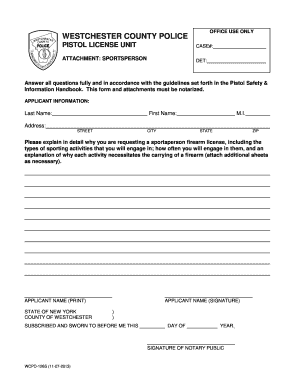
OFFICE USE ONLY WESTCHESTER COUNTY POLICE PISTOL LICENSE UNIT CASE#: ATTACHMENT: SPORTSPERSON DET: Answer all questions fully and in accordance with the guidelines set forth in the Pistol Safety &.

How it works
  • Open form

    Open form follow the instructions

  • Easily sign form

    Easily sign the form with your finger

  • Share form

    Send filled & signed form or save

How to fill out the Attachment For Sportsperson - Westchester County Clerk online

Filling out the Attachment For Sportsperson is an essential step for individuals seeking a sportsperson firearm license in Westchester County. This guide provides clear, step-by-step instructions to help users complete the form accurately and efficiently, ensuring all requirements are met.

Follow the steps to complete the form effectively.

  1. Press the ‘Get Form’ button to access the Attachment For Sportsperson document. This will allow you to obtain the form and open it for editing.
  2. Begin by filling in your applicant information. You will need to provide your last name, first name, middle initial, and full address, including street, city, state, and zip code. Ensure all details are accurate and complete.
  3. In the section requesting your explanation for the sportsperson firearm license, detail the specific activities you will engage in that require a firearm. Include the frequency of these activities and rationale for needing a firearm for each. If necessary, attach additional sheets to provide comprehensive information.
  4. Print your name clearly in the designated space for 'Applicant Name (Print)'. This will be used for identification purposes.
  5. Sign your name in the 'Applicant Name (Signature)' section to verify the information provided is accurate.
  6. The form must be notarized. Ensure that you have a notarization completed where the notary public will need to sign and date the document.
  7. Once all fields are completed and the form is notarized, you can save any changes made, download the completed form, print it for personal records, or share it as needed.

Complete your documentation process online today and ensure your application is submitted correctly.

Get form

Experience a faster way to fill out and sign forms on the web. Access the most extensive library of templates available.

Related content

filed: westchester county clerk 01/08/2018 05:09...

Jan 8, 2018 — FILED: WESTCHESTER COUNTY CLERK 01/08/2018 05:09 PM ... upon the Public...

Learn more
workforce development community education...

Ossining Extension Center, 22 Rockledge Ave., Ossining, NY, in the Arcadian Shopping...

Learn more
197106 - UserManual.wiki

Storage of medical records for patients no longer in the hospital becomes extremely...

Learn more
Questions & Answers

Get answers to your most pressing questions about US Legal Forms API.

Contact support

How do I convert a photo to high resolution?

To convert a picture to high resolution, you can use an image upscaling tool like Upscale.media. Upscaling is a process that increases the size and resolution of an image while trying to maintain its quality. Yes, a JPEG can be high resolution.

You could increase the resolution of a digital image file, but you'd lose image quality in the process. But today, Adobe Photoshop and Adobe Photoshop Lightroom have features that can help you increase resolution while upholding visual quality. It may not be movie magic, but it's pretty close.

The only way to resize a smaller photo into a larger, high-resolution image without highlighting poor image quality is to take a new photograph or re-scan your image at a higher resolution. You can increase the resolution of a digital image file, but you will lose image quality by doing so.

3:32 5:08 How to Fix Low Resolution Photos? - YouTube YouTube Start of suggested clip End of suggested clip And can help you to fix the resolution of your photos. Here's how it. Works open photoshop andMoreAnd can help you to fix the resolution of your photos. Here's how it. Works open photoshop and select open from the file menu locate the file you want to edit. Once your photo loads choose image from

How To Resize An Image Open the image in Paint. Select the entire image using the Select button in the Home tab and choose Select All. ... Open the Resize and Skew window by navigating to the Home tab and selecting the Resize button. Use the Resize fields to change the size of the image either by percentage or by pixels.

To change the pixel size of a JPEG image, you can use an image editing software or online tool. Open the image in the software, go to the "Image" or "Resize" option, and then input the desired pixel dimensions (width and height) to resize the image ingly.

The best resolution for a picture can vary depending on its purpose. While 300 DPI is a great benchmark for printed pictures, for large posters that may be further away from the viewer, you may be able to reduce the resolution to 150 DPI. For online images, the standard resolution is 72 PPI.

Get This Form Now!

Use professional pre-built templates to fill in and sign documents online faster. Get access to thousands of forms.

If you believe that this page should be taken down, please follow our DMCA take down process here.

Get Attachment For Sportsperson - Westchester County Clerk