Loading
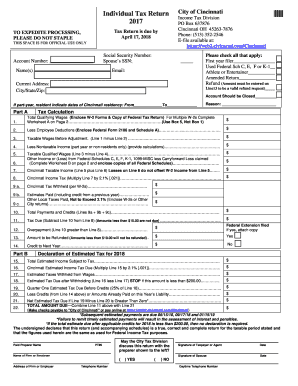
Get Oh Individual Tax Return - Cincinnati 2017
How it works
-

Open form follow the instructions
-

Easily sign the form with your finger
-

Send filled & signed form or save
How to fill out the OH Individual Tax Return - Cincinnati online
Filing your OH Individual Tax Return for Cincinnati can seem daunting, but with this guide, you will navigate each section with confidence. Whether you are a first-time filer or experienced, understanding how to accurately complete the form online is crucial for a smooth tax return process.
Follow the steps to accurately complete your tax return
- Click ‘Get Form’ button to obtain the OH Individual Tax Return form and open it in the editor.
- Begin by filling in your Social Security Number and your spouse’s SSN if applicable. Ensure the information is accurate to prevent delays in processing your return.
- Next, provide your Account Number and full name. Include a current email address so the tax office can reach you if needed.
- Enter your current address details, including city, state, and zip code.
- Follow the checklist by marking all relevant boxes that apply to your situation, such as if this is your first year filing or if you are filing an amended return.
- In Part A, begin your tax calculation by reporting your Total Qualifying Wages and attaching necessary documents like W-2 forms and a copy of your Federal Tax Return.
- Subtract any Employee Deductions from your Total Qualifying Wages to find your Taxable Wages Before Adjustment.
- If applicable, deduct Nontaxable Income if you are a part-year resident or non-resident. Carefully provide calculations to support these adjustments.
- Calculate your Taxable Qualified Wages by subtracting Line 4 from Line 3.
- Proceed to report your Other Income or Loss from Federal Schedules and sum this with your Taxable Qualified Wages for your Cincinnati Taxable Income.
- Now, calculate your Cincinnati Income Tax by multiplying your Cincinnati Taxable Income by the tax rate of 2.1%.
- Provide information on any Cincinnati Tax Withheld and other local taxes paid, which can be added to total payments and credits.
- Determine whether you owe tax or if you have an overpayment. If you have an overpayment, state the amount you wish to be refunded, considering the minimum threshold.
- Complete Part B concerning Estimated Taxes for the following year if necessary, outlining your Total Estimated Income Subject to Tax.
- Finally, review the entire form for completeness and accuracy. Save your changes and download a copy for your records.
- Once you are satisfied, print the form and mail it to the designated address provided on the form.
Start filling out your OH Individual Tax Return - Cincinnati online today for a seamless filing experience.
Get form
Experience a faster way to fill out and sign forms on the web. Access the most extensive library of templates available.
Related links form
Yes, if you are a resident of Cincinnati or worked in the city, you need to file a city tax return in addition to your OH Individual Tax Return - Cincinnati. Cincinnati has specific income tax laws, so it's essential to understand your responsibilities. Just ensure you meet the local filing requirements to avoid any penalties.
Get This Form Now!
Use professional pre-built templates to fill in and sign documents online faster. Get access to thousands of forms.