Loading
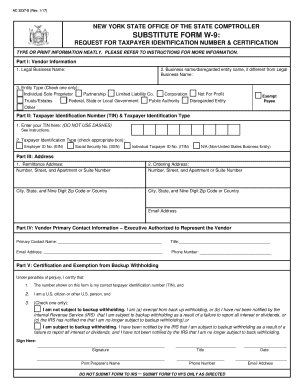
Get Ny Substitute Form W-9 2017-2026
How it works
-

Open form follow the instructions
-

Easily sign the form with your finger
-

Send filled & signed form or save
How to fill out the NY Substitute Form W-9 online
Filling out the NY Substitute Form W-9 accurately is essential for individuals and organizations that wish to conduct business with New York State. This guide provides detailed instructions on how to complete each section of the form online, ensuring that users have all the necessary information at their fingertips.
Follow the steps to complete the NY Substitute Form W-9 online with ease.
- Use ‘Get Form’ button to access the NY Substitute Form W-9 and open it for editing.
- In Part I, fill in your legal business name as it appears on official documents. If you have a business name different from your legal name, enter that in the appropriate field.
- Move to Part II and enter your taxpayer identification number (TIN). This number should not include any dashes, and must match the name entered in Part I.
- In Part III, provide both the remittance address and the ordering address where necessary. Ensure the address details are complete, including city and state.
- In Part IV, list the primary contact at your organization, including their name, title, email address, and phone number.
- Part V requires you to certify the accuracy of your TIN. Select the appropriate box concerning backup withholding, ensuring that you follow the instructions to check the box that applies to your situation.
- After completing the form, you can either save your changes, download the document, print it, or share it as needed.
Start filling out your NY Substitute Form W-9 online today to ensure compliance and accuracy.
If you claimed 0 on your NY Substitute Form W-9, you may still owe taxes due to insufficient withholding throughout the year. Your tax liability depends on various factors, including income and deductions. Consider reviewing your financial situation and consulting tax professionals to plan your withholdings more accurately.