Loading
Form preview
  • US Legal Forms
  • Other Templates
  • Tax Forms
  • Connecticut Tax Forms
  • Ct Drs Drs-pw 2020

Get Ct Drs Drs-pw 2020

2. How did you handle your other financial responsibilities such as your.

How it works

  1. Open form

    Open form follow the instructions

  2. Easily sign form

    Easily sign the form with your finger

  3. Share form

    Send filled & signed form or save

How to fill out the CT DRS DRS-PW online

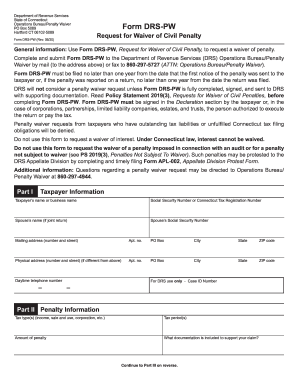
Filling out the CT DRS DRS-PW, Request for Waiver of Civil Penalty, is an important step for users seeking to waive certain penalties imposed by the Connecticut Department of Revenue Services. This comprehensive guide provides clear, step-by-step instructions to help you complete the form accurately and efficiently.

Follow the steps to successfully complete the DRS-PW form.

  1. Press the ‘Get Form’ button to access the DRS-PW form and open it in your preferred online editing tool.
  2. Part I: Taxpayer information. Fill in your name or business name, along with your Social Security Number or Connecticut Tax Registration Number. If applicable, include your partner's name and their Social Security Number. Fill in your mailing address and, if different, your physical address, along with your daytime telephone number.
  3. Part II: Penalty information. Specify the type of tax related to the penalties (e.g., income, sale and use, corporation, etc.) and the tax periods in question. Enter the amount of the penalty you are requesting to be waived and provide details of any documentation included to support your request.
  4. Part III: Facts and circumstances. Detail why you were unable to comply with your tax obligations by thoroughly explaining the situation in the provided sections. Discuss how you managed other financial responsibilities during the period of noncompliance. Describe the steps you took to comply once the situation changed and explain how you met your tax obligations thereafter.
  5. Identify any additional information that may be relevant to your penalty waiver request. Ensure you attach any supporting documentation, such as medical letters or reports, that substantiate your claims.
  6. In the Declaration section, sign and date the form, confirming all information is accurate and complete to the best of your knowledge. Make sure no outstanding tax liabilities or unfulfilled filing obligations exist.
  7. Once all sections of the form are completed, review your entries for accuracy. Save your changes, and then download, print, or share the completed form as necessary.

Complete your DRS-PW form online today to submit your request for a waiver of civil penalties.

Get form

Experience a faster way to fill out and sign forms on the web. Access the most extensive library of templates available.

Related content

Penalty waiver request, offer in compromise or...
In order to request a penalty waiver, you must complete Form DRS-PW Request for Waiver of...
Learn more
Advances in Nuclear Cardiology, Cardiac CT and...
A major national healthcare imperative for noninvasive imaging is for the tests that are...
Learn more
JVC DR M10SEK M10EK_B User Manual LPT0901 001B
User Manual: JVC DR-M10SEK DR-M10SEK nglish, ... DON'T obstruct the ventilation of the...
Learn more

Related links form

Renoir Staffing Services Temporary Employee Handbook 2013 Independent Schools Association Of The Central States School Profile Form 2018 AU RTA Form 18a 2024 Get Canada REG3055 - Alberta 2016

Questions & Answers

Get answers to your most pressing questions about US Legal Forms API.

Contact support

How do I change my bank information for direct deposit? ... If the IRS accepts your tax return and is unable to direct deposit your refund, then the IRS will mail your refund check to the address listed on your tax return. There's no way to change your bank information once the IRS has accepted your e-filed tax return.

Are the federal and state returns deposited separately? Yes, they are. The IRS and your state use separate refunding procedures and schedules, so they are processed by different entities. You can use the IRS Where's My Refund site for the latest status on your federal tax refund.

Cashing at a Bank However, if it is addressed to your spouse "and" or "&" you -- as is the case with a federal tax refund -- both parties must cash or deposit the check together. Sign the back of the check above the endorsement line and write your names in the same way they were written in front.

Can I deposit my tax refund into someone else's account? While there are no IRS rules that specifically forbid you from depositing your refund into someone else's account, we don't recommend it. ... The IRS will then have to re-process the refund, cut a check, and send it by mail.

You can split your refund among up to three different U.S. financial institutions as long as they will accept a direct deposit to your account. Remember: You can ask IRS to direct deposit your refund into your account, your spouse's account or a joint account.

A part-year resident's total income during his or her period of residency and his or her Connecticut source income during his period of nonresidency are subject to Connecticut income tax. (Connecticut source income of a nonresident is defined in the instructions to Form CT-1040NR/PY.) ... That is your CT source income.

The minimum income amount depends on your filing status and age. In 2018, for example, the minimum for single filing status if under age 65 is $12,000. If your income is below that threshold, you generally do not need to file a federal tax return.

Income requirements Even if you earned income last year, if it falls below the IRS minimum you don't have to file a tax return. ... If you have no income, however, you aren't obligated to file.

Connecticut Median Household Income If you are single or married and filing separately, the tax rate is 3% for those who make $10,000 or less in taxable income; 5% for up to $50,000; 5.5% for up to $100,000; 6% for up to $200,000; 6.5% for up to $250,000; 6.9% for up to $500,000 and 6.99% for over $500,000.

You must file a Connecticut income tax return if your gross income for the taxable year exceeds: $12,000 and you are married filing separately; $15,000 and you are filing single; $19,000 and you are filing head of household; or.

Get This Form Now!

Use professional pre-built templates to fill in and sign documents online faster. Get access to thousands of forms.
If you believe that this page should be taken down, please follow our DMCA take down processhere.
Get CT DRS DRS-PW
  • Adoption
  • Bankruptcy
  • Contractors
  • Divorce
  • Home Sales
  • Employment
  • Identity Theft
  • Incorporation
  • Landlord Tenant
  • Living Trust
  • Name Change
  • Personal Planning
  • Small Business
  • Wills & Estates
  • Packages A-Z
  • Affidavits
  • Bankruptcy
  • Bill of Sale
  • Corporate - LLC
  • Divorce
  • Employment
  • Identity Theft
  • Internet Technology
  • Landlord Tenant
  • Living Wills
  • Name Change
  • Power of Attorney
  • Real Estate
  • Small Estates
  • Wills
  • All Forms
  • Forms A-Z
  • Other Templates
  • Legal Hub
  • About Us
  • Help Portal
  • Legal Resources
  • Blog
  • Affiliates
  • Contact Us
  • Delete My Account
  • Site Map
  • Industries
  • Forms in Spanish
  • Localized Forms
  • State-specific Forms
  • Forms Kit
  • Real Estate Handbook
  • All Guides
  • Notarize
  • Incorporation services
  • For Consumers
  • For Small Business
  • For Attorneys
  • USLegal
  • FormsPass
  • pdfFiller
  • signNow
  • altaFlow
  • DocHub
  • Instapage
Form Packages
  • Adoption
  • Bankruptcy
  • Contractors
  • Divorce
  • Home Sales
  • Employment
  • Identity Theft
  • Incorporation
  • Landlord Tenant
  • Living Trust
  • Name Change
  • Personal Planning
  • Small Business
  • Wills & Estates
  • Packages A-Z
Form Categories
  • Affidavits
  • Bankruptcy
  • Bill of Sale
  • Corporate - LLC
  • Divorce
  • Employment
  • Identity Theft
  • Internet Technology
  • Landlord Tenant
  • Living Wills
  • Name Change
  • Power of Attorney
  • Real Estate
  • Small Estates
  • Wills
  • All Forms
  • Forms A-Z
  • Other Templates
Customer Service
  • Legal Hub
  • About Us
  • Help Portal
  • Legal Resources
  • Blog
  • Affiliates
  • Contact Us
  • Delete My Account
  • Site Map
  • Industries
  • Forms in Spanish
  • Localized Forms
  • State-specific Forms
  • Forms Kit
Legal Guides
  • Real Estate Handbook
  • All Guides
Prepared for you
  • Notarize
  • Incorporation services
Our Customers
  • For Consumers
  • For Small Business
  • For Attorneys
Our Sites
  • USLegal
  • FormsPass
  • pdfFiller
  • signNow
  • altaFlow
  • DocHub
  • Instapage
Social Media
Call us now toll free:
+1 833 426 79 33
As seen in:
© Copyright 1999-2026 airSlate Legal Forms, Inc. 17 Station Street, Suite 303, Brookline, MA 02445
  • Your Privacy Choices
  • Terms of Service
  • Privacy Notice
  • Content Takedown Policy
  • Bug Bounty Program
CT DRS DRS-PW
This form is available in several versions.
Select the version you need from the drop-down list below.
2021 CT DRS DRS-PW
Select form
  • 2021 CT DRS DRS-PW
  • 2020 CT DRS DRS-PW
  • 2019 CT DRS DRS-PW
  • 2018 CT DRS DRS-PW
  • 2015 CT DRS DRS-PW
  • 2010 CT DRS DRS-PW
Select form