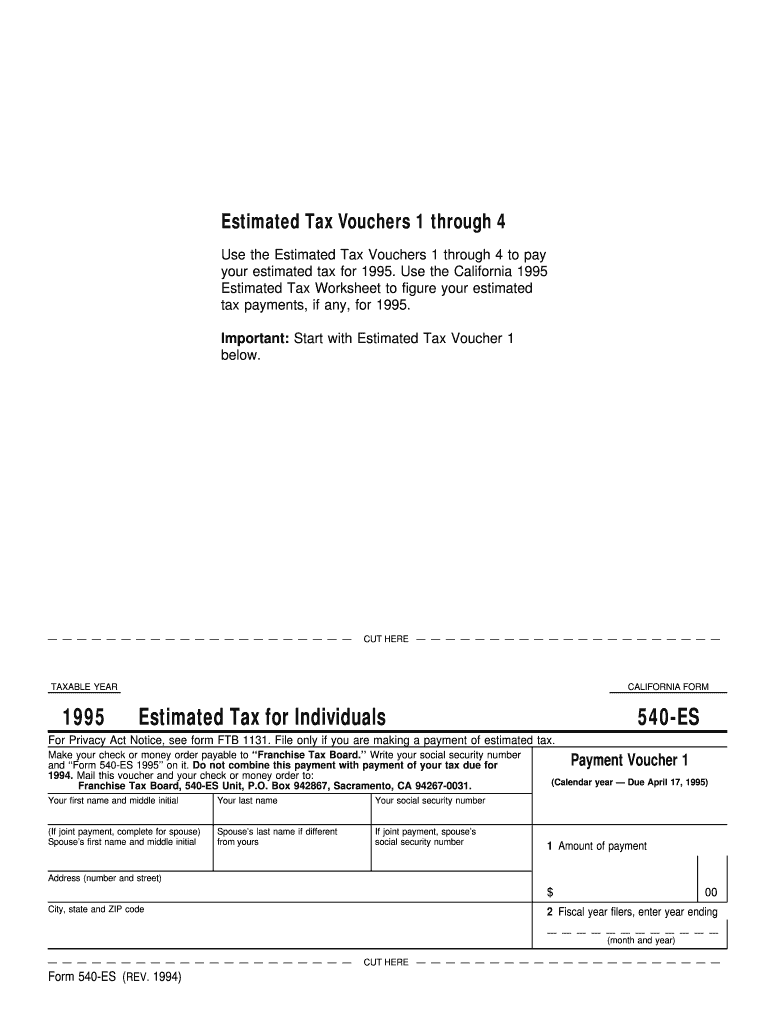
Estimated Tax Vouchers 1 through 4 Use the Estimated Tax Vouchers 1 through 4 to pay your estimated tax for 1995. Use the California 1995 Estimated Tax Worksheet to figure your estimated tax payments,.
Loading

Open form follow the instructions

Easily sign the form with your finger

Send filled & signed form or save
How to fill out the CA FTB 540-ES online
The CA FTB 540-ES is an essential form for individuals making estimated tax payments in California. This guide provides clear, step-by-step instructions on how to effectively complete this form online, ensuring that you meet your tax obligations without confusion.
Follow the steps to accurately complete the CA FTB 540-ES form online.
- Click 'Get Form' button to obtain the form and open it in the designated editor.
- Enter your personal information at the top of the form. This includes your first name, middle initial, last name, and social security number. If you are making a joint payment, also fill out the spouse's first name, middle initial, last name, and social security number.
- Indicate the taxable year for which you are filing, ensuring it reflects the correct year—1995 for the CA FTB 540-ES.
- In the payment voucher section, enter the amount of your estimated tax payment in the designated field.
- Provide your mailing address, including the street number and name, city, state, and ZIP code.
- If you are a fiscal year filer, enter the year ending (month and year) in the suitable section.
- Review your entries for accuracy to ensure that all required fields are correctly completed.
- Once all information is entered and verified, save the changes to your form. You may then download, print, or share the completed CA FTB 540-ES as needed.
Complete your CA FTB 540-ES form online today to ensure timely and accurate tax payments.
Experience a faster way to fill out and sign forms on the web. Access the most extensive library of templates available.
Related content
Go to ftb.ca.gov/pay for more information. You can schedule your payments up to one year...
FTB Form 540-ES, Estimated Tax for Individuals · FTB Instructions 540-ES, Estimated Tax...
Sep 30, 2015 — This equipment is a relatively complicated apparatus. During rigging...
Get answers to your most pressing questions about US Legal Forms API.
Who has to file schedule CA 540?
Filing schedule CA 540 is necessary for any taxpayer who needs to adjust their income reported on the standard form. This could include various income sources and specific deductions or credits that apply. It's a step toward accurate and compliant tax reporting under the CA FTB 540-ES.
Who must file California partnership return?
Entities doing business in California or earning income within the state must file a California partnership return. This includes both general and limited partnerships. By filing correctly, partnerships can stay compliant with tax regulations while optimizing their financial standing.
Who needs to file schedule CA 540?
Individuals who are filing a CA 540 and are making adjustments to their taxable income need to submit schedule CA 540. This includes taxpayers who have income from different sources or wish to claim certain deductions. Understanding when to use this form helps ensure you're accurately reporting under CA FTB 540-ES.
Who needs to file form 540?
Taxpayers who are California residents and meet specific income thresholds must file form 540. Typically, if your gross income exceeds the minimum filing requirement, you should submit this form. It's essential to verify your eligibility, as it directly affects your tax responsibilities under the CA FTB 540-ES.
Do I have to file form 540?
Whether you have to file the CA FTB 540 form depends on your residency status and your income level. Generally, if you're a California resident with taxable income above a certain amount, you must file. To navigate the specific requirements, visit US Legal Forms for helpful insights and tools that can assist you in the filing process.
How do I know if I need to file a Schedule A?
You typically need to file a Schedule A if you plan to itemize deductions or if your deductible expenses exceed the standard deduction amount. This form allows you to list expenses like mortgage interest, property taxes, and medical costs. To understand your obligations better, explore the informative materials available on US Legal Forms.
Can I file CA 540 online?
Yes, you can file the CA 540 form online through the California Franchise Tax Board's portal or with our US Legal Forms solutions. Filing online simplifies the process and often allows for quicker processing times. It's an efficient way to manage your taxes without the need for paper forms.
Do I need to file schedule CA 540?
You need to file Schedule CA 540 if you are a resident who earns income or if you receive income from sources within California. This form adjusts your income from federal tax purposes to the state tax requirements. Make sure to check the guidelines on the CA FTB website or consult US Legal Forms for more clarity on your specific situation.
Where do I get form 540 ES?
You can obtain the CA FTB 540-ES form directly from the California Franchise Tax Board's official website. Additionally, our website, US Legal Forms, provides an easy-to-use platform that lets you download the form quickly. This way, you can get started on your estimated tax payments without any hassle.
How to fill out FTB form 540?
To fill out the FTB form 540, gather all your financial information, including income, deductions, and credits. Use the instructions provided with the form as a guide to help you complete each section accurately. For additional assistance, online resources such as uslegalforms can simplify the process, ensuring you submit a correct CA FTB 540-ES.
Use professional pre-built templates to fill in and sign documents online faster. Get access to thousands of forms.
If you believe that this page should be taken down, please follow our DMCA take down process here.
This form is available in several versions. Select the version you need from the drop-down list below.