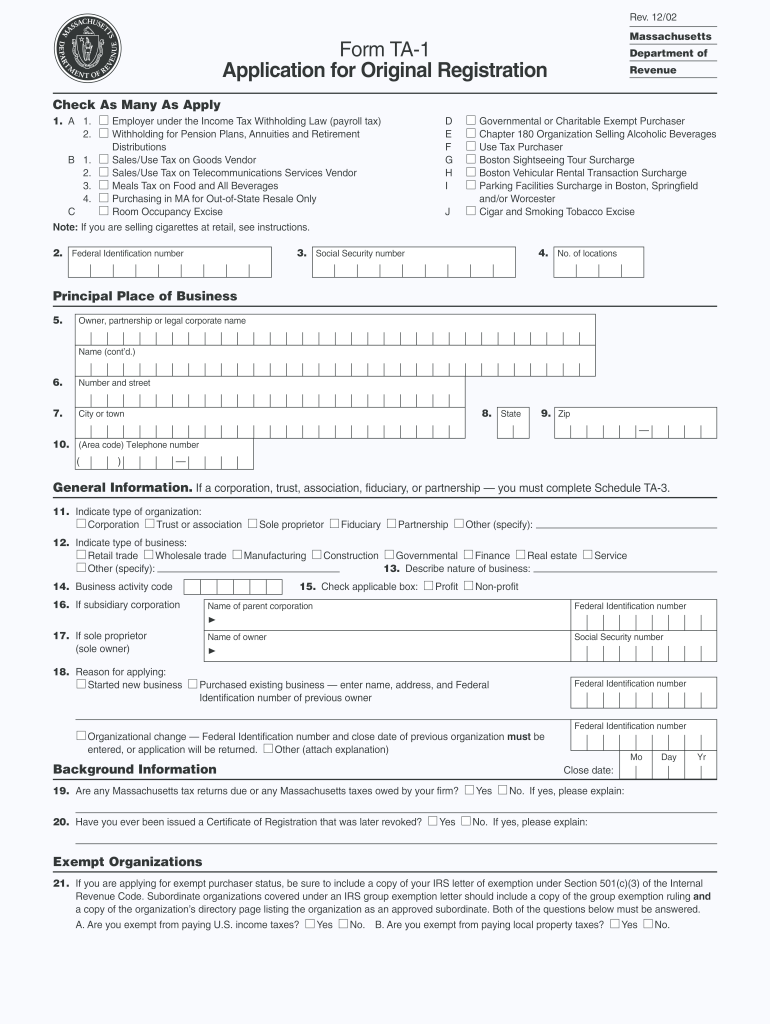
E (cont d.) 23. Number and street (PO box is not acceptable) 24. City or town 25. State 26. Zip 27. (Area code) Telephone number ( ) 28. Send certificate to: Location of business. 29. Send tax forms to: Principal place of business If Other, complete Schedule TA-4. Principal place of business Location of business Convention Center Financing District 30. Check here if your business location is within a Convention Center Financing District: Other. (see pages 24 26 of.
Loading

Open form follow the instructions

Easily sign the form with your finger

Send filled & signed form or save
How to fill out the MA DoR TA-1 online
The MA DoR TA-1 is an essential document for individuals and organizations seeking to register for various tax purposes in Massachusetts. This guide provides a clear, step-by-step approach to filling out the form online, ensuring users can navigate the process with confidence.
Follow the steps to successfully complete the MA DoR TA-1 form.
- Click ‘Get Form’ button to obtain the form and open it in the editor.
- Begin by indicating the type of application by checking all applicable boxes, including types of taxation such as income tax withholding and sales/use tax.
- Enter your Federal Identification Number in the designated field to ensure proper identification.
- Input the Social Security Number, if applicable, along with the number of business locations.
- Provide the principal place of business details, including the full legal name of the owner or company.
- Complete the contact information section, ensuring to include accurate address details and a working phone number.
- Specify the type of organization by checking the relevant box such as corporation or partnership, and detail the nature of the business.
- State the reason for applying, whether it’s for starting a new business, purchasing an existing one, or organizational changes.
- Answer background questions regarding any tax returns due or previous certificate revocations.
- If applying for exempt purchaser status, attach any necessary IRS exemption letters.
- Fill in the business's location details, including the trade name and ensure no PO boxes are used.
- Complete the filing frequency section by indicating whether the business is seasonal and detailing the months of operation.
- Indicate estimated tax obligations for various applicable tax types.
- Review all entered information for accuracy before proceeding to certification.
- Finally, sign and date the application, certifying that all information provided is true and correct.
- Save changes, download the completed form, print it, or share it as needed following submission.
We encourage you to complete this form online to streamline your tax registration process.
Experience a faster way to fill out and sign forms on the web. Access the most extensive library of templates available.
Related content
Apr 18, 2025 — Here you will find an updated listing of all Massachusetts Department of...
Oct 8, 2013 — “Nós sabemos que danos nos nervos periféricos são comuns com a...
Verificar: 1) Sensor da serpentina do evaporador pode estar mal conectado. 2) Carga de...
Get answers to your most pressing questions about US Legal Forms API.
Where do I file my WI Form 1?
Although the focus is on MA DoR TA-1, if you are looking to file Wisconsin Form 1, you'll need to refer to the Wisconsin Department of Revenue. They provide specific instructions for filing that can vary depending on your individual circumstances. Make sure to check their official site or resources like US Legal Forms for more clarity. It's important to stay informed to ensure compliance.
Can I file MA state taxes online?
Yes, you can file your MA state taxes online through the Massachusetts Department of Revenue (MA DoR) website. This method is often quicker and more efficient, allowing for easier submission and tracking of your tax return. You have the option to use approved tax software for a streamlined experience. For comprehensive resources, the US Legal Forms platform can also guide you through online filing.
Where do I file my MA form 1?
You file your MA Form 1 with the Massachusetts Department of Revenue (MA DoR). This form is crucial for reporting your individual income tax. Ensure that you check the specific filing instructions on the MA DoR website to avoid errors. If you need assistance, the US Legal Forms platform can help you navigate the filing process smoothly.
Where to send Massachusetts estimated tax payments?
Massachusetts estimated tax payments should be sent to the address specified in the MA DoR guidelines. Generally, you will mail your payments separately from your tax return. It is important to follow the directions to avoid any delays or penalties. Additionally, the US Legal Forms platform can provide resources to ensure you understand your payment obligations.
Where do I mail my MA tax form?
To mail your Massachusetts tax form, send it to the address specified for your form type on the MA DoR website. Typically, this is based on whether you are submitting a payment or just the form itself. Make sure you review any instructions provided to ensure timely processing of your tax documents. You can also explore the US Legal Forms platform for help in filling out and submitting your forms.
Where do I file forms beginning with the number 1?
You should file forms that start with the number 1 at the Massachusetts Department of Revenue (MA DoR). It is essential to ensure that all forms are completed correctly before submission. The MA DoR offers guidance on where to send these forms based on your specific tax situation. For additional assistance, consider visiting the US Legal Forms platform.
What are Massachusetts tax brackets?
Massachusetts has a system of tax brackets based on income levels, which affects how much you owe in state taxes. Income is typically taxed at a flat rate, but increases in income can lead to higher overall tax payments. To learn about current rates and how they apply to you, consulting the MA DoR TA-1 will provide clarity.
How much should I withhold for Massachusetts taxes?
The amount you should withhold for Massachusetts taxes varies based on your income level and filing status. It’s essential to calculate your expected tax liability accurately to avoid over- or under-withholding. The MA DoR TA-1 offers tools and insights to assist you in determining the correct withholding amount for your situation.
Is a Massachusetts tax ID the same as an EIN?
A Massachusetts tax ID and an Employer Identification Number (EIN) are not the same, though they serve related functions. The tax ID is assigned by the state for tax purposes, while an EIN is issued by the federal government for businesses. If you're navigating tax forms, the MA DoR TA-1 can help clarify the distinctions and the requirements relevant to your situation.
What withholding percentage should I choose?
Selecting the correct withholding percentage in Massachusetts depends on your financial situation, including income and expenses. You can use the Massachusetts Department of Revenue's guidelines to help you make this decision. To further simplify the process, consider using the MA DoR TA-1 to find the appropriate percentage that suits your needs.
Use professional pre-built templates to fill in and sign documents online faster. Get access to thousands of forms.
If you believe that this page should be taken down, please follow our DMCA take down process here.