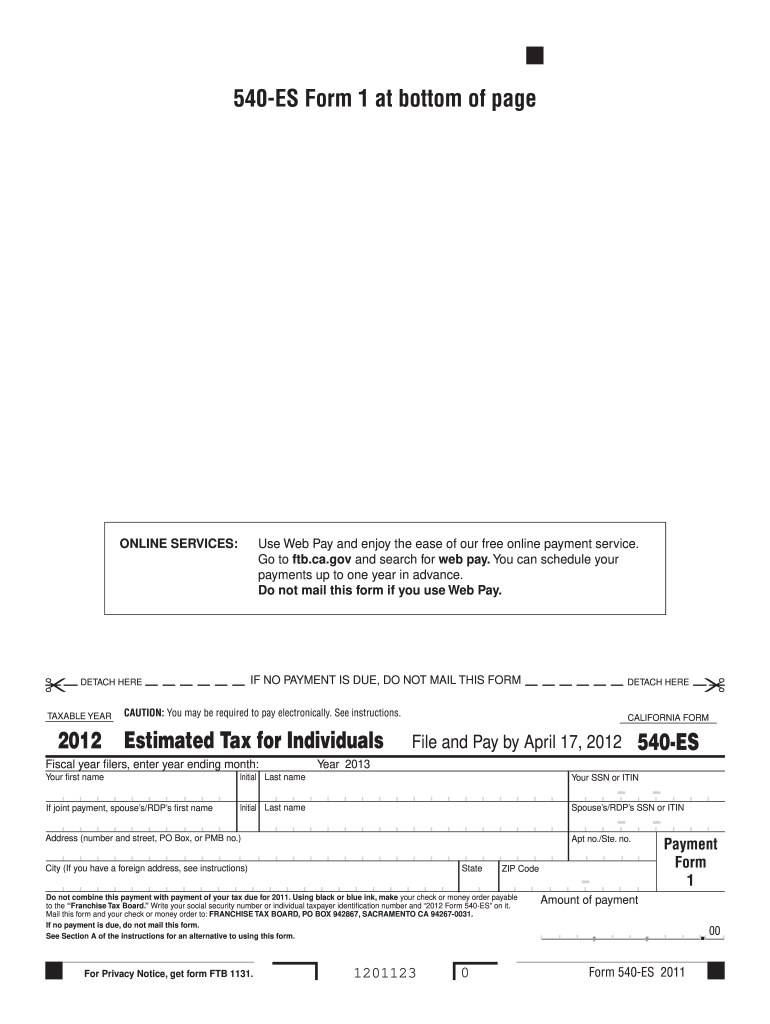
Address, see instructions) State ZIP Code Do not combine this payment with payment of your tax due for 2011. Using black or blue ink, make your check or money order payable to the Franchise Tax Board. Write your social security number or individual taxpayer identification number and 2012 Form 540-ES on it. Mail this form and your check or money order to: FRANCHISE TAX BOARD, PO BOX 942867, SACRAMENTO CA 94267-0031. If no payment is due, do not mail this form. See Section A of.
Loading

Open form follow the instructions

Easily sign the form with your finger

Send filled & signed form or save
How to fill out the CA FTB 540-ES online
This guide provides detailed instructions on how to complete the California Form 540-ES online. Whether you are familiar with tax documents or new to the process, this comprehensive guide will help ensure that you accurately fill out the form and submit it correctly.
Follow the steps to successfully complete the CA FTB 540-ES form online.
- Click the ‘Get Form’ button to access the 540-ES form in the editor.
- Indicate the taxable year by entering the year for which you are making the estimated tax payment. If you are filing for a fiscal year, specify the ending month.
- Provide your first name, middle initial, and last name in the corresponding fields.
- Enter your social security number (SSN) or individual taxpayer identification number (ITIN) accurately.
- If the payment is joint, include your partner's first name, middle initial, last name, and their SSN or ITIN.
- Fill out your address, including the street address, apartment number (if applicable), city, state, and ZIP code.
- Specify the amount of payment you are making in the designated field.
- Follow the instructions regarding electronic payment requirements if applicable. Ensure to not combine this payment with payments for other tax years.
- Once you have filled out all the necessary sections and double-checked your information, save your changes.
- Download or print the completed form, and if you are making a payment, include your payment method as instructed. Mail the form to the designated address if required.
Begin the process of completing your CA FTB 540-ES online today!
Experience a faster way to fill out and sign forms on the web. Access the most extensive library of templates available.
Related content
Go to ftb.ca.gov/pay for more information. You can schedule your payments up to one year...
FTB Form 540-ES, Estimated Tax for Individuals · FTB Instructions 540-ES, Estimated Tax...
Sep 30, 2015 — This equipment is a relatively complicated apparatus. During rigging...
Get answers to your most pressing questions about US Legal Forms API.
How to fill out FTB form 540?
To fill out the CA FTB 540-ES form, begin by gathering your personal information, such as your Social Security number and income details. Next, follow the line-by-line instructions provided with the form, making sure to report all income accurately and claim applicable deductions. If you need further assistance, uslegalforms offers resources that simplify the process, so you can complete your forms confidently.
Can I file CA 540 online?
Yes, you can file your CA FTB 540-ES online using various authorized e-file providers. This method streamlines the filing process and often leads to faster refunds. Additionally, filing online minimizes mistakes since many platforms offer guidance. Explore options on the California Franchise Tax Board's website for a list of approved e-file services.
Where to mail a 540 tax return in California?
You can mail your CA FTB 540-ES tax return to the address specified in the instructions provided by the California Franchise Tax Board. Typically, for most taxpayers, this address is located on the form itself. Be sure to check if you are mailing a refund request or a balance due, as this may affect the mailing address. Using the correct address ensures that your return is processed without delays.
Where can I pick up tax forms to fill out?
You can pick up tax forms, including the CA FTB 540-ES, at various public locations such as libraries and post offices. Additionally, the California Franchise Tax Board offers online access to all necessary forms for easy download. This ensures you always have access to the materials you need to file your taxes promptly.
Where can I pick up California state tax forms?
California state tax forms, including the CA FTB 540-ES, are available in several locations. You can find them at public libraries, post offices, and Franchise Tax Board offices throughout the state. Alternatively, visit the California Franchise Tax Board website to download the necessary forms directly.
Where do I get form 540 ES?
You can obtain the CA FTB 540-ES form directly from the California Franchise Tax Board's website. The form is readily available for download and printing. Additionally, various tax assistance locations may have physical copies on hand for you to fill out.
Do I need to file schedule CA 540?
You may need to file schedule CA 540 depending on your income situation. If you have certain adjustments or modifications to your federal income, the schedule will help clarify these changes for your California return. Always check the requirements to ensure you are compliant with California tax regulations.
Is form 540 the same as 1040?
No, form 540 and form 1040 are not the same. Form 540 is specifically for California residents, while form 1040 is a federal income tax return. Both forms serve their purposes, but they cater to different levels of government taxation.
Where do I find form 540 ES?
You can find the CA FTB 540-ES form on the official California Franchise Tax Board website. This site offers downloadable versions of the form in both PDF and fillable formats. Additionally, many tax preparation software programs include the CA FTB 540-ES as part of their offerings.
How to avoid underpayment penalty in California?
To avoid an underpayment penalty in California, ensure you are making timely estimated tax payments throughout the year. Meeting the safe harbor requirements by either paying 90% of your current year's tax or 100% of the previous year's tax can help. Regularly monitoring your income and adjusting your payments as needed for the CA FTB 540-ES will also minimize risk. Using tools like uslegalforms can assist in tracking your payments efficiently.
Use professional pre-built templates to fill in and sign documents online faster. Get access to thousands of forms.
If you believe that this page should be taken down, please follow our DMCA take down process here.
This form is available in several versions. Select the version you need from the drop-down list below.