Ame 3 Audit Massachusetts Department of Revenue Social Security/Federal ID number Address Dealer sale Year of model Check applicable box: Make Type/length Boat Serial or VIN number Date first brought into Massachusetts Recreation vehicle Model name Snow vehicle Engine size Date of sale Boat moored at (city/town) A. Sale by registered dealer Dealer must complete this schedule and collect tax before making delivery. 1. Gross sales price . . . . . . . . . . . . . . . . . . . . . . .

Open form follow the instructions

Easily sign the form with your finger

Send filled & signed form or save
How to fill out the MA DoR ST-6 online
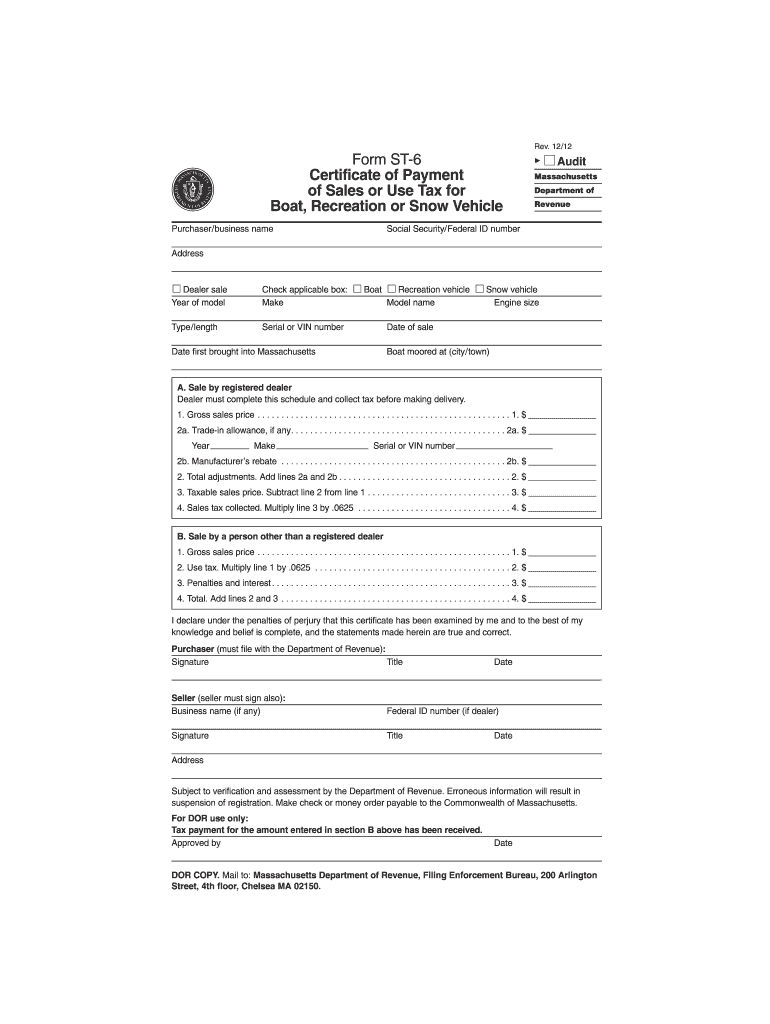
The MA DoR ST-6 form, also known as the Certificate of Payment of Sales or Use Tax for Boat, Recreation or Snow Vehicle, is essential for purchasers and sellers in Massachusetts. This guide will provide you with clear, step-by-step instructions on how to accurately complete this form online.
Follow the steps to fill out the MA DoR ST-6 online.
- Press the ‘Get Form’ button to access the MA DoR ST-6 and open the document in your preferred editor.
- Begin by entering the purchaser or business name at the top of the form. This identifies who is purchasing the vehicle.
- Fill in the Social Security or Federal ID number. This is essential for tax identification purposes.
- Provide the address of the purchaser. Ensure this is accurate for any future correspondence.
- Select the type of sale by checking the appropriate box: Boat, Recreation vehicle, or Snow vehicle. Enter the make and model details as required.
- For the sale by registered dealer, fill in the gross sales price for the vehicle. This is the total amount without taxes.
- If applicable, include any trade-in allowance and details of the trade-in vehicle, including its make, year, and serial or VIN number.
- If there is a manufacturer's rebate, include that amount in the specified section.
- Calculate the total adjustments by adding the trade-in allowance and manufacturer's rebate, then input this sum.
- Determine the taxable sales price by subtracting the total adjustments from the gross sales price.
- Calculate the sales tax collected by multiplying the taxable sales price by 0.0625. Enter this amount.
- For sales from individuals other than registered dealers, repeat the gross sales price and calculate the use tax as specified.
- Additionally, if there are penalties or interest, enter those amounts accordingly.
- At the bottom of the form, both the purchaser and seller must sign and date the document.
- Once all fields are filled out, save your changes, download a copy for your records, and print or share the form as necessary.
Complete your MA DoR ST-6 form online today to ensure smooth processing!
Experience a faster way to fill out and sign forms on the web. Access the most extensive library of templates available.
Related content
Visit mass.gov/dor/amend for additional information about filing an amended return, or...
The purpose of 830 CMR 62C.3.1 is to describe the various types of public written...
CAUTION. To reduce the risk of electrical shocks, fire, etc.: 1. Do not remove screws...
Get answers to your most pressing questions about US Legal Forms API.
What is the ST-9 form in Massachusetts?
The ST-9 form is an important tax document used in Massachusetts to claim sales tax exemptions. Businesses and individuals use this form to report exempt purchases, ensuring they are not charged sales tax where applicable. Understanding its purpose is vital for effective tax planning. If you need help with the ST-9 form, consider using uslegalforms for guidance and templates.
What do I attach to my Massachusetts tax return?
When filing your Massachusetts tax return, you need to attach various forms depending on your specific situation. Common attachments include W-2 forms, 1099 forms, and any additional schedules that apply to your income. It's crucial to ensure you include these documents to support the information on your return. For further assistance, uslegalforms provides resources to help streamline the process.
How do I get a 1099 form in Massachusetts?
To obtain a 1099 form in Massachusetts, you can request it from your employer or the payer who needs to report your income. Alternatively, you can visit the IRS website to download the form yourself. It's essential to ensure you receive all required copies of the 1099, especially when filing your taxes. If you're unsure about filling it out, uslegalforms can offer templates and guidance.
How do I file a ST-9 in Massachusetts?
You can file the ST-9 form by downloading it from the Massachusetts Department of Revenue's website. After completing the form with the necessary information, you can submit it either online or by mailing it to the appropriate address. Be sure to keep copies for your records, as you may need them for future reference or audits. Using platforms like uslegalforms can simplify the process of obtaining and filling out the ST-9 form.
Do I need to file an estate tax return in Massachusetts?
Yes, if the taxable estate exceeds a certain threshold, you must file an estate tax return in Massachusetts. This includes the MA DoR ST-6 form, which is specifically designed for reporting estate taxes. It’s important to assess your estate's value and ensure compliance with state requirements. Filing correctly helps avoid penalties and ensures that your estate is handled properly.
What is the new law for the Massachusetts estate tax?
Recent changes to the Massachusetts estate tax law have adjusted exemption limits and filing thresholds, impacting many families. The new law may require more estates to file a return than before. By understanding the implications of the MA DoR ST-6, estate representatives can navigate these changes effectively, ensuring they meet updated compliance standards.
Who needs an estate tax return?
An estate tax return is necessary for estates that exceed the Massachusetts estate tax exemption limit. Executors, administrators, and personal representatives must assess the estate's value and determine whether filing the MA DoR ST-6 is required. This step ensures compliance with legal and tax responsibilities while facilitating the estate distribution process.
How to file a modification of child support in Massachusetts?
To modify child support in Massachusetts, you must file a motion with the court that issued the original order. This process involves gathering necessary documents and justifications for the change. For guidance, consider using the MA DoR ST-6 to help clarify any associated legal obligations and streamline the filing process.
Who must file an estate tax return in Massachusetts?
In Massachusetts, any executor, administrator, or personal representative responsible for settling an estate must file an estate tax return if the estate's value exceeds the filing threshold. This requirement is essential for resolving tax obligations effectively. Utilizing the MA DoR ST-6 ensures that the executor fulfills their legal obligations efficiently, safeguarding the interests of beneficiaries.
What triggers an estate tax return?
An estate tax return is triggered when a deceased individual's estate exceeds the Massachusetts estate tax threshold. In these cases, the executor or personal representative must file the MA DoR ST-6 to report the estate's value and determine tax liability. It's important to act promptly to avoid any potential issues during the settlement process.
Use professional pre-built templates to fill in and sign documents online faster. Get access to thousands of forms.
If you believe that this page should be taken down, please follow our DMCA take down process here.
This form is available in several versions. Select the version you need from the drop-down list below.