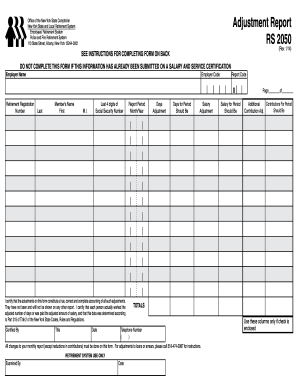
Get Ny Osc Rs 2050 2014
How it works
-

Open form follow the instructions
-

Easily sign the form with your finger
-

Send filled & signed form or save
How to fill out the NY OSC RS 2050 online
Filling out the NY OSC RS 2050 Adjustment Report online can streamline the process of correcting members' days worked and salary adjustments. This guide provides detailed instructions on how to successfully complete the form while ensuring compliance with the relevant regulations.
Follow the steps to accurately complete the form.
- Press the ‘Get Form’ button to access the RS 2050 Adjustment Report form and open it in your preferred editor.
- Begin by entering the employer name in section A. This should reflect the legal name of the public employer handling the retirement adjustments.
- In section B, input the employer code, which is the five-digit number assigned by the Retirement System that identifies your organization.
- Fill in section C with the report code — a two-digit number designated to uniquely identify the report. Ensure to use a separate adjustment report for each unique report code.
- Input the retirement registration number in section E, which consists of an 8-digit number beginning with 'ØA' or 'ØB' for Police and Fire members.
- In section F, enter the full name of the member, with last name first, followed by the first name and middle initial.
- For section G, include the last four digits of the member’s Social Security number.
- Indicate the report period in section H by entering the corresponding month and year for which the adjustments are being made.
- In section I, specify the days adjustment. State the number of days being added or reduced, using parentheses for reductions.
- Complete section J by calculating and entering the total days worked after the adjustment has been accounted for.
- In section K, record the salary adjustment amount, similarly indicating any reductions with parentheses.
- Then, in section L, state the total salary for the reporting period after implementing the adjustments.
- If applicable, complete section M for additional contributions, which should equal 3% of any additional salary being reported.
- Summarize all totals in the designated sections and ensure all changes are documented clearly across your report pages.
- Finally, confirm all data is correct, sign in the certification section, and save, download, print, or share the completed form as necessary.
Start filling out the NY OSC RS 2050 online today to ensure accurate adjustments and compliance!
Get form
The rules for the New York State pension system include specific vesting periods, eligibility requirements, and benefit calculations. Generally, you must work for at least 10 years to start receiving benefits, with an option for maximum pensions after 30 years of service. Understanding these rules can significantly affect your retirement planning. To explore these rules further, the NY OSC RS 2050 platform offers comprehensive insights and guidance.