Loading
Form preview
  • US Legal Forms
  • Other Templates
  • Tax Forms
  • New York Tax Forms
  • Ny Nys-45-att-mn 2005

Get Ny Nys-45-att-mn 2005-2026

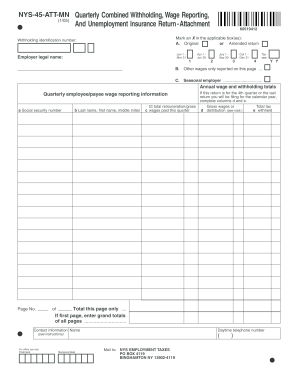
Ding identification number: Jan 1 Mar 31 Employer legal name: Apr 1 Jun 30 1 July 1 Sep 30 2 Oct 1 Dec 31 3 Tax year 4 B. Other wages only reported on this page ... C. Seasonal employer .................................. Y Y Annual wage and withholding totals Quarterly employee/payee wage reporting information a Social security number b Last name, first name, middle initial UI total remuneration/gross c wages paid this quarter Total this page only .... If first page, enter gra.

How it works

  1. Open form

    Open form follow the instructions

  2. Easily sign form

    Easily sign the form with your finger

  3. Share form

    Send filled & signed form or save

How to fill out the NY NYS-45-ATT-MN online

The NY NYS-45-ATT-MN is an essential form for reporting withholding information related to wages and unemployment insurance. This guide will provide you with step-by-step instructions on how to accurately complete this form online, ensuring compliance with state requirements.

Follow the steps to fill out the NYS-45-ATT-MN online successfully.

  1. Click ‘Get Form’ button to obtain the form and open it in the editor.
  2. Identify whether you are submitting an original or amended return by marking an X in the applicable box. This will help ensure the correct processing of your submission.
  3. Enter your withholding identification number in the appropriate field, which is crucial for the identification of your account.
  4. Provide your employer legal name in the designated space to ensure clarity in your submission.
  5. Mark the appropriate quarter in which wages were paid: January to March, April to June, July to September, or October to December.
  6. Fill in the tax year for which you are filing to keep records organized.
  7. If applicable, indicate any other wages being reported on this page.
  8. If you are a seasonal employer, mark this option as well.
  9. For each employee or payee, complete the quarterly wage reporting information. This includes entering the social security number, last name, first name, middle initial, and total remuneration or gross wages paid during the quarter.
  10. Sum up the total wages for this page and ensure accuracy before moving on. If this is the first page, also enter the grand total of all pages.
  11. Fill in your contact information, including your name and daytime telephone number, which will assist in any follow-up if necessary.
  12. If this return is for the fourth quarter or your last return for the calendar year, ensure to complete the gross wages and total tax distribution fields.
  13. After completing all sections, review your entries for accuracy. Make any necessary changes and finalize your form.
  14. You can then save changes to your form, download, print, or share it as required.

Complete your NYS-45-ATT-MN online today for accurate and efficient filing.

Get form

Experience a faster way to fill out and sign forms on the web. Access the most extensive library of templates available.
Get form

Related content

Form NYS-45, Quarterly Combined Withholding, Wage...
May 22, 2025 — Form NYS-45, Quarterly Combined Withholding, Wage Reporting, and...
Learn more
2008 NEW YORK STATE REFERENCE MANUAL FOR ...
by KR Bennett — NYS-45-MN. Quarterly Combined Withholding, Wage Reporting, and...
Learn more
Xcel Energy - GEM.wiki
Apr 30, 2021 — Xcel Energy (NYSE: XEL), based in Minneapolis, Minnesota, is a public...
Learn more

Related links form

And Judgment Creditors Consent To Allow License And Registration Form Sr 84 Sample Sworn Statement For Lost Naturalization Certificate Plcb 2068 Ez740 Ic

Questions & Answers

Get answers to your most pressing questions about US Legal Forms API.

Contact support

If you have no employees, you do not need to file a NYS-45. However, it is still important to remain aware of your other filing requirements to avoid any penalties. Maintaining accurate records of your business activities is always a good practice even when you are not employing anyone.

Adjusting your NYS withholding involves submitting a new Form IT-2104 to your employer. This form allows you to claim allowances to either increase or decrease your withholding amounts. By making these adjustments, you can ensure that you are withholding the appropriate amounts for your tax situation.

Individuals are typically required to file a New York tax return if they are residents or earn income sourced from New York. This includes both employees and self-employed individuals. Ensure you review the filing requirements based on your specific circumstances to determine your obligations.

Any employer in New York State who pays wages to employees is required to file a NYS-45. If your business has employees, this form helps report their wages and the associated withholding taxes. Staying compliant with this requirement is crucial for maintaining good standing with state authorities.

Yes, you can amend your NYS-45 online if you prefer digital solutions. Many platforms, including uslegalforms, offer services that facilitate online amendments, making the process quicker and easier. Just follow the instructions provided to ensure that your online submission is completed accurately.

Form 944 is designed for employers who have a small number of employees. If you have no employees, there is no need to file Form 944. However, you should ensure your NYS-45 is up to date with your tax records, even if no wages were reported.

Certain individuals may be exempt from NY state withholding. This includes employees who are in specific categories, such as ministers or certain students. It's important to check if you qualify for these exemptions to avoid unnecessary withholdings while filing your NYS-45.

Amending your New York State taxes can be done by filing the appropriate amended tax form. If you need to amend your NYS-45, clearly state your corrections, and submit the form to the New York State Department of Taxation and Finance. Utilizing a reliable platform like uslegalforms can simplify this process, ensuring that your amendments are filed accurately and on time.

To correct an NYS-45, you need to file a corrected form. This involves completing a new NYS-45 and indicating that it's a correction on the top of the form. Additionally, it's crucial to provide accurate information to ensure the updates reflect correctly in the New York State tax records.

The NYS-45 and 941 serve different purposes. The NYS-45 focuses on unemployment insurance reporting within New York State, while the 941 is a federal form for reporting income and social security taxes. Understanding these differences can help businesses meet their respective obligations more effectively.

Get This Form Now!

Use professional pre-built templates to fill in and sign documents online faster. Get access to thousands of forms.
Get form
If you believe that this page should be taken down, please follow our DMCA take down processhere.
Get NY NYS-45-ATT-MN
Get form
  • Adoption
  • Bankruptcy
  • Contractors
  • Divorce
  • Home Sales
  • Employment
  • Identity Theft
  • Incorporation
  • Landlord Tenant
  • Living Trust
  • Name Change
  • Personal Planning
  • Small Business
  • Wills & Estates
  • Packages A-Z
  • Affidavits
  • Bankruptcy
  • Bill of Sale
  • Corporate - LLC
  • Divorce
  • Employment
  • Identity Theft
  • Internet Technology
  • Landlord Tenant
  • Living Wills
  • Name Change
  • Power of Attorney
  • Real Estate
  • Small Estates
  • Wills
  • All Forms
  • Forms A-Z
  • Other Templates
  • Legal Hub
  • About Us
  • Help Portal
  • Legal Resources
  • Blog
  • Affiliates
  • Contact Us
  • Delete My Account
  • Site Map
  • Industries
  • Forms in Spanish
  • Localized Forms
  • State-specific Forms
  • Forms Kit
  • Real Estate Handbook
  • All Guides
  • Notarize
  • Incorporation services
  • For Consumers
  • For Small Business
  • For Attorneys
  • USLegal
  • FormsPass
  • pdfFiller
  • signNow
  • altaFlow
  • DocHub
  • Instapage
Form Packages
  • Adoption
  • Bankruptcy
  • Contractors
  • Divorce
  • Home Sales
  • Employment
  • Identity Theft
  • Incorporation
  • Landlord Tenant
  • Living Trust
  • Name Change
  • Personal Planning
  • Small Business
  • Wills & Estates
  • Packages A-Z
Form Categories
  • Affidavits
  • Bankruptcy
  • Bill of Sale
  • Corporate - LLC
  • Divorce
  • Employment
  • Identity Theft
  • Internet Technology
  • Landlord Tenant
  • Living Wills
  • Name Change
  • Power of Attorney
  • Real Estate
  • Small Estates
  • Wills
  • All Forms
  • Forms A-Z
  • Other Templates
Customer Service
  • Legal Hub
  • About Us
  • Help Portal
  • Legal Resources
  • Blog
  • Affiliates
  • Contact Us
  • Delete My Account
  • Site Map
  • Industries
  • Forms in Spanish
  • Localized Forms
  • State-specific Forms
  • Forms Kit
Legal Guides
  • Real Estate Handbook
  • All Guides
Prepared for you
  • Notarize
  • Incorporation services
Our Customers
  • For Consumers
  • For Small Business
  • For Attorneys
Our Sites
  • USLegal
  • FormsPass
  • pdfFiller
  • signNow
  • altaFlow
  • DocHub
  • Instapage
Social Media
Call us now toll free:
+1 833 426 79 33
As seen in:
© Copyright 1999-2026 airSlate Legal Forms, Inc. 17 Station Street, Ste. 203, Brookline, MA 02445
  • Your Privacy Choices
  • Terms of Service
  • Privacy Notice
  • Content Takedown Policy
  • Bug Bounty Program