Loading
Form preview
  • US Legal Forms
  • Other Templates
  • Tax Forms
  • New York Tax Forms
  • Ny Dtf St-130 2017

Get Ny Dtf St-130 2017

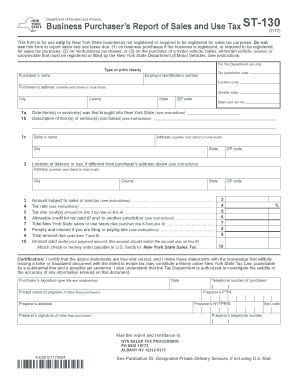
Ed for sales tax purposes. Do not use this form to report sales and use taxes due: (1) on business purchases if the business is registered, or required to be registered, for sales tax purposes; (2) on nonbusiness purchases; or (3) on the purchase of a motor vehicle, trailer, all-terrain vehicle, vessel, or snowmobile that must be registered or titled by the New York State Department of Motor Vehicles. See instructions. For Tax Department use only Type or print clearly Purchaser s name Emp.

How it works

  1. Open form

    Open form follow the instructions

  2. Easily sign form

    Easily sign the form with your finger

  3. Share form

    Send filled & signed form or save

How to fill out the NY DTF ST-130 online

The NY DTF ST-130 form is essential for businesses in New York State that are not registered for sales tax purposes. This guide provides clear, step-by-step instructions to help you complete the form accurately and efficiently online.

Follow the steps to complete your NY DTF ST-130 form.

  1. Click ‘Get Form’ button to obtain the form and open it in the editor.
  2. Enter the purchaser’s name in the designated field to identify your business. Ensure that the name is accurate and reflects your registered business entity.
  3. Provide the employer identification number in the specified area, which is vital for processing your tax information correctly.
  4. Fill in the tax jurisdiction code and location code if applicable to your business's operational area.
  5. Input the purchaser's address, including number and street or rural route, city, county, state, and ZIP code to establish your location.
  6. Specify the taxable sales amount, ensuring that it reflects the items or services purchased that are subject to tax.
  7. Record the date that the items or services were first brought into New York State in the provided field.
  8. Describe the items or services purchased, ensuring clarity for accurate tax classification.
  9. Fill in the seller's name and address, making sure to include city, state, and ZIP code for proper documentation.
  10. If the location of delivery or use is different from the purchaser's address, provide that information in the relevant section.
  11. Enter the amount that is subject to sales or use tax, as calculated from your purchase details.
  12. Indicate the applicable tax rate in the designated field.
  13. Calculate the tax due by multiplying the amount from the previous step by the tax rate you entered.
  14. If you have any allowable credit for tax paid to another jurisdiction, report that in the appropriate section.
  15. Subtract any credits from the tax due to determine the total New York State sales or use taxes due.
  16. If applicable, account for any penalties and interest if you are filing or paying late.
  17. Total the amounts to find the total amount due by adding taxes due and any penalties.
  18. Enter the payment amount, ensuring it matches the total due for accurate processing.
  19. Certification is crucial; personally sign the form, providing your printed name, title, date, and telephone number.
  20. If another person prepared the form, their information should be included in the relevant fields.
  21. When completed, users can save changes, download, print, or share the form as necessary.

Complete your NY DTF ST-130 form online today to ensure compliance and ease in your tax reporting.

Get form

Experience a faster way to fill out and sign forms on the web. Access the most extensive library of templates available.

Related content

Form ST-130 Business Purchaser's Report of Sales...
Form ST-130 is for New York State businesses not registered for sales tax, to report sales...
Learn more
New York's Amazon Tax Not Out of the Forest Yet
by S Zaprzalka · 2009 · Cited by 15 — DTF is the agency charged with enforcing the New...
Learn more
Customer Information Control System (CICS) ...
This publication contains detailed information necessary to implement three IBM program...
Learn more

Related links form

GSA SF 535 1975 GSA SF LLL-A Canada ITA Sheet Metal Worker Statutory Declaration Of Work Experience - British Columbia 2019 Canada ITA CS005 - British Columbia 2016

Questions & Answers

Get answers to your most pressing questions about US Legal Forms API.

Contact support

New York State exempts specific items from sales tax, including most food purchases, prescription medications, and certain services. Additionally, clothing and footwear priced under $110 are tax-exempt. To navigate these exemptions effectively, having a clear understanding of the rules outlined by the state can be beneficial. Resources like uslegalforms can provide clarity on how to apply this knowledge in practice.

If you are a business selling tangible personal property or certain services in New York, you must register for NYS sales tax. This includes both online and brick-and-mortar businesses. Additionally, vendors, retailers, and any entity seeking to collect sales tax from customers must complete the registration process. Utilizing the NY DTF ST-130 can streamline your tax compliance efforts.

In New York, certain customers qualify for tax exemption. Nonprofit organizations, governmental entities, and certain educational institutions often fall under this category. Additionally, purchases related to specific agricultural or manufacturing activities can also be exempt. To achieve tax-exempt status, customers may need to provide a properly filled NY DTF ST-130 form.

Your sales tax ID is not your EIN number. Each serves a different function in tax identification. When completing forms such as the NY DTF ST-130, it's essential to input the correct number to avoid any compliance issues.

No, a sales tax permit and an EIN are distinct. The sales tax permit allows businesses to collect sales tax from customers, while the EIN is used for tax identification purposes with the IRS. Clarifying these distinctions is crucial when you fill out forms like the NY DTF ST-130.

The NY sales tax ID is not the same as an EIN. The sales tax ID is specifically issued for collecting and remitting sales tax, whereas EIN serves a broader purpose for business identification. When handling tasks related to your NY DTF ST-130 form, make sure to differentiate between these two important identifiers.

Filing New York State sales tax online is straightforward. You can access the New York State Department of Taxation and Finance website, where you will provide your sales tax ID and the necessary details. Using the NY DTF ST-130 can streamline your filings by ensuring you enter accurate tax information.

Whether you need to file a NY nonresident return depends on your income sources. If you earned income in New York and are a nonresident, you must file the appropriate return to report that income. Completing the NY DTF ST-130 accurately can help clarify your tax obligations.

Filling out the NY ST 120 form involves several key steps, such as specifying your business and tax details accurately. You will need to gather your business information, including your NY DTF ST-130 number if applicable, and ensure all entries are complete. Consider using resources from US Legal Forms for guidance and templates that simplify the process.

No, the provider tax ID is not synonymous with an EIN. The provider tax ID specifically refers to the identification number used for medical practices and healthcare providers, while EIN applies to businesses for tax identification. When completing the NY DTF ST-130, ensure you use the appropriate number based on your business type.

Get This Form Now!

Use professional pre-built templates to fill in and sign documents online faster. Get access to thousands of forms.
If you believe that this page should be taken down, please follow our DMCA take down processhere.
Get NY DTF ST-130
  • Adoption
  • Bankruptcy
  • Contractors
  • Divorce
  • Home Sales
  • Employment
  • Identity Theft
  • Incorporation
  • Landlord Tenant
  • Living Trust
  • Name Change
  • Personal Planning
  • Small Business
  • Wills & Estates
  • Packages A-Z
  • Affidavits
  • Bankruptcy
  • Bill of Sale
  • Corporate - LLC
  • Divorce
  • Employment
  • Identity Theft
  • Internet Technology
  • Landlord Tenant
  • Living Wills
  • Name Change
  • Power of Attorney
  • Real Estate
  • Small Estates
  • Wills
  • All Forms
  • Forms A-Z
  • Other Templates
  • Legal Hub
  • About Us
  • Help Portal
  • Legal Resources
  • Blog
  • Affiliates
  • Contact Us
  • Delete My Account
  • Site Map
  • Industries
  • Forms in Spanish
  • Localized Forms
  • State-specific Forms
  • Forms Kit
  • Real Estate Handbook
  • All Guides
  • Notarize
  • Incorporation services
  • For Consumers
  • For Small Business
  • For Attorneys
  • USLegal
  • FormsPass
  • pdfFiller
  • signNow
  • altaFlow
  • DocHub
  • Instapage
Form Packages
  • Adoption
  • Bankruptcy
  • Contractors
  • Divorce
  • Home Sales
  • Employment
  • Identity Theft
  • Incorporation
  • Landlord Tenant
  • Living Trust
  • Name Change
  • Personal Planning
  • Small Business
  • Wills & Estates
  • Packages A-Z
Form Categories
  • Affidavits
  • Bankruptcy
  • Bill of Sale
  • Corporate - LLC
  • Divorce
  • Employment
  • Identity Theft
  • Internet Technology
  • Landlord Tenant
  • Living Wills
  • Name Change
  • Power of Attorney
  • Real Estate
  • Small Estates
  • Wills
  • All Forms
  • Forms A-Z
  • Other Templates
Customer Service
  • Legal Hub
  • About Us
  • Help Portal
  • Legal Resources
  • Blog
  • Affiliates
  • Contact Us
  • Delete My Account
  • Site Map
  • Industries
  • Forms in Spanish
  • Localized Forms
  • State-specific Forms
  • Forms Kit
Legal Guides
  • Real Estate Handbook
  • All Guides
Prepared for you
  • Notarize
  • Incorporation services
Our Customers
  • For Consumers
  • For Small Business
  • For Attorneys
Our Sites
  • USLegal
  • FormsPass
  • pdfFiller
  • signNow
  • altaFlow
  • DocHub
  • Instapage
Social Media
Call us now toll free:
+1 833 426 79 33
As seen in:
© Copyright 1999-2026 airSlate Legal Forms, Inc. 17 Station Street, Suite 303, Brookline, MA 02445
  • Your Privacy Choices
  • Terms of Service
  • Privacy Notice
  • Content Takedown Policy
  • Bug Bounty Program
NY DTF ST-130
This form is available in several versions.
Select the version you need from the drop-down list below.
2019 NY DTF ST-130
Select form
  • 2019 NY DTF ST-130
  • 2018 NY DTF ST-130
  • 2017 NY DTF ST-130
  • 2015 NY DTF ST-130
  • 2014 NY DTF ST-130
  • 2013 NY DTF ST-130
Select form