WORKBASED TRAINING HOURS REPORTITA Customer Service 800 8100 Granville Ave Richmond, BC V6Y 3T6 Tel: 7783288700 Fax: 7783288701 Toll Free: 18666606011 customerservice itabc.caSPONSOR REPORT FOR WORKBASED.
Loading

Open form follow the instructions

Easily sign the form with your finger

Send filled & signed form or save
How to fill out the Canada ITA CS005 - British Columbia online
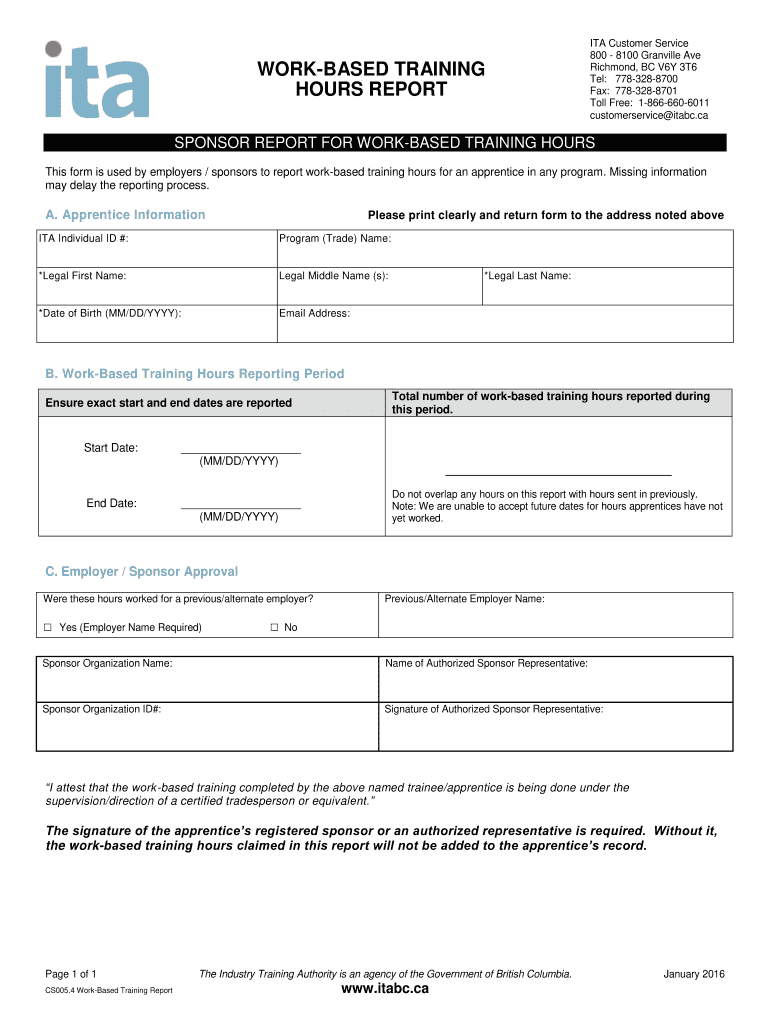
Filling out the Canada ITA CS005 - British Columbia form is essential for reporting work-based training hours for apprentices. This guide provides clear and detailed instructions to ensure a smooth and accurate submission process.
Follow the steps to successfully complete your report.
- Click ‘Get Form’ button to obtain the form and open it in the editor.
- Begin by providing the apprentice information. Clearly print the ITA Individual ID #, program (trade) name, legal first name, legal middle name (if applicable), date of birth (MM/DD/YYYY), email address, and legal last name.
- In the work-based training hours reporting period section, ensure you accurately report the start and end dates of the training period in MM/DD/YYYY format. It is important to only include hours that have not previously been reported.
- Enter the total number of work-based training hours reported during the specified period. Be cautious not to overlap these hours with previously submitted reports, and remember that hours for future dates cannot be accepted.
- Proceed to the employer/sponsor approval section. Indicate whether the hours were worked for a previous or alternate employer by checking the corresponding box and providing the employer name if applicable.
- Fill in the sponsor organization name, the name of the authorized sponsor representative, and the sponsor organization ID#. Ensure that the authorized representative signs the form to attest the work-based training was supervised by a certified tradesperson.
- After completing all required fields, review the form for accuracy, save your changes, and proceed to download, print, or share the form as needed.
Complete your form and submit your work-based training hours online today.
Experience a faster way to fill out and sign forms on the web. Access the most extensive library of templates available.
Related content
Final Rule to Improve Tracking of Workplace Injuries and Illnesses | Injury Tracking...
Jan 12, 2017 — Registered Apprenticeship, reporting on Registered Apprenticeship...
held against their will and compelled to work as janitors for three years and to live in...
Get answers to your most pressing questions about US Legal Forms API.
Can I file my Canadian tax return online?
You can certainly file your Canadian tax return online using various platforms, including the Canada ITA CS005 - British Columbia site. This method is often quicker and more efficient than traditional mail. Ensure you have all your documents ready to ensure a smooth filing process.
Does CRA ask for rent receipts?
Yes, the CRA may request rent receipts to verify your claim for the BC renters tax credit or any other deductions. It’s essential to keep these receipts organized in case of an audit. The Canada ITA CS005 - British Columbia guidelines can help you understand how to maintain your records properly.
How can I write off my rent on my taxes?
Writing off your rent on your taxes generally involves claiming the BC renters tax credit if you meet the eligibility criteria. You need to keep receipts and documentation to support your claim. The Canada ITA CS005 - British Columbia resources can help guide you through the process to ensure accurate filing.
How to claim BC renter's tax credit?
To claim the BC renter's tax credit, you need to access the appropriate form through the Canada ITA CS005 - British Columbia site. Collect your rental receipts and personal identification to complete the application. It's important to submit the claim on time to receive your benefits without delays.
How to file an income tax return in BC, Canada?
Filing an income tax return in BC, Canada, requires you to gather your income statements, deductions, and credits. You can use the Canada ITA CS005 - British Columbia online platform to complete your return efficiently. After filling out the required forms, you can submit your return electronically or by mail, ensuring you adhere to the filing deadline.
How to claim BC renters tax credit?
Claiming the BC renters tax credit involves filling out the designated form on the Canada ITA CS005 - British Columbia platform. Make sure you gather all necessary information, including your rental agreement and proof of payment. Submit the completed form along with any required documents to the tax office before the deadline.
How to claim BC sales tax credit?
To claim the BC sales tax credit, you need to complete the appropriate application form available on the Canada ITA CS005 - British Columbia website. Ensure you provide accurate information regarding your income and residency status. Once your application is processed, you will receive your credit directly by cheque or direct deposit.
Use professional pre-built templates to fill in and sign documents online faster. Get access to thousands of forms.
If you believe that this page should be taken down, please follow our DMCA take down process here.
This form is available in several versions. Select the version you need from the drop-down list below.