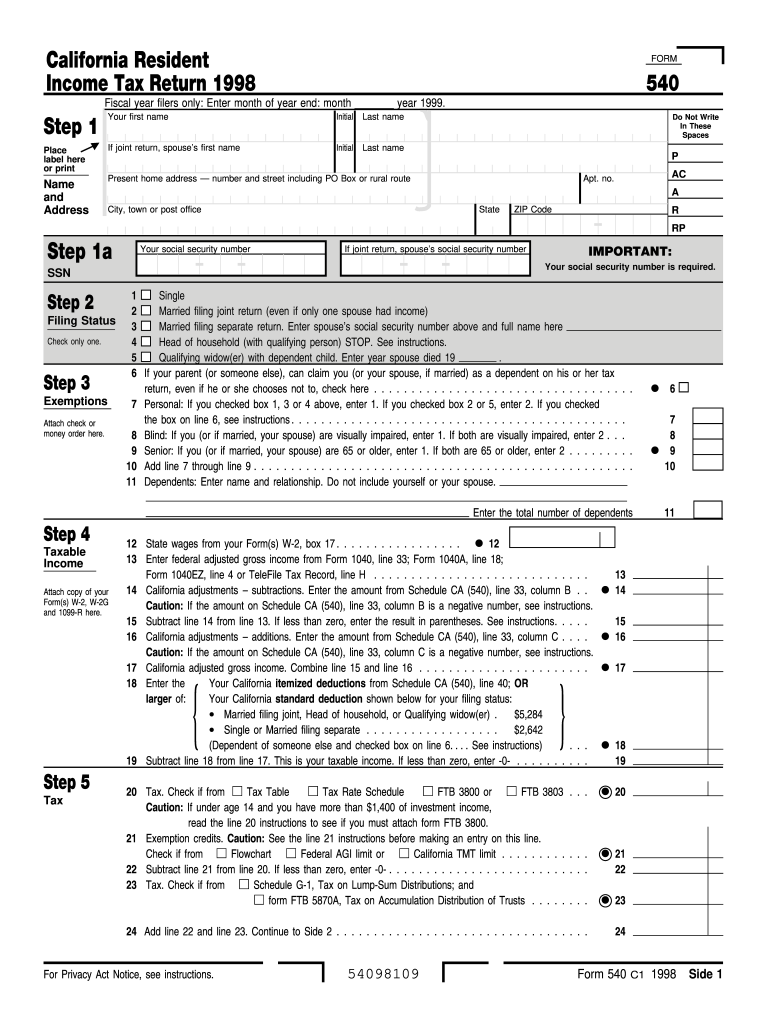
Step 1a Your social security number If joint return, spouse s social security number IMPORTANT: Your social security number is required. SSN 1 Single 2 Married filing joint return (even if only one spouse had income) Filing Status 3 Married filing separate return. Enter spouse s social security number above and full name here Check only one. Head of household (with qualifying person) STOP. See instructions. 4 . Qualifying widow(er) with dependent child. Enter year spouse died 19 5 6 If.
Loading

Open form follow the instructions

Easily sign the form with your finger

Send filled & signed form or save
How to fill out the CA FTB 540 online
Completing the CA FTB 540 form online is an essential step for California residents filing their income tax return. This guide will help you navigate each section of the form with clear and detailed instructions.
Follow the steps to complete your CA FTB 540 online.
- Press the ‘Get Form’ button to access the form and open it in your document editor.
- Begin filling in your personal information in Step 1. Enter your first name, initial, and last name. If you are filing a joint return, include your spouse's name as well.
- If someone can claim you or your spouse as a dependent, check the indicated box.
- Move on to Step 2 for taxable income. Attach copies of your W-2 forms and other income statements as needed.
- Enter adjustments, deductions, and calculate your taxable income.
- Finish by reviewing your information, ensuring accuracy, and preparing for submission. You will have options to save changes, download, print, or share the completed form.
Start filling out your CA FTB 540 online today to ensure compliance and avoid penalties!
Experience a faster way to fill out and sign forms on the web. Access the most extensive library of templates available.
Related content
For line 7, line 8, line 9, and line 10: Multiply the number you enter in the box by the...
California counts on all of us. Make a payment · Check your refund status · Power of...
Jun 7, 2017 — This is a troubleshooting and diagnostics guide for Brocade Fabric OS...
Get answers to your most pressing questions about US Legal Forms API.
Do I have to file taxes if I only made $5000?
If you only made $5000, you may not need to file a CA FTB 540, depending on your filing status and age. However, it's wise to check the thresholds set by the Franchise Tax Board, as they can change annually. Even if you're not required to file, doing so might benefit you if you qualify for tax credits or a refund, so consider your options carefully before deciding.
Who must file form 540?
Individuals who earn a specified amount of income must file form 540. This includes residents earning income from all sources and non-residents earning California source income. Moreover, certain exemptions apply for low-income earners, so reviewing the latest guidelines from the California Franchise Tax Board is essential. Ensuring compliance with these requirements will help you avoid penalties.
How to fill out FTB form 540?
Filling out the CA FTB 540 requires careful attention to detail. Start by gathering all relevant income documents, such as W-2s and 1099s. Follow the instructions on the form, entering your personal information, income amounts, and applicable deductions. If you find this process complex, consider using the US Legal Forms platform, which offers resources and templates to help you accurately complete the CA FTB 540.
Can I file CA 540 online?
Yes, you can file the CA FTB 540 online using various e-filing platforms, including the California Franchise Tax Board's own website. Online filing offers convenience, faster processing, and immediate confirmation of your submission. By using trusted online tax preparation services, you often access helpful features that guide you through the filing process to ensure accuracy. Embracing digital options simplifies your experience.
Who is considered a California resident for tax purposes?
A California resident for tax purposes is anyone who is in the state for other than a temporary or transitory purpose. This typically includes individuals who live in California most of the year, or those who maintain a permanent home in the state. Certain students and military personnel may have different residency rules, so be sure to review specific guidelines. Understanding your residency status is crucial for correctly filing your CA FTB 540.
How do I file an amended 540?
To file an amended CA FTB 540, you need to use form 540X, which is specifically designed for amendments. Start by completing your original return, making any necessary corrections in the new form. Make sure to clearly indicate the changes on the amended return, and submit it either by mail or through the appropriate electronic systems. This process allows you to adjust your tax liability and claim any additional refunds you may be entitled to.
Who is required to file a California income tax return?
Individuals who earn income in California must file a California income tax return using the CA FTB 540 form. If you are a resident, you need to report all income, regardless of where it was earned. Additionally, non-residents must also file if they earn income from California sources. It's important to check your income level and residency status to determine your filing obligations.
Do I need to file schedule CA 540?
Whether you need to file schedule CA 540 depends on your specific tax situation. Generally, if you are filing a California resident tax return and required to report income, you must use the CA FTB 540. It's advisable to review your income sources and tax obligations. For a clear understanding and help, USLegalForms offers resources tailored for your needs.
How to fill out California resale certificate form?
Filling out the California resale certificate form involves providing valid identification information, including your seller’s permit number and both your name and address. Clearly list the items you plan to resell and verify that your details are precise. This ensures that you comply with California tax regulations and make the most of your CA FTB 540 filing.
Who should file schedule CA 540?
Individuals who reside in California and earn income that necessitates state taxation must file the schedule CA 540. This schedule captures adjustments to your income, ensuring all deductions and credits are included. If you have business income or rental income, it's particularly essential for filing your CA FTB 540 accurately.
Use professional pre-built templates to fill in and sign documents online faster. Get access to thousands of forms.
If you believe that this page should be taken down, please follow our DMCA take down process here.
This form is available in several versions. Select the version you need from the drop-down list below.