Loading
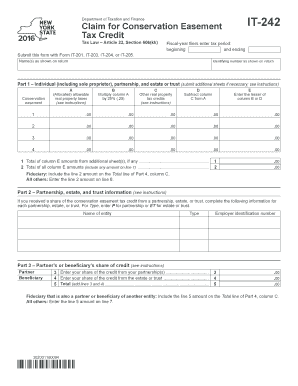
Get Ny Dtf It-242 2016
How it works
-

Open form follow the instructions
-

Easily sign the form with your finger
-

Send filled & signed form or save
How to fill out the NY DTF IT-242 online
Filling out the NY DTF IT-242 form for conservation easement tax credits can be straightforward with the right guidance. This comprehensive guide will navigate you through each section of the form, ensuring that you meet all requirements seamlessly.
Follow the steps to accurately complete your form.
- Press the 'Get Form' button to obtain the form and open it in your preferred editor.
- Begin by entering your name(s) as shown on your tax return. This ensures that all records are accurately associated with your tax identity.
- For fiscal-year filers, specify your tax period by entering the beginning and ending dates of the fiscal year.
- Input your identifying number as shown on your tax return. This number is vital for proper identification.
- In Part 1, fill out the columns as follows: Column A should reflect the allocated allowable conservation real property taxes. Column B needs the calculated tax credits for conservation easements. For each entry, multiply the figures in Column A by 25% and place the result in Column C.
- Subtract the values in Column C from those in Column A and display the result in Column D. This gives you the remaining allowable credit value.
- In Column E, record the lesser amount between Column B and Column D, ensuring that you do not exceed what you are eligible to claim.
- At the bottom of Part 1, total the amounts in Column E from any additional sheets you may have. Also, compute the total for all Column E amounts and enter it accordingly.
- If you are involved with partnerships, estates, or trusts, move to Part 2 to provide the required information for each entity, specifying the type as P for partnerships or ET for estates and trusts.
- In Part 3, record your share of the conservation easement credit from partnerships and estates or trusts. The sum of these two figures goes on to Line 5 of Part 3.
- Proceed to Part 4, enter details about beneficiaries if applicable, ensuring all identifying information matches your prior entries.
- In Part 5, consolidate and input your figures from previous parts: Lines 6, 7, and 8 should reflect amounts associated with you as an individual, partner, or fiduciary respectively.
- Calculate your credit before any limitations and determine the lesser value between this total and $5,000, which is your conservation easement tax credit.
- Complete Part 6 by providing the identifying information pertaining to the conservation easement, including addresses and pertinent numbers. Ensure clarity, and use additional sheets if required.
- Finally, review the entire document for accuracy, then save your changes, and proceed to download, print, or share the completed form as needed.
Start completing your NY DTF IT-242 form online today for a seamless tax credit experience.
Get form
Experience a faster way to fill out and sign forms on the web. Access the most extensive library of templates available.
To get a NY withholding identification number, you must register with the New York Department of Taxation and Finance. This registration can typically be completed online, and using the NY DTF IT-242 will guide you through the necessary steps. Ensuring proper registration is crucial for complying with state withholding laws.
Get This Form Now!
Use professional pre-built templates to fill in and sign documents online faster. Get access to thousands of forms.