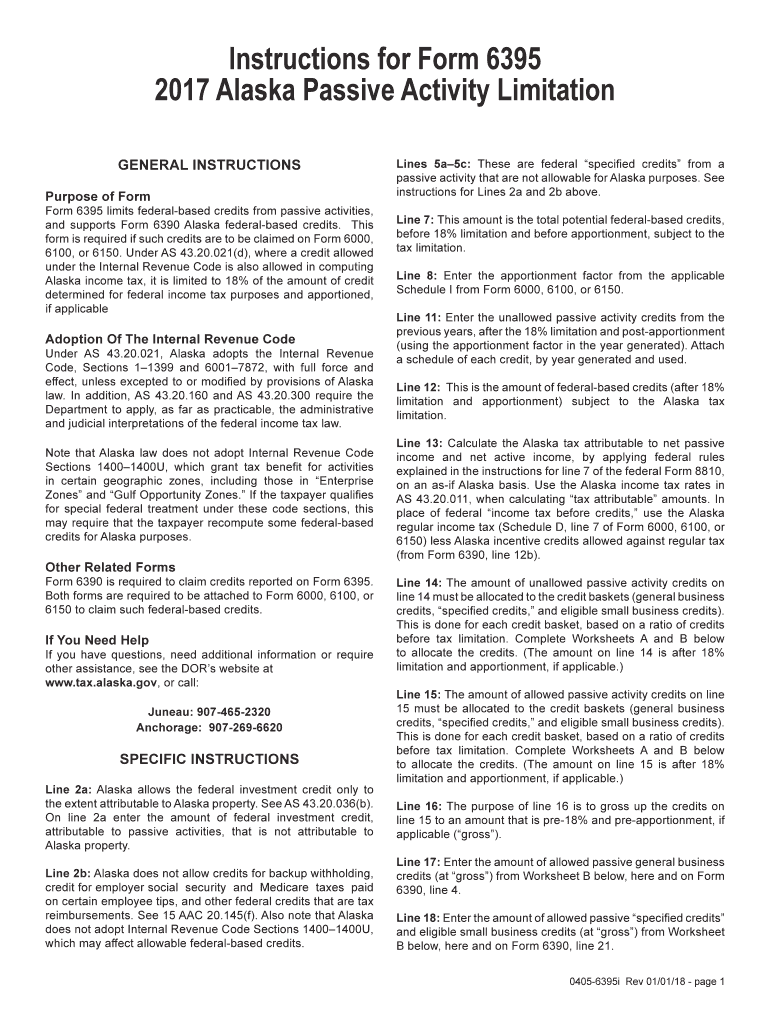
Instructions for Form 6395 2017 Alaska Passive Activity Limitation GENERAL INSTRUCTIONS Purpose of FormForm 6395 limits federalbased credits from passive activities, and supports Form 6390 Alaska.
Loading

Open form follow the instructions

Easily sign the form with your finger

Send filled & signed form or save
How to fill out the AK 6395i online
The AK 6395i form is essential for individuals claiming Alaska federal-based credits related to passive activities. This guide will provide clear, step-by-step instructions to assist users in completing the form accurately and efficiently.
Follow the steps to successfully complete the AK 6395i online
- Press the 'Get Form' button to access the form and open it in the editor.
- Complete Line 2a by entering the amount of federal investment credit attributable to passive activities that does not relate to Alaska property as specified under AS 43.20.036(b).
- For Line 2b, report any credits that Alaska does not permit for backup withholding, social security and Medicare taxes paid on specific employee tips, and other federal credits that are tax reimbursements, following guidance in 15 AAC 20.145(f).
- Fill out Lines 5a to 5c to indicate the federal specified credits from passive activities that are not allowable for Alaska purposes.
- Enter the total potential federal-based credits on Line 7, before the 18% limitation and before apportionment.
- Input the apportionment factor from the applicable Schedule I from Form 6000, 6100, or 6150 on Line 8.
- On Line 11, enter any unallowed passive activity credits from previous years, after applying the 18% limitation and post-apportionment.
- Use Line 12 to report the amount of federal-based credits after both the 18% limitation and apportionment, subject to the Alaska tax limitation.
- Calculate the tax attributable to net passive income and net active income on Line 13 by using Alaska income tax rates.
- Allocate the unallowed passive activity credits to credit baskets on Line 14, as instructed in the accompanying worksheets.
- On Line 15, allocate the allowable passive activity credits to the credit baskets, calculating based on the ratios provided.
- Complete Line 16 to gross up the allowable passive activity credits to a pre-18% and pre-apportionment amount.
- Enter the allowed passive general business credits on Line 17, derived from Worksheet B.
- On Line 18, report the allowed passive specified credits and eligible small business credits, again sourced from Worksheet B.
- After filling out all required sections, save your changes, and choose to either download, print, or share the completed form.
Complete your AK 6395i form online today to ensure your claims for federal-based credits are accurately submitted.
Experience a faster way to fill out and sign forms on the web. Access the most extensive library of templates available.
Related content
_ _ _ _ _ _ _ . _ _ _ _ . _ _ _ _ _ _ _ _ _ _ _ _ _ _ _ _ _ _ _ _ _ _ _ _ _ _. _ _ _ _ _...
by A FARZAN — Program reductions are used widely to simplify reasoning about the...
Get answers to your most pressing questions about US Legal Forms API.
Can I file form 1065 with TurboTax online?
You can indeed file Form 1065 using TurboTax online. The software provides a clear path for entering your partnership's financial data, ensuring you adhere to AK 6395i requirements. This option simplifies your tax preparation process while maximizing accuracy.
How to file a 1065 tax form?
Filing a 1065 tax form involves gathering your partnership's financial documents, including income, deductions, and credits. You can complete the form manually or use a tax preparation service. Choosing platforms like uslegalforms helps streamline the process, ensuring you meet AK 6395i standards.
How to file form 1065 online?
To file Form 1065 online, start by selecting a tax software that supports electronic filing of partnership tax returns. You will need to gather all necessary financial information and follow the software's guidance to ensure accurate completion. This method facilitates compliance with AK 6395i requirements.
Can 1065 be filed electronically?
Yes, Form 1065 can be filed electronically, providing a speedy and efficient way to submit your tax information. You must use approved tax software or platforms like those available through uslegalforms to ensure your filing meets AK 6395i compliance. Electronic filing also allows for quicker processing.
How do I file AK 1?
Filing AK 1 requires you to obtain the form that details your share of income from partnerships and corporations. You can fill out the form online or by hand, ensuring all relevant information is accurate. It's essential to file it correctly to comply with the AK 6395i standards.
How to file form 8843?
Filing Form 8843 begins with downloading the form from the IRS website. You will need to complete the form with your personal information and specifics regarding your residency status. After filling it out, you can mail the completed form to the IRS, helping align your status with the AK 6395i guidelines.
How to file k1 turbo tax?
To file a K-1 using TurboTax, start by gathering your K-1 form, which reports your share of income, deductions, and credits. Next, log into your TurboTax account, and select the option to enter your K-1 information. The program will guide you through the necessary sections, ensuring that you accurately report this income while optimizing for AK 6395i regulations.
Is it better to claim 1 or 0 on your taxes?
Deciding whether to claim 1 or 0 on your taxes primarily depends on your individual financial circumstances. Claiming 0 may lead to higher withholding and a possible refund, while claiming 1 may allow you to keep more of your income throughout the year. Utilize resources like AK 6395i to help evaluate your tax implications and make the best choice for your situation.
How can I fill my income tax return by myself?
You can fill out your income tax return by gathering the necessary documents, such as income statements and expense receipts, then choosing the correct tax form. Take time to understand each section of the form before proceeding. With the help of AK 6395i, you can find clear instructions and resources that empower you to complete your return confidently.
How to fill out a 15 H form?
Filling out a 15 H form requires you to provide personal details such as your name, address, and tax identification number. It's also important to confirm your eligibility for the benefits associated with the form. For a smoother experience, refer to AK 6395i, which can offer practical tips and examples for filling out this form correctly.
Use professional pre-built templates to fill in and sign documents online faster. Get access to thousands of forms.
If you believe that this page should be taken down, please follow our DMCA take down process here.
This form is available in several versions. Select the version you need from the drop-down list below.