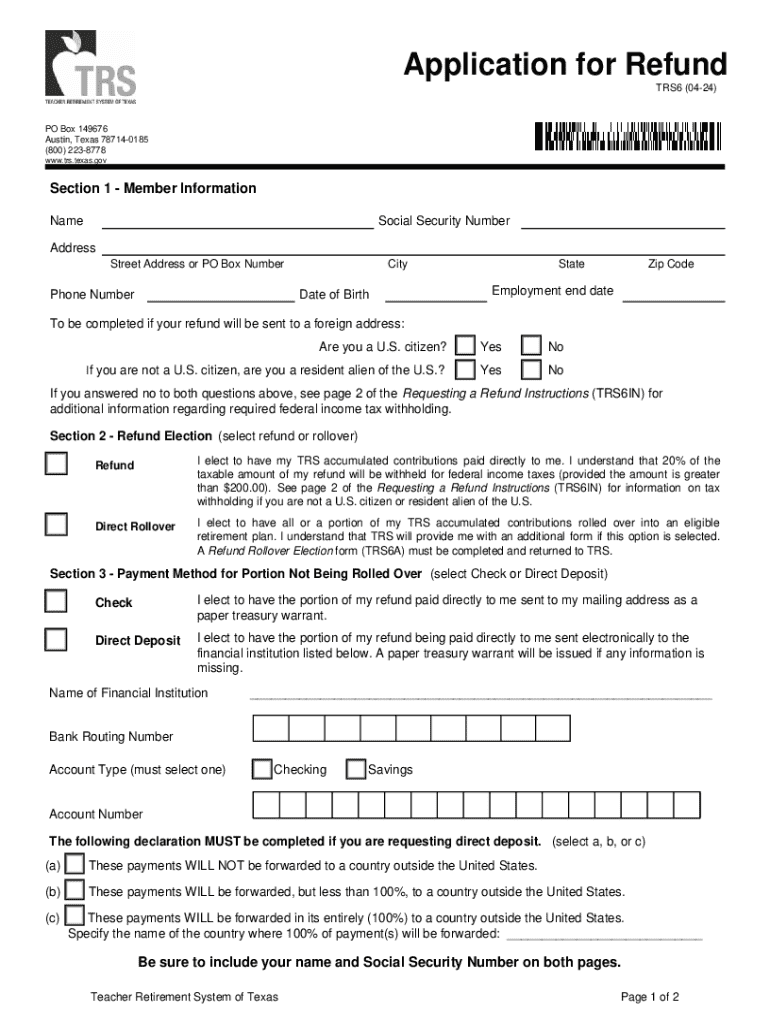
Box Number Phone Number City Date of Birth State Zip Code Employment end date To be completed if your refund will be sent to a foreign address: Are you a U.S. citizen? Yes No I f you are not a U.S. citizen, are you a resident alien of the U.S.? Yes No If you answered no to both questions above, see page 2 of the Requesting a Refund Instructions (TRS6IN) for additional information regarding required federal income tax withholding. Section 2 - Refund Election (select refund or rollov.

Open form follow the instructions

Easily sign the form with your finger

Send filled & signed form or save
How to fill out the TX TRS 6 online
The TX TRS 6 is an essential form for individuals seeking refunds from the Teacher Retirement System of Texas. This guide provides you with clear, step-by-step instructions to assist you in completing the form online efficiently and effectively.
Follow the steps to complete the TX TRS 6 online.
- Click ‘Get Form’ button to obtain the form and open it in your preferred online document editor.
- Fill out Section 1 - Member Information. Provide your name, Social Security number, address, phone number, city, date of birth, state, zip code, and employment end date.
- If applicable, complete the U.S. citizenship question. Specify whether you are a U.S. citizen and if not, indicate your residency status.
- In Section 2 - Refund Election, choose your refund type: 'Refund' or 'Direct Rollover'. Read the implications of each option and select accordingly.
- Proceed to Section 3 - Payment Method. Decide whether you prefer to receive your refund by check or direct deposit and provide the necessary financial institution details.
- Complete the required declaration regarding the payment's forwarding if opting for direct deposit. Select the appropriate option based on your circumstances.
- In Section 4 - Waiver of Benefits, read and affirm your understanding of terminating TRS membership and the benefits relinquished. Sign the document within the required notary section.
- Ensure your name and Social Security number are included on both pages of the form, then save or download your completed form.
- Submit the completed TX TRS 6 to the Teacher Retirement System of Texas at the specified address.
Take the next step towards your refund by completing the TX TRS 6 online today.
Experience a faster way to fill out and sign forms on the web. Access the most extensive library of templates available.
Related content
TRS recommends that you submit the completed Form W-8BEN with your TRS 6 in order to...
Be sure to include your name and Social Security Number on both pages of the form. Step 2:...
6-6 Tecla [CLEAR CUE]. Desativa o sinal CUE em todos os canais. A tecla se acende quando o...
Get answers to your most pressing questions about US Legal Forms API.
How long do you have to be vested in Texas TRS?
You must be vested in the Texas TRS system for at least 5 years to qualify for retirement benefits. Being vested means you have established eligibility for a monthly retirement benefit when you decide to retire. Understanding the vesting timeline is crucial for any educator planning their career. US Legal Forms can be a valuable resource to help you track your status and explore your retirement options.
How many years do I need to retire with TRS in Texas?
To retire with full benefits from the Texas TRS system, you typically need 30 years of service. However, you can retire with a reduced benefit after a minimum of 5 years of service credit. Knowing your retirement timeline can help you plan better financially. Using the US Legal Forms platform might assist you in calculating your retirement benefits and options.
Is Texas TRS a good retirement plan?
The Texas TRS system is often considered a solid retirement plan for educators. It provides benefits that are relatively secure and structured to support your retirement needs. Many educators appreciate the defined benefit aspect, which guarantees payouts based on service years and salary history. Assessing your individual circumstances with a tool like the US Legal Forms can provide clarity on whether TRS aligns with your retirement goals.
Can you retire early from TRS in Texas?
Yes, you can retire early from the Texas TRS system, but usually, you must meet specific criteria. Typically, this involves having at least 25 years of service or being at least 55 years old with at least 5 years of creditable service. Early retirement may reduce your monthly benefits, so it’s crucial to evaluate your long-term financial situation. Consider using resources like US Legal Forms to ensure you understand all implications before making a decision.
Can you collect social security and Texas teacher retirement?
Yes, you can collect both Social Security and Texas teacher retirement benefits, but it may be affected by certain provisions like the Windfall Elimination Provision. Many educators wonder how this interaction works, especially as they plan for retirement. It’s wise to explore your options and understand how each benefit impacts your overall retirement income. Platforms like US Legal Forms can assist you in navigating these complexities.
How many years do you have to work as a teacher in Texas to retire?
To retire under the Texas Teacher Retirement System (TX TRS 6), you generally need at least 5 years of service credit. However, retiring with full benefits typically requires 30 years of service. It’s important to check your personal situation, as years of service can affect your retirement payout. Consulting with the US Legal Forms platform can help clarify your specific retirement timeline.
How many years do you have to teach in Texas to get a pension?
In Texas, you must have at least five years of service credit to qualify for a pension through the Texas TRS system. This requirement ensures that you contribute a meaningful amount to the system before retirement benefits kick in. Understanding these stipulations is important as you plan your teaching career and future retirement in the TX TRS 6 framework.
Can you withdraw from the teacher retirement system of Texas?
Yes, you can withdraw from the Texas Teacher Retirement System, but this typically depends on your length of service and the termination of your employment. If you withdraw, you may forfeit future retirement benefits associated with staying in the TX TRS 6. It is wise to review your options with a financial advisor to ensure this is the right decision for your circumstances.
What happens to your teacher retirement if you quit in Texas?
When you quit your teaching position in Texas, your teacher retirement benefits remain intact but are deferred until you decide to retire. You will retain ownership of your contributions, and your account will continue to earn interest. If you're uncertain about your future plans, consider keeping your funds in the TX TRS 6 system, as this may benefit you later.
Can I cancel TRS?
You cannot simply cancel your Texas TRS membership, but you can choose to withdraw your funds under certain conditions. If you decide to withdraw, understand that this action may impact your future retirement benefits. It is crucial to review your options carefully within the TX TRS 6 framework. Consulting with a professional can help you navigate these decisions effectively.
Use professional pre-built templates to fill in and sign documents online faster. Get access to thousands of forms.
If you believe that this page should be taken down, please follow our DMCA take down process here.