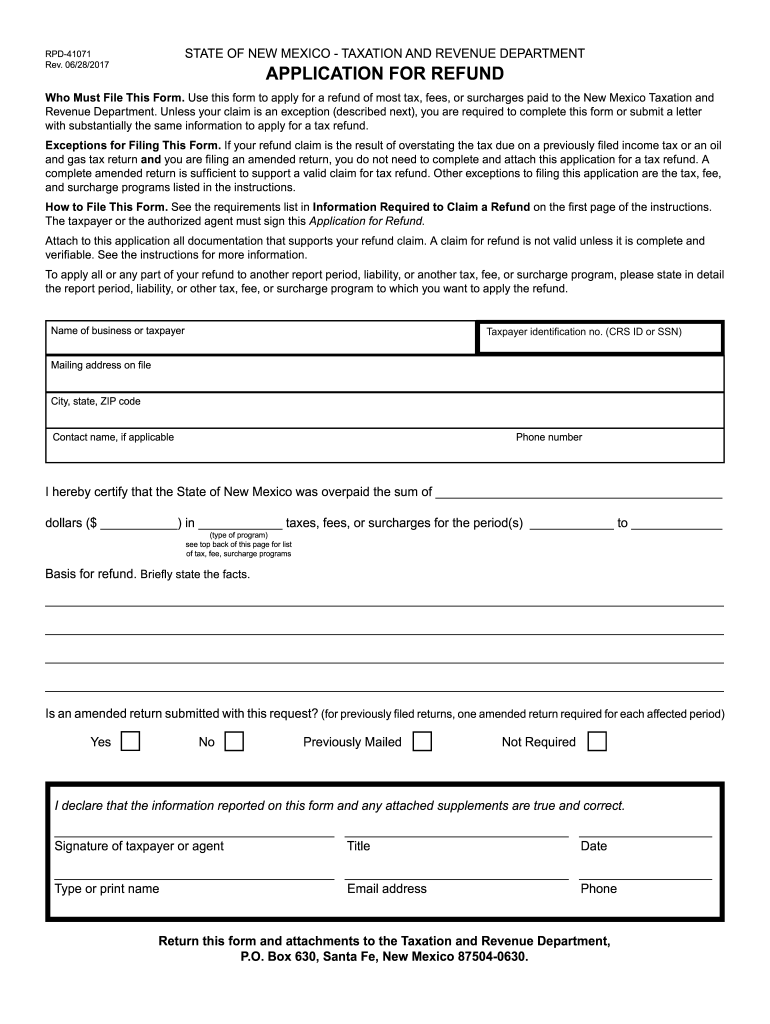
630. RPD-41071 Rev. 06/28/2017 Request For Direct Deposit If you are requesting a refund of tax, fees, or surcharges paid to the New Mexico Taxation and Revenue Department for any of the programs listed below and would like your refund deposited directly into your bank account located at a inancial institution inside the territorial jurisdiction of the United States (U.S.), complete the information. If the information below is incomplete or incorrect, the Department mails the refund to the a.
Loading

Open form follow the instructions

Easily sign the form with your finger

Send filled & signed form or save
How to fill out the NM TRD RPD-41071 online
This guide provides clear and comprehensive instructions on how to complete the NM TRD RPD-41071 form online. It is designed for users of all experience levels to ensure a seamless application process for tax refunds in New Mexico.
Follow the steps to successfully complete the NM TRD RPD-41071 form.
- Click the ‘Get Form’ button to access the application and open it in the editor.
- Provide your taxpayer identification number (CRS ID or SSN) in the designated field.
- Enter the name of the business or taxpayer as registered with the state.
- Fill out the mailing address, including the city, state, and ZIP code.
- If applicable, include the contact name for reference.
- Provide your phone number for communication regarding your application.
- In the section for refund amount, clearly state the sum you believe was overpaid in taxes, fees, or surcharges.
- Specify the type of tax, fee, or surcharge for which you are seeking a refund.
- For the basis for refund, briefly outline the facts supporting your claim.
- Indicate whether an amended return is submitted by selecting 'Yes' or 'No'.
- Sign and date the application, then print your name and add your email address and phone number.
- For direct deposit requests, fill in the routing number and account number, and indicate the type of account.
- Finally, review the completed application for accuracy, then save changes, download, print, or share the form as needed.
Complete your NM TRD RPD-41071 form online today for a smooth filing experience.
Experience a faster way to fill out and sign forms on the web. Access the most extensive library of templates available.
Related content
You can "Request a Refund" and upload all required documentation online using TAP...
by G Bujewski · Cited by 7 — The SCAPS LIF pulsed laser fiber optic-based system uses...
Disclaimer: This publication is provided for the purpose of disseminating information...
Get answers to your most pressing questions about US Legal Forms API.
How do I apply for a tax refund in New Mexico?
Applying for a tax refund in New Mexico involves completing your tax return and, if necessary, the NM TRD RPD-41071. You can submit these forms either online or by traditional mail. Be sure to check for any updates or changes to the process on the New Mexico Taxation and Revenue Department's website. Uslegalforms can help ensure you have everything you need for a successful application.
What is the RPD-41071 application for tax refund?
The RPD-41071 application is a form used in New Mexico to apply for a tax refund for certain transactions. This form helps streamline the refund process by clearly outlining your claim. It is important to fill it out accurately to avoid processing delays. Utilizing uslegalforms can simplify your understanding and completion of the RPD-41071.
How to calculate New Mexico gross receipts tax?
Calculating New Mexico gross receipts tax requires you to apply the appropriate tax rate to your gross receipts from business activities. Be sure to check the latest tax rates on the New Mexico Taxation and Revenue Department’s website. Document your calculations accurately, especially if refunds are involved, such as with the NM TRD RPD-41071 application. Uslegalforms has helpful resources for your tax calculations.
How do I qualify for a tax refund?
To qualify for a tax refund in New Mexico, you must file your state tax return accurately and reflect any overpayment of taxes. Completing the NM TRD RPD-41071 can help determine your eligibility for a refund. Ensure you meet all necessary criteria outlined by the New Mexico Taxation and Revenue Department. Uslegalforms is available to assist you in understanding these requirements.
Where do I send my New Mexico state tax return?
You can send your New Mexico state tax return to the mailing address specified by the New Mexico Taxation and Revenue Department, typically found on the tax return form itself. If you're using the NM TRD RPD-41071, ensure it is included in this submission. For electronic submissions, follow the instructions on the state’s website. Uslegalforms can guide you through the submission process.
What documents do I need to file for tax refund?
To file for a tax refund in New Mexico, you will need various documents, including your completed tax return, W-2 forms, and any applicable schedules. Additionally, if you are using the NM TRD RPD-41071, include it with your submission. Gathering these documents ahead of time can simplify your application. Uslegalforms can help you find the right forms to use.
How do I request for income tax refund?
Requesting an income tax refund in New Mexico involves filing your tax return and, if eligible, completing the NM TRD RPD-41071 application. Submit the completed paperwork to the New Mexico Taxation and Revenue Department. Make sure to double-check your information to avoid any delays. Consider using uslegalforms to streamline this process.
How do I apply for a refund in New Mexico?
To apply for a refund in New Mexico, you need to fill out the appropriate forms provided by the New Mexico Taxation and Revenue Department. Ensure you include the NM TRD RPD-41071 application for tax refund if applicable. You can submit these forms electronically or via mail. Don't forget to keep copies for your records.
What is the RFD 01 application for refund?
The RFD 01 application is a distinct form used in New Mexico for specific tax refund requests. It serves different purposes compared to the NM TRD RPD-41071, which is more general. Understanding the differences between these forms can help you choose the right application for your situation.
What is the personal income tax form for New Mexico?
In New Mexico, the personal income tax form is known as the PIT-1 form. This form is essential for individuals reporting their income and calculating tax liabilities. To understand how it connects with other forms, like the NM TRD RPD-41071, exploring detailed guides can be beneficial.
Use professional pre-built templates to fill in and sign documents online faster. Get access to thousands of forms.
If you believe that this page should be taken down, please follow our DMCA take down process here.