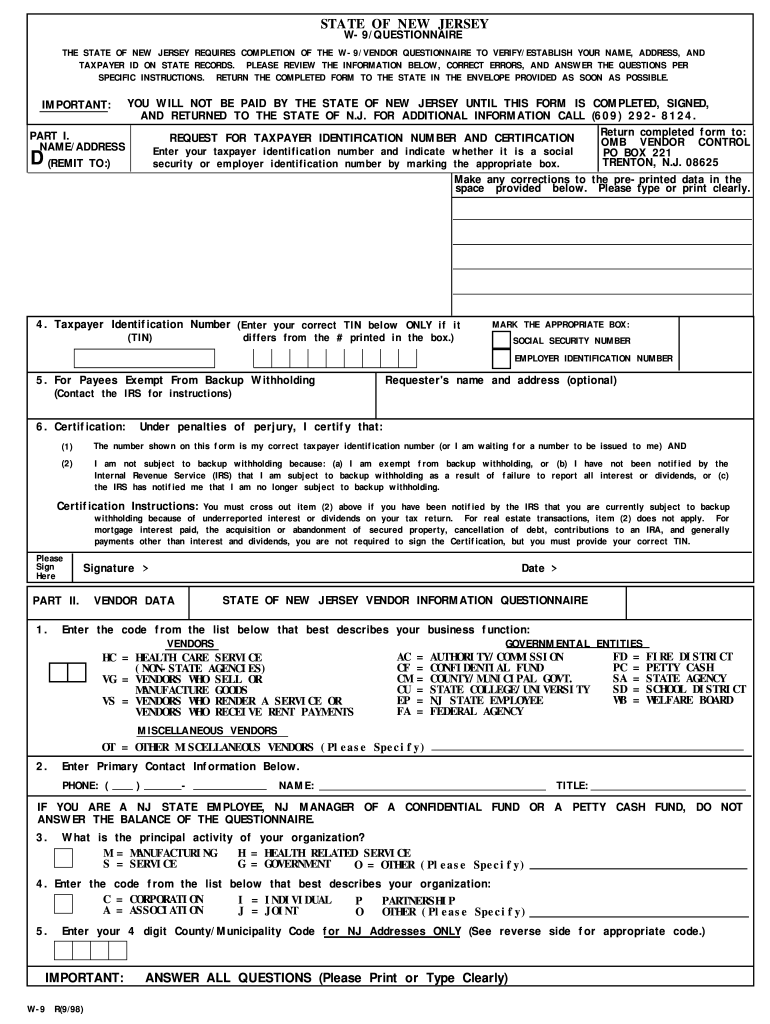
ER MISCELLANEOUS VENDORS (Please Specify) 2. Enter Primary Contact Information Below. PHONE: ( ) - NAME: TITLE: IF YOU ARE A NJ STATE EMPLOYEE, NJ MANAGER OF A CONFIDENTIAL FUND OR A PETTY CASH FUND, DO NOT ANSWER THE BALANCE OF THE QUESTIONNAIRE. 3. What is the principal activity of your organization? M MANUFACTURING S SERVICE H HEALTH RELATED SERVICE G GOVERNMENT O OTHER (Please Specify) 4. Enter the code from the list below that best describes your organization: C CORPORA.
Loading

Open form follow the instructions

Easily sign the form with your finger

Send filled & signed form or save
How to fill out the NJ W-9 online
Filling out the NJ W-9 form is crucial for establishing your taxpayer identification information with the State of New Jersey. This guide will walk you through the process step-by-step to ensure accurate completion.
Follow the steps to complete your NJ W-9 online
- Click ‘Get Form’ button to obtain the form and open it in the editor.
- In Part I, enter your name and address. Make sure to correct any pre-printed errors in the space provided. Clearly type or print your information.
- If applicable, indicate if you are exempt from backup withholding by following the instructions in the provided section. Contact the IRS if you need guidance on this matter.
- In the Certification section, read the statements carefully. Under penalties of perjury, confirm that the TIN you provided is correct and that you are not subject to backup withholding by marking the correct statements.
- Sign and date the form. Your signature indicates that you attest to the accuracy of the information provided.
- Proceed to Part II, where you will enter your vendor data. Pick the code from the list that best describes your business function or governmental entity.
- Enter your primary contact information, including your phone number, name, and title in the spaces provided.
- Specify the principal activity of your organization using the corresponding codes (M, S, H, G, O) in the provided section.
- In the final section, select the appropriate code that describes your organization (C, A, I, J, P, O).
- If you are using an NJ address, enter the four-digit County/Municipality code in the specified area.
- Once you have filled out all sections accurately, review the form for any errors. Save your changes and download, print, or share the completed form as necessary.
Complete your NJ W-9 online today to ensure your information is accurately filed.
Experience a faster way to fill out and sign forms on the web. Access the most extensive library of templates available.
Related content
Enter your TIN in the appropriate box. For individuals, this is your social security...
The number shown on this form is my correct taxpayer identification number (or I am...
CUIDADO: ○ Esta câmera de vídeo destina-se a ser utilizada com sinais de TV a cores...
Get answers to your most pressing questions about US Legal Forms API.
How do I fill out a W9 for dummies?
Filling out a NJ W-9 can be easy, even for beginners. Start by writing your name and business name in the designated spaces. Next, add your address and select your tax classification. Just follow the prompts and instructions, and if you need more help, platforms like USLegalForms offer step-by-step assistance to simplify the process.
Who fills out what on a W9?
Typically, the individual or business receiving income fills out the NJ W-9 form. This includes independent contractors, freelancers, and any other payees. On the other hand, businesses or individuals requesting the W-9 must ensure they provide guidance to the payer on how to complete it if needed.
How do I electronically fill out a W9?
To electronically fill out a NJ W-9, you can use various online tools that allow for digital input. Simply download the form from the IRS website or use a reliable service like USLegalForms, which offers an easy-to-use platform for filling the form electronically. Once completed, you can save and send it directly to the requester.
Is a W9 hard to fill out?
Filling out a NJ W-9 is generally simple, especially if you understand the information required. The form is straightforward, with clear instructions provided by the IRS. If you feel uncertain, resources such as USLegalForms can guide you through the process, making it easier to complete correctly.
How do you fill out a W9 step by step?
To fill out a NJ W-9 form step by step, start with your name and business name if applicable. Next, provide your address, city, state, and zip code. After that, complete the tax classification section and enter your taxpayer identification number. Finally, sign and date the form before submitting it to the requester.
Do I fill out a W9 myself?
Yes, you typically need to fill out a NJ W-9 yourself. The form requires your personal information and tax classification, which only you can accurately provide. If you have any concerns or questions, consider using platforms like USLegalForms, which can assist you with the process and ensure everything is in order.
How to calculate tax on W-9 income?
Calculating tax on income reported via the NJ W-9 involves determining your income bracket and applying the relevant tax rate. Start by adding all income sources reported on the W-9. Then, subtract any applicable deductions to arrive at your taxable income, which will inform your final tax obligation.
What do I put on line 3 of W-9?
On line 3 of the NJ W-9 form, you should indicate your tax classification. This includes options such as individual, corporation, or partnership. It's essential to select the correct option to avoid any tax complications. You can refer to the guidelines provided by the IRS for clear definitions of each classification.
Who is required to fill out a W9 form?
Individuals such as freelancers, contractors, and vendors who receive payments are typically required to fill out a W-9 form. This applies to anyone whose earnings must be reported for tax purposes. If you fall into these categories, filling out a NJ W-9 is essential for accurate financial reporting.
Is submitting a W9 mandatory?
Submitting a W-9 is mandatory if a requester needs your taxpayer identification for reporting purposes. If you receive income from a client, they will often require this form to comply with tax regulations. If in doubt, it’s best to clarify with the requester regarding the necessity of a NJ W-9.
Use professional pre-built templates to fill in and sign documents online faster. Get access to thousands of forms.
If you believe that this page should be taken down, please follow our DMCA take down process here.
This form is available in several versions. Select the version you need from the drop-down list below.