Loading
Get Ne 8-553-1997 2012
How it works
-

Open form follow the instructions
-

Easily sign the form with your finger
-

Send filled & signed form or save
How to fill out the NE 8-553-1997 online
Filling out the NE 8-553-1997 form online is a straightforward process that requires attention to detail. This guide will provide you with clear instructions on how to complete each section of the form to ensure accuracy and compliance.
Follow the steps to complete the NE 8-553-1997 form online.
- Press the ‘Get Form’ button to access the NE 8-553-1997 document and open it in the online editor.
- Begin by filling out the employer's information, ensuring that the employer's name and address are entered correctly.
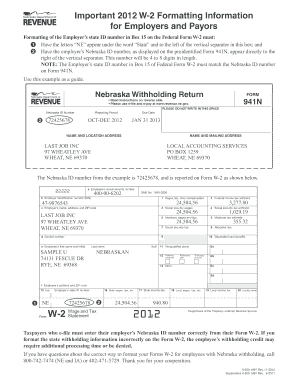
- Next, locate Box 15, where you will enter the letters 'NE' under the word 'State' and the employer's Nebraska ID number next to the vertical separator.
- Proceed to fill out the employee's information, including their name, address, and social security number.
- Input the necessary wage and tax information in the designated boxes, ensuring all figures are accurate.
- Review all entries for correctness, especially the Nebraska ID number, as this must match the ID number on Form 941N.
- Once all sections are completed, you may save changes, download, print, or share the completed NE 8-553-1997 form as needed.
Start filling out your NE 8-553-1997 form online today for a smoother filing experience.
Get form
Experience a faster way to fill out and sign forms on the web. Access the most extensive library of templates available.
Related links form
To get a Nebraska state ID number, you need to apply either online or in-person at designated state offices. Ensure you have proper identification and proof of your Nebraska residency. For a smooth process, consider using resources like NE 8-553-1997 that walk you through each step of obtaining your state ID.
Get This Form Now!
Use professional pre-built templates to fill in and sign documents online faster. Get access to thousands of forms.