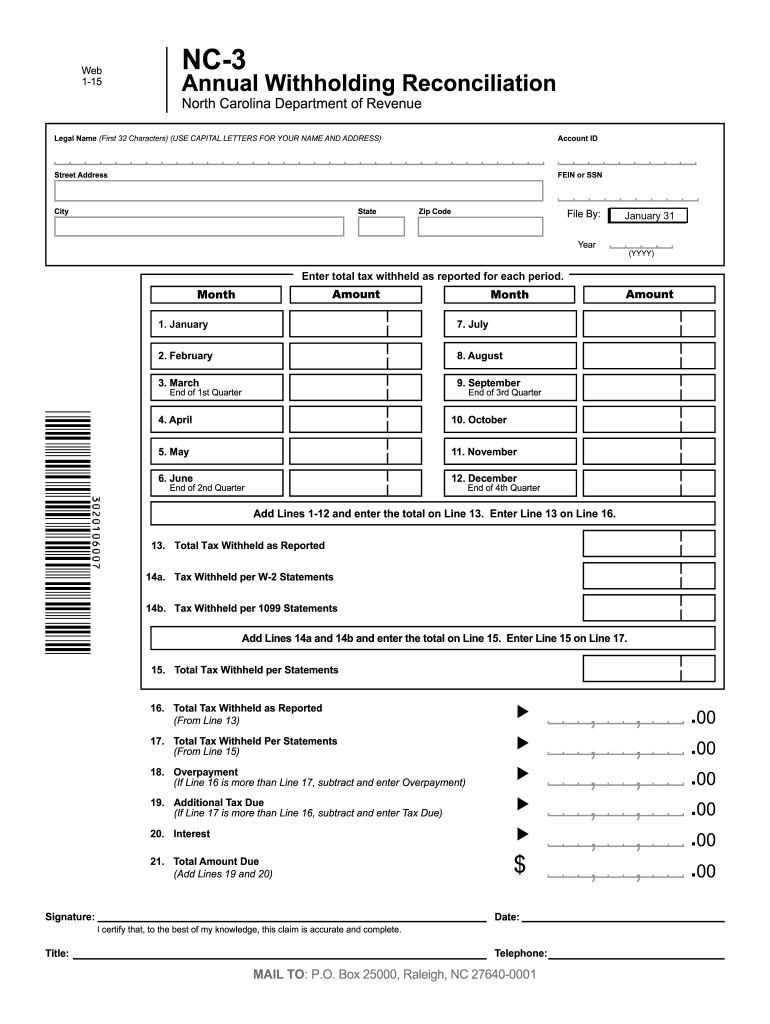
FEIN or SSN City State Zip Code File By: January 31 Year (YYYY) Enter total tax withheld as reported for each period. Amount Month 1. January 7. July 2. February 8. August 3. March 9. September End of 1st Quarter End of 3rd Quarter 4. April 10. October 5. May 11. November 6. June Amount Month 12. December End of 2nd Quarter End of 4th Quarter Add Lines 1-12 and enter the total on Line 13. Enter Line 13 on Line 16. 13. Total Tax Withheld as Report.
Loading

Open form follow the instructions

Easily sign the form with your finger

Send filled & signed form or save
How to fill out the NC NC-3 online
Filling out the NC NC-3 form accurately is essential for proper annual withholding reconciliation with the North Carolina Department of Revenue. This guide will provide you with comprehensive, step-by-step instructions for completing the form online.
Follow the steps to accurately complete the NC NC-3 form.
- Press the ‘Get Form’ button to obtain the NC NC-3 form and open it in the editing interface.
- Begin by entering your legal name in capital letters, limited to the first 32 characters, in the designated field.
- Input your account ID in the specified section to ensure your submission is correctly attributed.
- Fill in your street address, including the city, state, and zip code to provide accurate contact information.
- Input your Federal Employer Identification Number (FEIN) or Social Security Number (SSN) as required.
- Mark the appropriate year in the YYYY format for which you are filing the reconciliation.
- For each month from January to December, enter the total tax withheld reported for that period in the respective fields.
- After filling the monthly totals, add Lines 1-12 and enter the total on Line 13. This represents the total tax withheld as reported.
- Enter the tax withheld total from W-2 statements in Line 14a and from 1099 statements in Line 14b.
- Add Lines 14a and 14b, and enter the total on Line 15. This is the total tax withheld per statements.
- Once you have completed the previous steps, ensure Line 16 displays the same amount as Line 13 (Total Tax Withheld as Reported).
- Verify that Line 17 shows the total tax withheld per statements, matching Line 15.
- If Line 16 exceeds Line 17, subtract to calculate the overpayment on Line 18. Conversely, if Line 17 exceeds Line 16, determine the additional tax due on Line 19.
- Complete any applicable interest calculations on Line 20 and total it with Line 19 (if applicable) to determine the total amount due on Line 21.
- In the signature section, provide your name, title, date, and telephone number, certifying the accuracy of information provided.
- Finally, review your completed NC NC-3 form for any errors before saving your changes, downloading, printing, or sharing the form as needed.
Complete your NC NC-3 form online today to ensure timely submission and compliance.
Experience a faster way to fill out and sign forms on the web. Access the most extensive library of templates available.
Related content
In 1919, these Curtiss flying boats attempted to cross the Atlantic Ocean. The NC-4 became...
WARNING: • For safe operation, the M12 socket of the connecting cable must be rated 60V...
Get answers to your most pressing questions about US Legal Forms API.
What is the difference between NC 5 and NC-3?
The main difference between the NC-5 and NC-3 forms lies in their purpose and detail. The NC-5 form reports individual employee withholding while the NC-3 is a summary of all wages and taxes withheld for all employees. Understanding how each form works is vital for accurate tax reporting. To navigate these forms effectively, uslegalforms can help you gain clarity and assistance.
Who must file NC-5?
Employers with employees subject to state income tax must file the NC-5 form. This form details how much state tax has been withheld from your employees' paychecks. Filing the NC-5 is an essential step for compliance and helps keep accurate records of withheld taxes. Uslegalforms can provide you with the necessary tools and templates to assist in completing the NC-5.
What is a NC 5P?
The NC 5P is a form used for reporting individual employee earnings and withholding information. It is specific to employers and helps maintain accurate records for state taxes. While the NC-3 provides a summary, the NC 5P offers detailed information. If you need assistance with this form, uslegalforms can guide you through its requirements.
Who is required to file NC3?
Employers in North Carolina are required to file the NC-3 form. This includes any business that has employees and is subject to state unemployment tax. Additionally, if you file the NC-3, you must also provide information about your employees' wages. To simplify the process, platforms like uslegalforms can assist you with the requirements and filing steps.
Does the NC-3 have to be filed electronically?
Yes, the NC-3 must be filed electronically in North Carolina. This requirement ensures faster processing and improved accuracy in handling your filings. You can easily manage your NC-3 submissions through online portals, making the process convenient. For help with electronic filing, consider utilizing platforms like uslegalforms that offer guidance and resources.
How to file form NC-3?
Filing form NC-3 involves gathering your payroll information and submitting it electronically through the North Carolina Department of Revenue's online system. Ensure you have all necessary data, such as your quarterly withholding totals, ready for submission. For a seamless experience, consider using uslegalforms, which offers user-friendly tools and guidance for filing the NC-3. This service simplifies the entire process and helps ensure compliance.
How do I know if I am exempt from NC withholding?
You may be exempt from NC withholding if you meet certain criteria, such as having no taxable income in the state. Reviewing your individual circumstances is essential to determine your withholding status accurately. Additionally, you can consult the resource guide provided by the North Carolina Department of Revenue. Always consider seeking advice from a tax professional for clarity.
Who is required to file NC-3?
Employers who withhold North Carolina income tax from employee wages must file the NC-3. This requirement applies to businesses of all sizes, whether you have one employee or many. Understanding your obligation to file the NC-3 helps you avoid potential penalties. Regular filing also keeps your business in good standing with state authorities.
What is a NC-3 form?
The NC-3 form is a North Carolina tax document used to report and submit withholding taxes for employees. It summarizes all the state income tax withheld during the tax year for your business. Filing the NC-3 accurately is important to ensure compliance with state tax regulations. Understanding its purpose helps you manage your tax obligations effectively.
What is the NC3 form?
The NC NC-3 form is the annual reconciliation form used by employers in North Carolina to report withheld state income taxes for the year. It summarizes all employee tax withholdings and ensures that the amounts submitted align with what has been reported to the NCDOR. Filing this form accurately is crucial for maintaining compliance with state tax laws.
Use professional pre-built templates to fill in and sign documents online faster. Get access to thousands of forms.
If you believe that this page should be taken down, please follow our DMCA take down process here.
This form is available in several versions. Select the version you need from the drop-down list below.