Loading
Form preview
  • US Legal Forms
  • Other Templates
  • Tax Forms
  • North Carolina Tax Forms
  • Nc Dor Nc-5500 2016

Get Nc Dor Nc-5500 2016

The good compliance reason applies only if all of the following statements are true: All required tax returns and reports due have been filed. All tax and interest due for the tax period for which the penalty waiver is requested has been fully paid. Any amount due on a notice of collection received for a tax period that is different from the tax period for which the penalty waiver is requested has been fully paid. During the past three years, no p.

How it works

  1. Open form

    Open form follow the instructions

  2. Easily sign form

    Easily sign the form with your finger

  3. Share form

    Send filled & signed form or save

How to fill out the NC DoR NC-5500 online

This guide provides a comprehensive overview of how to complete the NC DoR NC-5500 form online. The form is designed for taxpayers seeking to request a waiver of penalties imposed by the North Carolina Department of Revenue.

Follow the steps to accurately complete the NC DoR NC-5500 form.

  1. Click the ‘Get Form’ button to obtain the NC DoR NC-5500 form and access it in an online editor.
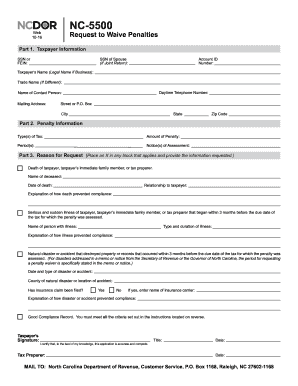
  2. In Part 1, enter your taxpayer information, including your social security number (SSN) or federal employer identification number (FEIN), account ID number, and legal name. If you are filing jointly, include the SSN of your spouse and ensure you provide your daytime telephone number. Also, fill in the mailing address, including street or P.O. Box, city, state, and zip code.
  3. In Part 2, specify the penalty information. List the type(s) of tax associated with the penalty, the amount of penalty, and the applicable period(s). You must attach a copy of each notice of tax assessment or write the notice numbers in the designated space.
  4. For Part 3, indicate the reason for your penalty waiver request. Mark an X in the boxes that apply to you—options include the death of a taxpayer or immediate family member, serious illness, natural disaster, or good compliance record. Provide any required information related to your chosen reason.
  5. Finally, ensure that the taxpayer (or tax preparer) signs and dates the form, certifying that all information provided is accurate. Review the completed form carefully and ensure all necessary attachments are included.
  6. Once you have filled out the form, save your changes. You can download, print, or share the form as needed.

Complete your NC DoR NC-5500 form online today for a smoother process!

Get form

Experience a faster way to fill out and sign forms on the web. Access the most extensive library of templates available.

Related content

Request to Waive Penalties
To request a penalty waiver for any penalty other than an information return penalty...
Learn more
NC-4 - Employee's Withholding Allowance...
PURPOSE - Complete Form NC-4, Employee's Withholding Allowance. Certificate, so that your...
Learn more
Vingtor-Stentofon Phontech Maritime & Energy...
Vingtor-Stentofon and Phontech products are developed by the Zenitel Group and include a...
Learn more

Related links form

MN DPS DVS PS2005-31 2019 DD 2536 2003 Canada BSF386 E (Formerly RABC) 2018 UK D777BDL 2014

Questions & Answers

Get answers to your most pressing questions about US Legal Forms API.

Contact support

Individuals who earn income in North Carolina, including employees and certain non-resident individuals, are subject to NC withholding. This includes wages, salaries, bonuses, and commissions. Employers are responsible for withholding the appropriate amount from their employees' paychecks. To navigate these regulations easily, you can check the NC DoR NC-5500 for up-to-date information.

One exception to the underpayment of estimated tax in North Carolina is if your total withholding equals or exceeds your total tax liability for the year. Additionally, if you had no tax liability in the previous year, you may not be required to make estimated payments. To ensure you understand your specific situation, consider utilizing resources from the NC DoR NC-5500.

The NCDOR unauthorized substance tax is a tax imposed by the North Carolina Department of Revenue on products that are considered unauthorized substances. This tax applies to sales and use of these products, and compliance is essential to avoid facing penalties. To get detailed information and updates, you can visit the NC DoR NC-5500 page, or access helpful guides from platforms like uslegalforms.

Getting your underpayment penalty waived requires a formal request to the NC DoR. You need to provide a valid reason for your underpayment, such as life changes or unforeseen circumstances. Make sure to include any supporting documents that justify your request. Resources like uslegalforms can help guide you through the necessary steps for a successful waiver.

To avoid penalties for underpayment of estimated tax in North Carolina, it's crucial to calculate your estimated payments carefully. You should file your estimated taxes on time and monitor your actual income against estimates. If you're unsure, platforms like uslegalforms can provide useful tools to assist you in this calculation. This way, you can make informed decisions and avoid unnecessary penalties.

To request a penalty waiver in North Carolina, you should contact the NC DoR directly. You can explain your situation and provide any relevant documentation that supports your request. It's essential to act promptly, as there are specific timeframes for filing such requests. Utilizing platforms like uslegalforms can help streamline this process for you.

Setting up a NC withholding account is a simple process through the NC DoR website. You can register online and complete the required forms to begin withholding taxes from employee paychecks. This setup is crucial for compliance and helps maintain smooth financial operations for your business. Look for additional resources on US Legal Forms to guide you through the registration process.

You should file your NC tax return directly through the North Carolina Department of Revenue's e-filing platform or by mailing it to the designated address provided on the form. Using the online service is often the fastest method. Ensure that you're familiar with the submission guidelines to avoid any issues. Always check the latest information from the NC DoR for updates.

Yes, you can file your North Carolina tax return electronically through the NC DoR's e-filing system. E-filing provides a convenient way to submit your return, reducing the time needed for processing. It also helps you receive any refunds more quickly. Make sure to keep all documentation organized for easy access while filing.

To file your NC state taxes, you will use Form NC-1040 or the simpler NC-1040EZ, depending on your tax situation. These forms are accessible through the NC DoR's official website. Be sure to review the criteria for each form to determine which best suits your needs. Using the correct form helps ensure accuracy and compliance.

Get This Form Now!

Use professional pre-built templates to fill in and sign documents online faster. Get access to thousands of forms.
If you believe that this page should be taken down, please follow our DMCA take down processhere.
Get NC DoR NC-5500
  • Adoption
  • Bankruptcy
  • Contractors
  • Divorce
  • Home Sales
  • Employment
  • Identity Theft
  • Incorporation
  • Landlord Tenant
  • Living Trust
  • Name Change
  • Personal Planning
  • Small Business
  • Wills & Estates
  • Packages A-Z
  • Affidavits
  • Bankruptcy
  • Bill of Sale
  • Corporate - LLC
  • Divorce
  • Employment
  • Identity Theft
  • Internet Technology
  • Landlord Tenant
  • Living Wills
  • Name Change
  • Power of Attorney
  • Real Estate
  • Small Estates
  • Wills
  • All Forms
  • Forms A-Z
  • Other Templates
  • Legal Hub
  • About Us
  • Help Portal
  • Legal Resources
  • Blog
  • Affiliates
  • Contact Us
  • Delete My Account
  • Site Map
  • Industries
  • Forms in Spanish
  • Localized Forms
  • State-specific Forms
  • Forms Kit
  • Real Estate Handbook
  • All Guides
  • Notarize
  • Incorporation services
  • For Consumers
  • For Small Business
  • For Attorneys
  • USLegal
  • FormsPass
  • pdfFiller
  • signNow
  • altaFlow
  • DocHub
  • Instapage
Form Packages
  • Adoption
  • Bankruptcy
  • Contractors
  • Divorce
  • Home Sales
  • Employment
  • Identity Theft
  • Incorporation
  • Landlord Tenant
  • Living Trust
  • Name Change
  • Personal Planning
  • Small Business
  • Wills & Estates
  • Packages A-Z
Form Categories
  • Affidavits
  • Bankruptcy
  • Bill of Sale
  • Corporate - LLC
  • Divorce
  • Employment
  • Identity Theft
  • Internet Technology
  • Landlord Tenant
  • Living Wills
  • Name Change
  • Power of Attorney
  • Real Estate
  • Small Estates
  • Wills
  • All Forms
  • Forms A-Z
  • Other Templates
Customer Service
  • Legal Hub
  • About Us
  • Help Portal
  • Legal Resources
  • Blog
  • Affiliates
  • Contact Us
  • Delete My Account
  • Site Map
  • Industries
  • Forms in Spanish
  • Localized Forms
  • State-specific Forms
  • Forms Kit
Legal Guides
  • Real Estate Handbook
  • All Guides
Prepared for you
  • Notarize
  • Incorporation services
Our Customers
  • For Consumers
  • For Small Business
  • For Attorneys
Our Sites
  • USLegal
  • FormsPass
  • pdfFiller
  • signNow
  • altaFlow
  • DocHub
  • Instapage
Social Media
Call us now toll free:
+1 833 426 79 33
As seen in:
© Copyright 1999-2026 airSlate Legal Forms, Inc. 17 Station Street, Ste. 203, Brookline, MA 02445
  • Your Privacy Choices
  • Terms of Service
  • Privacy Notice
  • Content Takedown Policy
  • Bug Bounty Program
NC DoR NC-5500
This form is available in several versions.
Select the version you need from the drop-down list below.
2020 NC DoR NC-5500
Select form
  • 2020 NC DoR NC-5500
  • 2019 NC DoR NC-5500
  • 2016 NC DoR NC-5500
  • 2012 NC DoR NC-5500
Select form