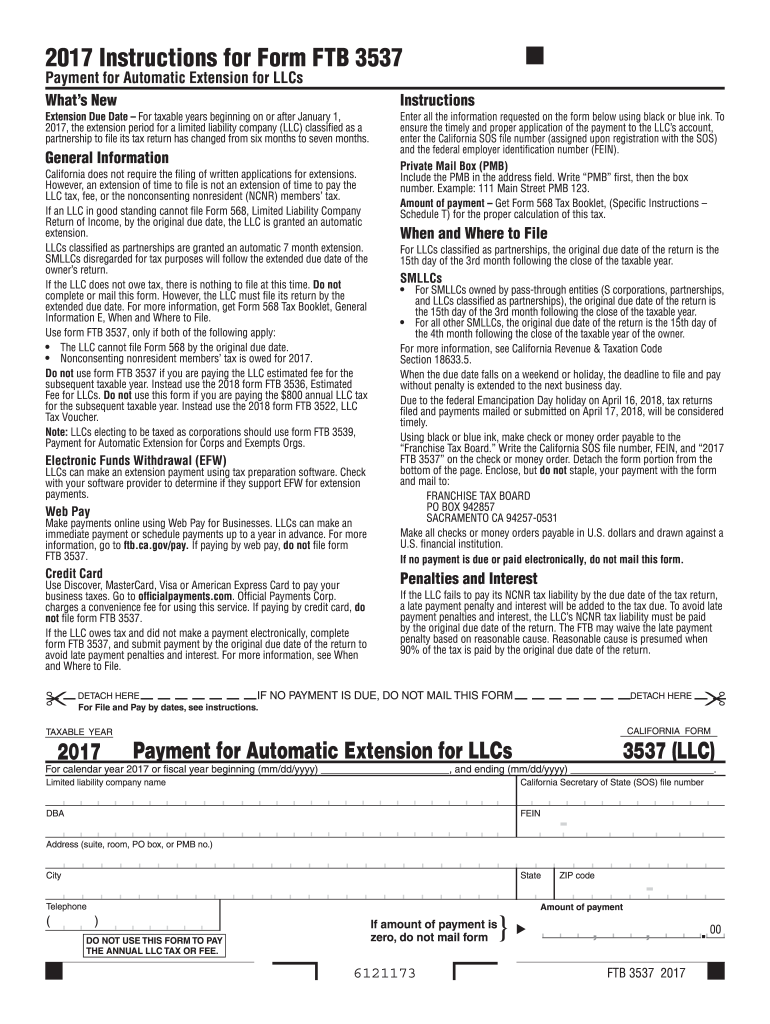
Ion period for a limited liability company (LLC) classified as a partnership to file its tax return has changed from six months to seven months. General Information California does not require the filing of written applications for extensions. However, an extension of time to file is not an extension of time to pay the LLC tax, fee, or the nonconsenting nonresident (NCNR) members tax. If an LLC in good standing cannot file Form 568, Limited Liability Company Return of Income, by the original.
Loading

Open form follow the instructions

Easily sign the form with your finger

Send filled & signed form or save
How to fill out the CA FTB 3537 online
Filling out the CA FTB 3537 form online for limited liability companies (LLCs) can be a straightforward process when you have clear guidance. This document serves as a comprehensive guide to help you navigate each section of the form with confidence.
Follow the steps to fill out the CA FTB 3537 form online.
- Click the ‘Get Form’ button to access the CA FTB 3537 form and open it in the online editor.
- Enter the taxable year at the top of the form, which refers to the tax period you are filing for. Ensure you select the correct year to avoid any filing issues.
- Provide the limited liability company's name exactly as it is registered, along with the California Secretary of State (SOS) file number, and the federal employer identification number (FEIN).
- Fill in the address field, ensuring to include any relevant details such as suite, room, PO box, or PMB number. Follow this format: PMB first, followed by the box number.
- Indicate the amount of payment due in the designated field. Consult the relevant guidelines to calculate the correct tax amount owed.
- Review all information entered to ensure accuracy; check for any typographical errors or missing details.
- Once all sections are completed and verified, you can save your changes, download the form, print it, or share it as needed.
Complete your documents online to ensure timely processing and avoid penalties.
Experience a faster way to fill out and sign forms on the web. Access the most extensive library of templates available.
Related content
Do not use form FTB 3537 if you are paying the LLC estimated fee for the subsequent...
FTB 3537 Payment California Franchise Tax. Board P O Box 942840 Sacramento CA 94240. 0040...
Get answers to your most pressing questions about US Legal Forms API.
Is California franchise tax the same as income tax?
No, California franchise tax and income tax differ fundamentally. While franchise tax applies to businesses operating in California, income tax is levied on the earnings of individuals and entities. Understanding this distinction is important for fiscal planning, especially when filing the CA FTB 3537. Clarity in these terms can help you make informed financial decisions.
How do I avoid California franchise tax?
Avoiding California franchise tax often involves careful business structuring and tax planning. For some, choosing specific business types or qualifying for exemptions can provide relief. However, filing the CA FTB 3537 properly is crucial even if you aim to minimize your tax liabilities. Consulting with a tax professional or using platforms like uslegalforms can help you navigate these complexities.
What is the difference between CA Form 3536 and 3537?
The main difference lies in their purposes; CA Form 3536 is for the annual tax payment, while Form 3537 is for estimated tax payments throughout the year. Each form has specific filing requirements, which can affect your tax planning strategies. Using the CA FTB 3537 accurately ensures you manage your tax obligations effectively. Knowing the distinctions is vital for proper compliance.
What is California franchise tax payment?
The California franchise tax payment represents a levy imposed on businesses operating within the state, regardless of income. This tax supports various state services and infrastructure. The CA FTB 3537 form is your tool for reporting and paying this tax. Adhering to these rules helps ensure that you maintain good standing in California.
What is California Form 3537?
California Form 3537 serves as the state's franchise tax payment form for estimated taxes. It is crucial for California business entities to file this form to comply with state tax laws. The CA FTB 3537 helps taxpayers assess their expected franchise tax obligations effectively. Understanding the form is key to fulfilling your tax responsibilities.
How do I get a tax-exempt form in California?
To obtain a tax-exempt form in California, you must submit an application to the California Franchise Tax Board, demonstrating your eligibility for tax-exempt status. This process typically involves providing detailed information about your organization and its purpose. Platforms like UsLegalForms offer resources to help you navigate this process effectively, ensuring you have the right forms and guidance.
What is the difference between 3536 and 3537?
The difference between forms 3536 and 3537 is crucial for LLC owners in California. Form 3536 is designed for LLCs to submit estimated payments for taxes, while CA FTB 3537 is specifically for paying the minimum annual franchise tax of $800. It's essential to understand which form applies to your situation to maintain compliance with California's tax laws.
What is the difference between an S Corp and an LLC in California?
The primary difference between an S Corporation and an LLC in California lies in their tax treatment and structure. While an LLC offers flexible management and fewer formalities, an S Corp allows for a pass-through taxation structure, potentially resulting in lower self-employment taxes. Choosing the right business structure impacts your tax liabilities and needs thorough consideration—resources like UsLegalForms can help you understand your options.
How to fill out a withholding exemption form?
Filling out a withholding exemption form involves providing your personal information, including your name and Social Security number, then indicating the reason for your exemption. Keep in mind that accurate completion is crucial for both you and your employer. For assistance, platforms like UsLegalForms offer guidance on how to complete various forms correctly, ensuring that your filing obligations, such as those concerning the CA FTB 3537, are clear.
What is CA form 3537 used for?
The CA form 3537 is primarily used to report the income generated by estates and trusts in California. This form allows fiduciaries to disclose the financial activities of the estate or trust and any tax liabilities arising from that income. Submitting the CA FTB 3537 ensures that beneficiaries receive their due distributions and helps avoid potential tax penalties.
Use professional pre-built templates to fill in and sign documents online faster. Get access to thousands of forms.
If you believe that this page should be taken down, please follow our DMCA take down process here.
This form is available in several versions. Select the version you need from the drop-down list below.