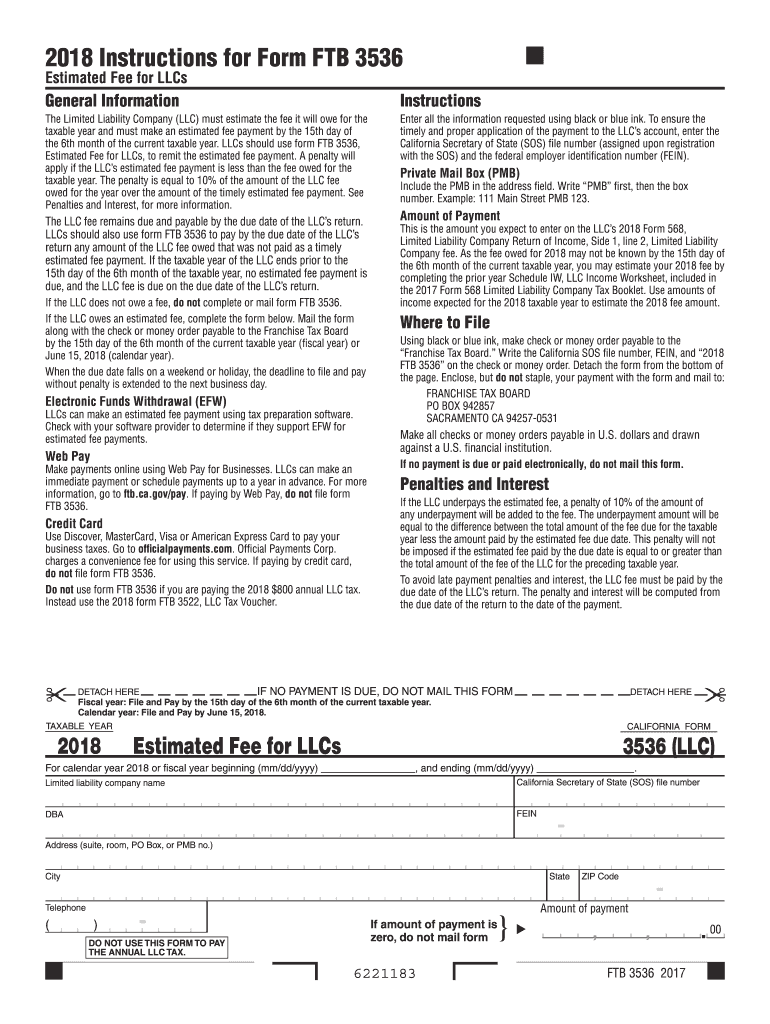
Ake an estimated fee payment by the 15th day of the 6th month of the current taxable year. LLCs should use form FTB 3536, Estimated Fee for LLCs, to remit the estimated fee payment. A penalty will apply if the LLC s estimated fee payment is less than the fee owed for the taxable year. The penalty is equal to 10% of the amount of the LLC fee owed for the year over the amount of the timely estimated fee payment. See Penalties and Interest, for more information. Enter all the information request.
Loading

Open form follow the instructions

Easily sign the form with your finger

Send filled & signed form or save
How to fill out the CA FTB 3536 online
Filling out the CA FTB 3536 form is an important step for limited liability companies (LLCs) in California to estimate their fees for the taxable year. This guide provides clear, step-by-step instructions to help you navigate the online process efficiently.
Follow the steps to complete the form online.
- Click ‘Get Form’ button to access the CA FTB 3536 form and open it in the editor.
- Fill in the LLC name, California Secretary of State (SOS) file number, federal employer identification number (FEIN), and current address using blue or black ink. Ensure all information is accurate to facilitate proper application to your account.
- In the section for taxable year, enter the appropriate beginning and ending dates for the fiscal year, or specify the calendar year for which you are estimating the fee.
- Estimate the amount of payment based on your expected income for the 2018 taxable year. If the actual fee owed is unknown, refer to the prior year's Schedule IW for guidance.
- Review the completed form for accuracy, ensuring all required fields are filled out correctly. Double-check the payment amount and ensure that you have not entered zero if an amount is due.
- Once satisfied with the form, follow the instructions to either save your changes, download, or print the form for mail submission along with your payment.
- If you are paying electronically, ensure not to mail the form. Otherwise, enclose your check or money order made payable to the Franchise Tax Board, and mail it to the designated address.
Complete your CA FTB 3536 form online today to ensure timely and accurate fee submissions!
Experience a faster way to fill out and sign forms on the web. Access the most extensive library of templates available.
Related content
The Limited Liability Company (LLC) must estimate the fee it will owe for the taxable year...
Form FTB 3522, the California Franchise Tax Board's "Claim for Refund or Credit," allows...
This publication contains information on the emula- tion of 1401, 1440, and 1460 object...
Get answers to your most pressing questions about US Legal Forms API.
How do I avoid $800 LLC fees in California?
To avoid the $800 LLC fees in California, consider ensuring your LLC has no income or is not conducting business within the state. Additionally, you can explore filing as a different entity type, if applicable. Engaging a tax professional or using UsLegalForms can provide actionable strategies to minimize these fees effectively.
Who must file form 3522?
Any LLC in California needs to file CA form 3522 during its initial formation period. This requirement ensures that the state is aware of your business structure and its compliance with tax obligations. If you're unsure about this process, accessing resources like UsLegalForms can simplify your filings and keep you informed of your responsibilities.
What is the difference between ca form 3522 and 3536?
CA Form 3522 and CA FTB 3536 serve different purposes for LLCs. While form 3536 is specifically for the annual franchise tax payment, form 3522 is associated with the initial LLC tax. Recognizing these differences helps you manage your LLC’s financial obligations effectively. Platforms like UsLegalForms can help you navigate these forms easily.
What is form 3536 for?
The CA FTB 3536 is designed for Limited Liability Companies (LLCs) in California. This form facilitates the payment of the annual tax due to the state. Understanding this obligation helps avoid penalties and ensures your business remains in good standing. Using UsLegalForms can guide you through the filing process seamlessly.
Do I need to file FTB 3536?
If your business operates as an LLC in California, you typically need to file the CA FTB 3536. This form ensures that you comply with state regulations and avoid potential fines. It's essential to assess your specific business needs, as certain exemptions may apply. Consulting a tax professional or using platforms like UsLegalForms can provide clarity and assistance.
What is the difference between FTB form 3522 and 3536?
FTB form 3522 applies to the minimum franchise tax for new LLCs, while FTB form 3536 is for reporting the ongoing annual tax obligations. Each form serves a different purpose in the tax landscape for California LLCs. Familiarity with both forms is essential for maintaining compliance and financial health in your business operations.
What is CA FTB form 3586?
CA FTB form 3586 is used to report the interest and penalties associated with tax filings. While it is different from CA FTB 3536, understanding both forms is crucial for LLCs to maintain compliance. By staying informed about these forms, your business can simplify tax management and minimize complications.
What is CA Form 3536 for?
CA Form 3536 is used by businesses to report their estimated tax payments to the California Franchise Tax Board. This form helps in calculating your annual tax liability and ensures that you meet your tax obligations on time. Completing CA FTB 3536 accurately allows you to avoid penalties and interest on underpayments. You can simplify the process using resources available on platforms like US Legal Forms.
Who Must File Form 568?
All LLCs (not classified as a corporation) that are doing business in California, or file an article of organization or certificate of registration with the Secretary of State must file Form 568, Limited Liability Company Return of Income, pay the annual minimum franchise tax of $800, and LLC fee (if applicable).
What FTB 3536?
The Limited Liability Company (LLC) must estimate the fee it will owe for the taxable year and must make an estimated fee payment by the 15th day of the 6th month of the current taxable year. LLCs should use form FTB 3536, Estimated Fee for LLCs, to remit the estimated fee payment.
Use professional pre-built templates to fill in and sign documents online faster. Get access to thousands of forms.
If you believe that this page should be taken down, please follow our DMCA take down process here.
This form is available in several versions. Select the version you need from the drop-down list below.